Refer to the exhibit, which shows the FortiGuard Distribution Network of a FortiGate device. FortiGuard Distribution Network on FortiGate An administrator is trying to find the web filter database signature on FortiGate to resolve issues with websites not being filtered correctly in a flow-mode web filter profile. Why is the web filter database version not visible on the GUI, such as with IPS definitions?
Correct Answer: C
Unlike IPS or antivirus databases, FortiGate does not store a full web filter database locally. Instead, FortiGate queries FortiGuard (or FortiManager, if configured) dynamically to classify and filter web content in real time. Key points: # Web filtering works on a cloud-based model: # When a user requests a website, FortiGate queries FortiGuard servers to check its category and reputation. # The response is then cached locally for faster lookups on repeated requests. # No local web filter database version: # Unlike IPS and antivirus, which download and store signature updates locally, web filtering relies on cloud- based queries. # This is why no database version appears in the GUI. # Flow mode vs Proxy mode: # In proxy mode, FortiGate can cache some web filter data, improving performance. # In flow mode, all queries happen dynamically, with no locally stored database.
FCSS_EFW_AD-7.6 Exam Question 47
Refer to the exhibit. A LAN interface connected from FortiGate to two FortiSwitch devices is shown. Which two statements about the LAN interface connection shown in the exhibit are correct? (Choose two.)
Correct Answer: A,C
Based on the provided exhibit and the Fortinet Enterprise Firewall 7.6 Administrator curriculum, the architecture shown is a standard FortiLink deployment used to manage FortiSwitch units directly from the FortiGate. * FortiLink Interface (C): The exhibit explicitly shows the configuration of a logical interface designated as a FortiLink interface. This is a specialized Fortinet proprietary management protocol that allows the FortiGate to discover, authorize, and manage FortiSwitch devices. Once FortiLink is established, the FortiGate can manage switch ports, VLANs, and security policies on the switches as if they were local interfaces. * 802.3ad Aggregate (A): To provide both redundancy and increased bandwidth, FortiLink is typically configured as an 802.3ad (Link Aggregation) aggregate interface. This allows the FortiGate to use multiple physical ports (in this case, port1 and port2) as a single logical pipe to the switches. In the exhibit ' s configuration snippet, the set type aggregate command is clearly visible, which confirms that an 802.3ad link is being used to facilitate the connection. Regarding the incorrect options: * Option B is incorrect because SD-WAN is used for steering traffic across multiple WAN paths and is not the protocol used for internal switch management via FortiLink. * Option D is incorrect because while STP/RSTP is active on the FortiSwitches to prevent loops within the switching fabric, the FortiGate does not typically " run " STP on the FortiLink aggregate interface itself; rather, the link aggregation (LACP) and the FortiLink logic handle the path redundancy and loop prevention between the firewall and the managed switches.
FCSS_EFW_AD-7.6 Exam Question 48
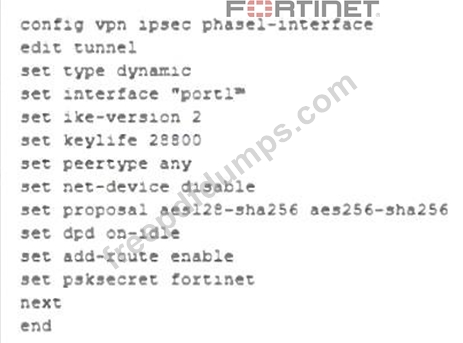
Refer to the exhibit, which contains a partial VPN configuration. What can you conclude from this VPN IPsec phase 1 configuration?
Correct Answer: A
This IPsec Phase 1 configuration defines a dynamic VPN tunnel that can accept connections from multiple peers. The settings chosen here suggest a configuration optimized for networks with intermittent traffic patterns while ensuring resources are used efficiently. Key configurations and their impact: # set type dynamic # This allows multiple peers to establish connections dynamically without needing predefined IP addresses. # set ike-version 2 # Uses IKEv2, which is more efficient and supports features like EAP authentication and reduced rekeying overhead. # set dpd on-idle # Dead Peer Detection (DPD) is triggered only when the tunnel is idle, reducing unnecessary keep-alive packets and improving resource utilization. # set add-route enable # FortiGate automatically adds the route to the routing table when the tunnel is established, ensuring connectivity when needed. # set proposal aes128-sha256 aes256-sha256 # Uses strong encryption and hashing algorithms, ensuring a secure connection. # set keylife 28800 # Sets a longer key lifetime (8 hours), reducing the frequency of rekeying, which is beneficial for stable connections. Because DPD is set to on-idle, the tunnel will not constantly send keep-alive messages but will still ensure connectivity when traffic is detected. This makes the configuration ideal for networks with regular but non- continuous traffic, balancing security and resource efficiency.
FCSS_EFW_AD-7.6 Exam Question 49
A company's users on an IPsec VPN between FortiGate A and B have experienced intermittent issues since implementing VXLAN. The administrator suspects that packets exceeding the 1500-byte default MTU are causing the problems. In which situation would adjusting the interface's maximum MTU value help resolve issues caused by protocols that add extra headers to IP packets?
Correct Answer: C
When using IPsec VPNs and VXLAN, additional headers are added to packets, which can exceed the default 1500-byte MTU. This can lead to fragmentation issues, dropped packets, or degraded performance. To resolve this, the MTU (Maximum Transmission Unit) should be adjusted only if all devices in the network path support it. Otherwise, some devices may still drop or fragment packets, leading to continued issues. Why adjusting MTU helps: # VXLAN adds a 50-byte overhead to packets. # IPsec adds additional encapsulation (ESP, GRE, etc.), increasing the packet size. # If packets exceed the MTU, they may be fragmented or dropped, causing intermittent connectivity issues. # Lowering the MTU on interfaces ensures packets stay within the supported size limit across all network devices.
FCSS_EFW_AD-7.6 Exam Question 50
How can FortiGate_B advertise only 172.16.1.248/30 using BGP?
Correct Answer: D
Comprehensive and Detailed Explanation From Exact Extract documents and Knowledge: In BGP (Border Gateway Protocol), there are two primary ways to inject routes into the BGP table: using the network command or through redistribution. The network command is the standard and most precise method for advertising a specific prefix that already exists in the local routing table. In the lab environment, " Link C " is identified as the subnet 172.16.1.248/30 , which is directly connected to the FortiGate. By using the Network command (e.g., set network 172.16.1.248 255.255.255.252), the administrator ensures that only this specific prefix is advertised to BGP neighbors. In contrast, " Redistribute connected " (Option A) would advertise every directly connected network on the device, which would require an additional " Route map out " (Option B) to filter, making the " Network " command the most direct and correct configuration for the requirement.