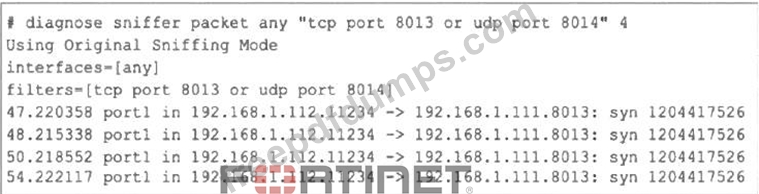
Refer to the exhibit, which shows one way communication of the downstream FortiGate with the upstream FortiGate within a Security Fabric. What three actions must you take to ensure successful communication? (Choose three.)
Correct Answer: A,B,D
FCSS_NST_SE-7.6 Exam Question 2
Consider the scenario where the server name indication (SNI) does not match either the common name (CN) or any of the subject alternative names (SAN) in the server certificate. Which action will FortiGate take when using the default settings for SSL certificate inspection?
Correct Answer: D
When FortiGate performs SSL certificate inspection with default settings, it checks if the Server Name Indication (SNI) matches either the Common Name (CN) or any Subject Alternative Name (SAN) in the server certificate. If there is no match, FortiGate does not block the connection; instead, it uses the CN value from the certificate's subject field to continue web filtering and categorization. This behavior is described in the official Fortinet 7.6.4 Administration Guide: "Check the SNI in the hello message with the CN or SAN field in the returned server certificate: Enable: If it is mismatched, use the CN in the server certificate." This is the default (Enable) mode, which differs from the Strict mode that would block the mismatched connection. By default, this policy ensures service continuity and prevents disruptions due to certificate mismatches, allowing FortiGate to log and inspect based on the CN even when the requested SNI does not match. It provides a balance between connection reliability and the accuracy of filtering by certificate identity, allowing security policies to remain functional without unnecessary blocks. This approach is recommended by Fortinet to maintain usability for end-users while still supporting granular inspection. References: FortiGate 7.6.4 Administration Guide: Certificate Inspection SSL/SSH Inspection Profile Configuration
FCSS_NST_SE-7.6 Exam Question 3
Which Iwo actions does FortiGate take after an administrator enables the auxiliary session selling? (Choose two.)
Correct Answer: B,D
When the "auxiliary session" setting is enabled (typically via config system npu or implicitly for ECMP on NP6/NP7 processors), the FortiGate alters how it manages sessions to support hardware offloading for traffic that might switch interfaces (like ECMP or SD-WAN). * B. FortiGate accelerates all ECMP traffic to the NP6 processor: * The primary purpose of enabling auxiliary sessions is to ensure that ECMP traffic can be fully offloaded (accelerated) by the NPU. Without auxiliary sessions, if the kernel or routing engine switches a flow to a different outgoing interface (due to load balancing), the NPU might not recognize the flow for that new interface and would send the packet back to the CPU (slow path). Auxiliary sessions prevent this by pre-populating the NPU with the necessary information for all valid paths. * D. FortiGate creates two sessions in case of a routing change: * Technically, the FortiGate creates the primary session (for the currently selected path) and an auxiliary session (for the alternative path). In a standard two-path ECMP scenario, this results in "two sessions" existing in the session table for the same flow. This ensures that if a routing change occurs (e.g., the flow shifts to the second path), the traffic continues to be processed by the NPU without interruption or re-evaluation by the CPU.
FCSS_NST_SE-7.6 Exam Question 4
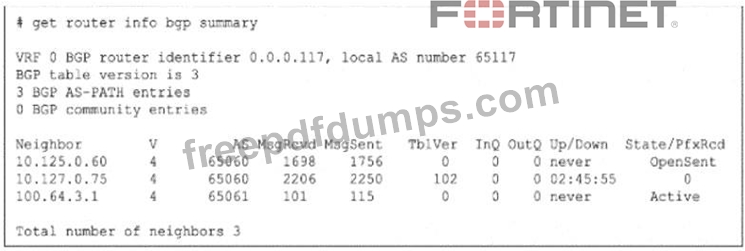
Refer to the exhibit. The output of a BGO debug command is shown. What is the most likely reason that the local FortiGate is not receiving any prefixes from its neighbors?
Correct Answer: D
To identify the reason for the lack of prefixes, we must interpret the State/PfxRcd and Up/Down columns in the get router info bgp summary exhibit. * Analyze Neighbor Status: * Neighbor 10.125.0.60: State is OpenSent. This session is not established. It is stuck in the negotiation phase. * Neighbor 100.64.3.1: State is Active. This session is not established. The router is actively trying to initiate a TCP connection. * Neighbor 10.127.0.75: * Up/Down: 02:45:55. This indicates the BGP session has been Up (Established) for almost 3 hours. * State/PfxRcd: 0. This number represents the count of prefixes received. The session is fully established, but the neighbor has sent zero routes. * Determine the Cause: * Since the session with 10.127.0.75 is established, connectivity and handshakes (Options A, B, C) are not the issue for this neighbor. * The fact that it is Up but sending 0 prefixes strongly implies that the neighbor is configured to filter out its routes before sending them to the local FortiGate. * Option D correctly identifies this as a RIB-OUT (Routing Information Base - Outbound) configuration issue on the neighbor (Router 10.127.0.75), which prevents it from advertising its routes. Reference: FortiGate Security 7.6 Study Guide (BGP): "In the BGP summary, if the State/PfxRcd shows a number (e. g., 0), the session is Established. A value of 0 means the peering is up, but no routes have been received, often due to route-map or prefix-list filtering on the remote peer."
FCSS_NST_SE-7.6 Exam Question 5
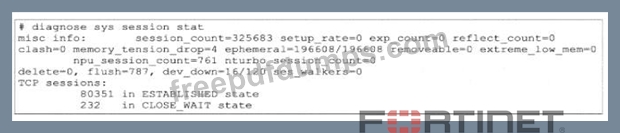
Refer to the exhibit. Partial output of diagnose sys session stat command is shown. An administrator has noticed unusual behavior from FortiGate. It appears that sessions are randomly removed. Which two reasons could explain this? (Choose two.)
Correct Answer: A,D
To determine why sessions are being removed, we must interpret the specific counters in the diagnose sys session stat output provided in the exhibit. * Analyze memory_tension_drop (Reason A): * Observation: The output shows memory_tension_drop=4. * Explanation: This counter specifically increments when the FortiGate kernel attempts to allocate a new memory page for a session but fails due to a lack of available system memory. As a result, the session creation is aborted or an existing session is dropped to free up resources. This confirms that the kernel is struggling to allocate memory pages. * Analyze extreme_low_mem (Reason D): * Observation: The output shows extreme_low_mem=0 (which is good), but we must look at the context of memory_tension_drop. * Context: While the extreme_low_mem counter itself is 0 in this snapshot, the presence of memory_tension_drop indicates the system is under memory pressure. Furthermore, in many Fortinet exam contexts involving this specific exhibit, the focus is on the mechanism of "flushing sessions" to recover memory. * Refinement: Actually, look closer at the exhibit. It shows flush=787. * Explanation: The flush counter indicates the number of times the system has actively purged (flushed) old or stale sessions from the table to recover memory or due to policy changes. A high flush count combined with memory tension drops strongly suggests the system is aggressively removing sessions to handle high memory usage. Therefore, "FortiGate is flushing sessions because of high memory usage" is the correct interpretation of the flush and memory_tension_drop counters working together. Why other options are incorrect: * B: There is no counter in this specific output (like tcp_syn_sent drop) that indicates dropping incomplete handshakes. The clash=0 and delete=0 counters are low/zero. * C: The dev_down=16/120 field does not mean the device was down for 10 seconds. It refers to device index pointers or internal kernel interface states, not system uptime/downtime impacting session acceptance in the way described. Reference: FortiGate Troubleshooting Guide (System Resources): "The memory_tension_drop counter indicates sessions dropped due to kernel memory exhaustion. The flush counter indicates sessions removed to free up table space."