A network administrator is troubleshooting a network access issue for a specific host. The administrator suspects the host is being assigned a different network access policy than expected. Where would the administrator look to identify which network access policy, if any, is being applied to a particular host?
Correct Answer: C
When troubleshooting network access in FortiNAC-F, it is often necessary to verify exactly why a host has been granted a specific level of access. Since FortiNAC-F evaluates policies from the top down and assigns access based on the first match, an administrator needs a clear way to see the results of this evaluation for a specific live endpoint. The Policy Details (C) view is the designated tool for this purpose. By navigating to the Hosts > Hosts (or Adapter View) in the Administration UI, an administrator can search for the specific MAC address or IP of the host in question. Right-clicking on the host record reveals a context menu from which Policy Details can be selected. This view provides a real-time "look" into the policy engine's decision for that specific host, showing the Network Access Policy that was matched, the User/Host Profile that triggered the match, and the resulting Network Access Configuration (VLAN/ACL) currently applied.
NSE6_FNC_AD-7.6 Exam Question 27
An administrator wants to create a conference manager administrator account but would like to limit the number of conference accounts that can be generated to 30. Which statement about conference accounts is true?
Correct Answer: B
In FortiNAC-F, the Conference Manager is a specialized administrative role designed for delegated administration, often used by receptionists or event organizers to create temporary guest accounts. To maintain security and prevent the over-provisioning of credentials, FortiNAC-F allows for granular restrictions on these accounts. According to the FortiNAC-F Administration Guide regarding Administrative Profiles, when an administrator creates a profile for a Conference Manager, they can define specific "Account Limits." Under the profile settings (located in System > Settings > Admin Profiles), there is a field specifically for "Max Accounts." By entering "30" into this field, the administrator ensures that any user assigned to this profile cannot exceed 30 active conference accounts at any given time. This setting is distinct from the Portal configuration or the Guest templates. While templates define the type of account (e.g., duration and access level), the Administrative Profile defines the capabilities and limitations of the person creating those accounts. This ensures that even if a guest template allows for unlimited registrations, the specific administrator is physically restricted by the system from generating more than the allotted 30. "Administrative Profiles define what an administrator can see and do within the system. For delegated administration roles like the Conference Manager, the 'Max Accounts' field in the Administrative Profile is used to specify the maximum number of accounts the user is permitted to create. Once this limit is reached, the user will be unable to generate additional accounts until existing ones expire or are deleted."
NSE6_FNC_AD-7.6 Exam Question 28
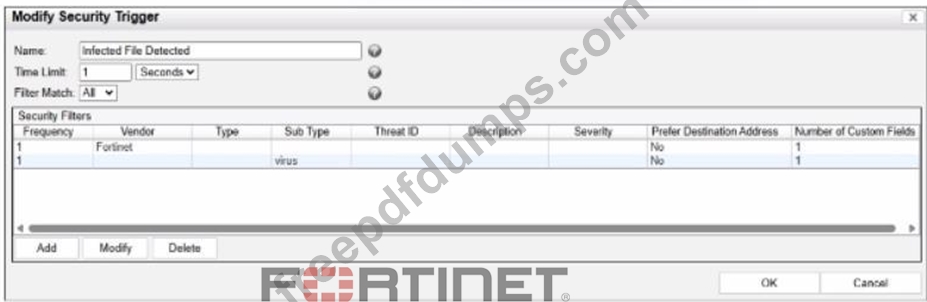
Refer to the exhibit. What would FortiNAC-F generate if only one of the security fitters is satisfied?
Correct Answer: D
In FortiNAC-F, Security Triggers are used to identify specific security-related activities based on incoming data such as Syslog messages or SNMP traps from external security devices (like a FortiGate or an IDS). These triggers act as a filtering mechanism to determine if an incoming notification should be escalated from a standard system event to a Security Event. According to the FortiNAC-F Administrator Guide and relevant training materials for versions 7.2 and 7.4, the Filter Match setting is the critical logic gate for this process. As seen in the exhibit, the "Filter Match" configuration is set to "All". This means that for the Security Trigger named "Infected File Detected" to "fire" and generate a Security Event or a subsequent Security Alarm, every single filter listed in the Security Filters table must be satisfied simultaneously by the incoming data. In the provided exhibit, there are two filters: one looking for the Vendor "Fortinet" and another looking for the Sub Type "virus". If only one of these filters is satisfied (for example, a message from Fortinet that does not contain the "virus" subtype), the logic for the Security Trigger is not met. Consequently, FortiNAC-F does not escalate the notification. Instead, it processes the incoming data as a Normal Event, which is recorded in the Event Log but does not trigger the automated security response workflows associated with security alarms. "The Filter Match option defines the logic used when multiple filters are defined. If 'All' is selected, then all filter criteria must be met in order for the trigger to fire and a Security Event to be generated. If the criteria are not met, the incoming data is processed as a normal event. If 'Any' is selected, the trigger fires if at least one of the filters matches."
NSE6_FNC_AD-7.6 Exam Question 29
An administrator wants to build a security rule that will quarantine contractors who attempt to access specific websites. In addition to a user host profile, which two components must the administrator configure to create the security rule? (Choose two.)
Correct Answer: B,D
A security rule requires a trigger to detect the condition, such as contractors accessing specific websites based on security or traffic events. It also requires an action to define the response, such as quarantining the contractor when the trigger condition is met.
NSE6_FNC_AD-7.6 Exam Question 30
While troubleshooting a network connectivity issue, an administrator determines that a device was being automatically provisioned to an incorrect VLAN. Where would the administrator look to identify when and why FortiNAC-F made the network access change?
Correct Answer: A
The Port Changes view records provisioning actions performed by FortiNAC-F, including VLAN changes, along with the associated reason and timestamp. This allows the administrator to determine when the network access change occurred and what triggered it.