

I40-420 Exam Question 46
HOTSPOT
CORPORATE INFORMATION SYSTEM (CIS) - EMPLOYEE DATA TRANSFER
-From the CIS main menu, the CIS user selects the Transfer Employee Data option.
-The Transfer Employee Data option creates a transaction file of CIS Employee logical file records that have a status flag equal to Add or Change. Each record in the transaction file contains employee badge number, first name, last name, phone number, facility, supervisor badge number, organization, job code, and status flag.
-The CIS transaction file is written to the Financial System (FS) server's temporary file work area. This data transfer is a user requirement for both applications.
-From the FS main menu, the FS user selects the Load Employee Data option.
-The Load Employee Data option accesses the CIS transaction file from the FS server's temporary file work area. The Load Employee Data option processes the input records according to the status flag, initiating different processing logic for Add and Change. The Load Employee Data option loads all attributes from each record to the FS, except the status flag.
-As part of the same elementary process, when an employee is being Added or Changed to the FS Employee logical file it also saves the employee's pay grade code, retrieved from the Payroll System.
-Both applications have a requirement to access a version of the Employee logical file.
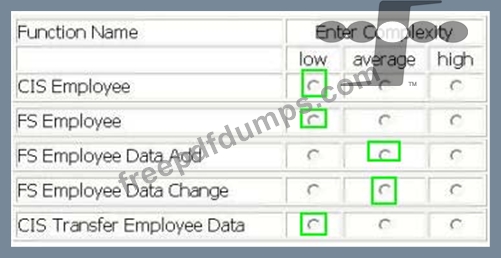
Determine the complexity for the functions listed.
Select the complexity for each function:

CORPORATE INFORMATION SYSTEM (CIS) - EMPLOYEE DATA TRANSFER
-From the CIS main menu, the CIS user selects the Transfer Employee Data option.
-The Transfer Employee Data option creates a transaction file of CIS Employee logical file records that have a status flag equal to Add or Change. Each record in the transaction file contains employee badge number, first name, last name, phone number, facility, supervisor badge number, organization, job code, and status flag.
-The CIS transaction file is written to the Financial System (FS) server's temporary file work area. This data transfer is a user requirement for both applications.
-From the FS main menu, the FS user selects the Load Employee Data option.
-The Load Employee Data option accesses the CIS transaction file from the FS server's temporary file work area. The Load Employee Data option processes the input records according to the status flag, initiating different processing logic for Add and Change. The Load Employee Data option loads all attributes from each record to the FS, except the status flag.
-As part of the same elementary process, when an employee is being Added or Changed to the FS Employee logical file it also saves the employee's pay grade code, retrieved from the Payroll System.
-Both applications have a requirement to access a version of the Employee logical file.
Determine the complexity for the functions listed.
Select the complexity for each function:
I40-420 Exam Question 47
An External Input is an elementary process that:
I40-420 Exam Question 48
An External Output is defined as an elementary process that:
I40-420 Exam Question 49
The boundary for the function point count:
I40-420 Exam Question 50
HOTSPOT
ALERT SYSTEM - ALERT NOTIFICATION
-Brokers use the Alert Profile screen to maintain the Alert Profile logical file. They can Add, Change, Delete and View alert information.
-Brokers also maintain a list of many securities to monitor. The securities information is considered to be part of the Alert Profile.
-The Alert Profile record is not considered complete until at least one security has been entered. The account number, alert contact name, alert phone number, and security id are required fields. The user is required to enter at least one of the remaining fields: low price threshold, high price threshold, and high volume threshold, they may enter values in all three.
-When an Alert Profile record is Added a validation is performed on the account number against the Account Master logical file and a validation on the securities against the Securities logical file.
-When Alert Profile records are Changed a validation is on the account number against the Account Master. All fields can be modified.
-No validations are performed for the Alert Profile View.
-When an Alert Profile record is Deleted the user must enter the account number, alert contact name, alert phone number. The account number is validated against the Account Master.
-Error messages are displayed whenever validations fail


Select the complexity of each function:

ALERT SYSTEM - ALERT NOTIFICATION
-Brokers use the Alert Profile screen to maintain the Alert Profile logical file. They can Add, Change, Delete and View alert information.
-Brokers also maintain a list of many securities to monitor. The securities information is considered to be part of the Alert Profile.
-The Alert Profile record is not considered complete until at least one security has been entered. The account number, alert contact name, alert phone number, and security id are required fields. The user is required to enter at least one of the remaining fields: low price threshold, high price threshold, and high volume threshold, they may enter values in all three.
-When an Alert Profile record is Added a validation is performed on the account number against the Account Master logical file and a validation on the securities against the Securities logical file.
-When Alert Profile records are Changed a validation is on the account number against the Account Master. All fields can be modified.
-No validations are performed for the Alert Profile View.
-When an Alert Profile record is Deleted the user must enter the account number, alert contact name, alert phone number. The account number is validated against the Account Master.
-Error messages are displayed whenever validations fail
Select the complexity of each function:
