I40-420 Exam Question 6
A logical data store is maintained by the application being counted. It has tax code as the key attribute and tax rate as the only other attribute. How would this data store be counted?
I40-420 Exam Question 7
HOTSPOT
The Stock Purchasing (SP) and Point of Sale (POS) applications have the following requirements.
-The POS application maintains details of customer purchases in the Item Purchases logical file.
-The SP application is used to place orders with suppliers based on daily inventory levels.
-The SP application is used to maintain supplier information. The Supplier Information logical file contains descriptions of items the supplier stocks and supplier contact information.
-The Inventory logical file is maintained by the SP application through a daily batch process which references the Item Purchases logical file.
-When the batch process is complete, the SP application displays a list of items that are below 20% of normal inventory levels. The user selects items to be ordered and specifies the supplier. The SP application then generates a purchase order for each supplier. The purchase orders are sent electronically to each supplier and stored in the Order logical file.
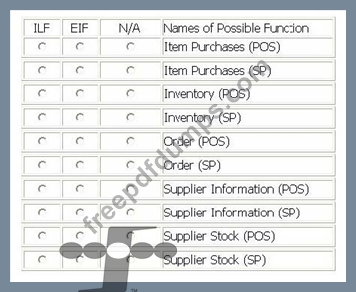
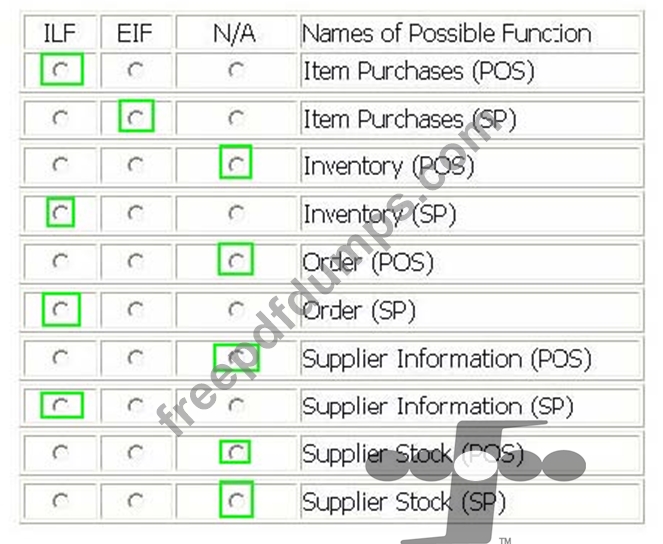
-From the Names of Possible Functions listed identify the data function both the SP and POS applications. Select N/A if a Name of Possible Function does not apply.
Identify the functions used:
The Stock Purchasing (SP) and Point of Sale (POS) applications have the following requirements.
-The POS application maintains details of customer purchases in the Item Purchases logical file.
-The SP application is used to place orders with suppliers based on daily inventory levels.
-The SP application is used to maintain supplier information. The Supplier Information logical file contains descriptions of items the supplier stocks and supplier contact information.
-The Inventory logical file is maintained by the SP application through a daily batch process which references the Item Purchases logical file.
-When the batch process is complete, the SP application displays a list of items that are below 20% of normal inventory levels. The user selects items to be ordered and specifies the supplier. The SP application then generates a purchase order for each supplier. The purchase orders are sent electronically to each supplier and stored in the Order logical file.
-From the Names of Possible Functions listed identify the data function both the SP and POS applications. Select N/A if a Name of Possible Function does not apply.
Identify the functions used:
I40-420 Exam Question 8
The application functional size after an enhancement project does NOT include the size of the:
I40-420 Exam Question 9
The user requires monthly listing of new customers acquired during the month. The listing is transmitted by email to the sales manager. No ILFs are maintained during processing. How would this transactional function be measured?
I40-420 Exam Question 10
HOTSPOT
The Human Resources (HR) application includes functionality to maintain the Department logical file.
-The user enters a department number and presses the View button to display an existing
department. An error message is displayed if the department does not exist.
-When the user adds or updates a department, the cost center is validated against the Cost Center logical file. The Cost Center logical file is maintained in the Payroll application.
-The user Adds a new department by entering department #, Name, phone #, mail stop, cost center and manager. The user completes the add by pressing the Add button. An error message displayed if the department # already exists.
-The user Updates information about the displayed department. Name, phone #, mail stop, cost center and manager may be changed. The user completes the update by pressing the Update button.
-The user Deletes the displayed department by pressing the Delete button.
-A manager must be selected using the Manager Drop Down list, which displays manager name and department number. The Employee logical file is maintained in the HR application and is the source for the Manager Drop Down list.
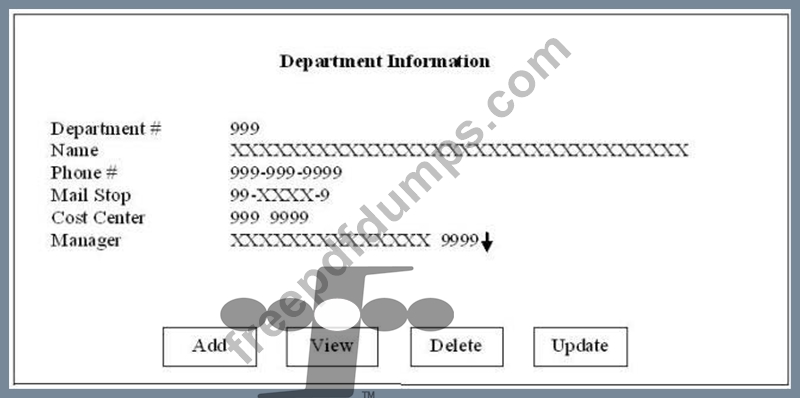
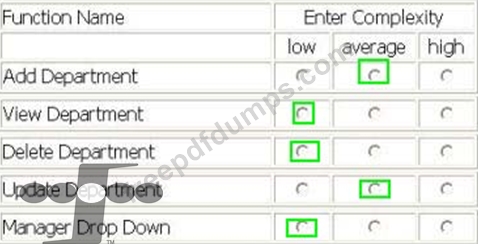
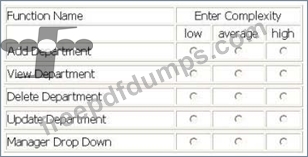
Determine the complexity for department transactions. Select the complexity for each function.
The Human Resources (HR) application includes functionality to maintain the Department logical file.
-The user enters a department number and presses the View button to display an existing
department. An error message is displayed if the department does not exist.
-When the user adds or updates a department, the cost center is validated against the Cost Center logical file. The Cost Center logical file is maintained in the Payroll application.
-The user Adds a new department by entering department #, Name, phone #, mail stop, cost center and manager. The user completes the add by pressing the Add button. An error message displayed if the department # already exists.
-The user Updates information about the displayed department. Name, phone #, mail stop, cost center and manager may be changed. The user completes the update by pressing the Update button.
-The user Deletes the displayed department by pressing the Delete button.
-A manager must be selected using the Manager Drop Down list, which displays manager name and department number. The Employee logical file is maintained in the HR application and is the source for the Manager Drop Down list.
Determine the complexity for department transactions. Select the complexity for each function.