

CKS Exam Question 6
SIMULATION
Using the runtime detection tool Falco, Analyse the container behavior for at least 20 seconds, using filters that detect newly spawning and executing processes in a single container of Nginx.
store the incident file art /opt/falco-incident.txt, containing the detected incidents. one per line, in the format
[timestamp],[uid],[processName]
Using the runtime detection tool Falco, Analyse the container behavior for at least 20 seconds, using filters that detect newly spawning and executing processes in a single container of Nginx.
store the incident file art /opt/falco-incident.txt, containing the detected incidents. one per line, in the format
[timestamp],[uid],[processName]
CKS Exam Question 7
SIMULATION
A container image scanner is set up on the cluster.
Given an incomplete configuration in the directory
/etc/kubernetes/confcontrol and a functional container image scanner with HTTPS endpoint https://test-server.local.8081/image_policy
1. Enable the admission plugin.
2. Validate the control configuration and change it to implicit deny.
Finally, test the configuration by deploying the pod having the image tag as latest.
A container image scanner is set up on the cluster.
Given an incomplete configuration in the directory
/etc/kubernetes/confcontrol and a functional container image scanner with HTTPS endpoint https://test-server.local.8081/image_policy
1. Enable the admission plugin.
2. Validate the control configuration and change it to implicit deny.
Finally, test the configuration by deploying the pod having the image tag as latest.
CKS Exam Question 8
SIMULATION
Create a RuntimeClass named untrusted using the prepared runtime handler named runsc.
Create a Pods of image alpine:3.13.2 in the Namespace default to run on the gVisor runtime class.
Verify: Exec the pods and run the dmesg, you will see output like this:-
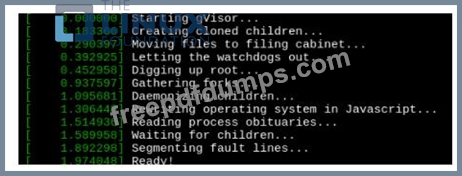
Create a RuntimeClass named untrusted using the prepared runtime handler named runsc.
Create a Pods of image alpine:3.13.2 in the Namespace default to run on the gVisor runtime class.
Verify: Exec the pods and run the dmesg, you will see output like this:-
CKS Exam Question 9
SIMULATION
On the Cluster worker node, enforce the prepared AppArmor profile
#include <tunables/global>
profile nginx-deny flags=(attach_disconnected) {
#include <abstractions/base>
file,
# Deny all file writes.
deny /** w,
}
EOF'
Edit the prepared manifest file to include the AppArmor profile.
apiVersion: v1
kind: Pod
metadata:
name: apparmor-pod
spec:
containers:
- name: apparmor-pod
image: nginx
Finally, apply the manifests files and create the Pod specified on it.
Verify: Try to make a file inside the directory which is restricted.
On the Cluster worker node, enforce the prepared AppArmor profile
#include <tunables/global>
profile nginx-deny flags=(attach_disconnected) {
#include <abstractions/base>
file,
# Deny all file writes.
deny /** w,
}
EOF'
Edit the prepared manifest file to include the AppArmor profile.
apiVersion: v1
kind: Pod
metadata:
name: apparmor-pod
spec:
containers:
- name: apparmor-pod
image: nginx
Finally, apply the manifests files and create the Pod specified on it.
Verify: Try to make a file inside the directory which is restricted.
CKS Exam Question 10
SIMULATION
Create a network policy named restrict-np to restrict to pod nginx-test running in namespace testing.
Only allow the following Pods to connect to Pod nginx-test:-
1. pods in the namespace default
2. pods with label version:v1 in any namespace.
Make sure to apply the network policy.
Create a network policy named restrict-np to restrict to pod nginx-test running in namespace testing.
Only allow the following Pods to connect to Pod nginx-test:-
1. pods in the namespace default
2. pods with label version:v1 in any namespace.
Make sure to apply the network policy.