

AZ-104 Exam Question 131
A web developer creates a web application that you plan to deploy as an Azure web app. Users must enter credentials to access the web application.
You create a new web app named WebApp1 and deploy the web application to WebApp1.
You need to disable anonymous access to WebApp1.
What should you configure?
You create a new web app named WebApp1 and deploy the web application to WebApp1.
You need to disable anonymous access to WebApp1.
What should you configure?
AZ-104 Exam Question 132
You have an Azure virtual machine named VM1.
The network interface for VM1 is configured as shown in the exhibit. (Click the Exhibit tab.)
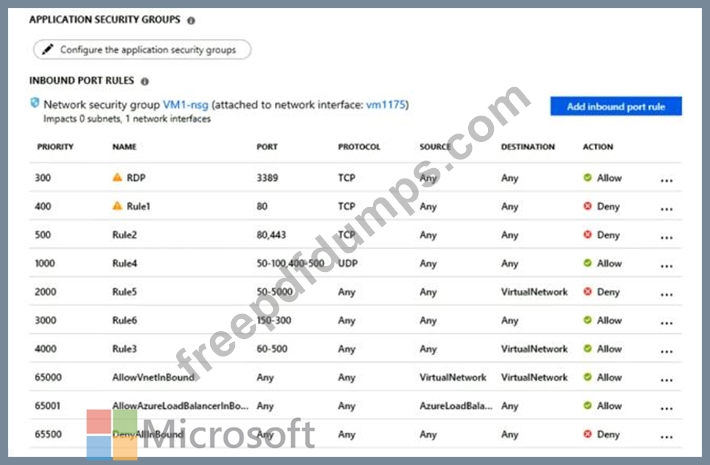
You deploy a web server on VM1, and then create a secure website that is accessible by using the HTTPS protocol VM1 is used as a web server only.
You need to ensure that users can connect to the website from the Internet.
What should you do?
The network interface for VM1 is configured as shown in the exhibit. (Click the Exhibit tab.)
You deploy a web server on VM1, and then create a secure website that is accessible by using the HTTPS protocol VM1 is used as a web server only.
You need to ensure that users can connect to the website from the Internet.
What should you do?
AZ-104 Exam Question 133
You have an Azure web app named WebApp1 that runs in an Azure App Service plan named ASP1. ASP1 is based on the D1 pricing tier.
You need to ensure that WebApp1 can be accessed only from computers on your on-premises network. The solution must minimize costs.
What should you configure? To answer, select the appropriate options in the answer area.
NOTE: Each correct selection is worth one point.

You need to ensure that WebApp1 can be accessed only from computers on your on-premises network. The solution must minimize costs.
What should you configure? To answer, select the appropriate options in the answer area.
NOTE: Each correct selection is worth one point.

AZ-104 Exam Question 134
You have the Azure resources shown on the following exhibit.

You plan to track resource usage and prevent the deletion of resources.
To which resources can you apply locks and tags? To answer, select the appropriate options in the answer area.
NOTE: Each correct selection is worth one point.

You plan to track resource usage and prevent the deletion of resources.
To which resources can you apply locks and tags? To answer, select the appropriate options in the answer area.
NOTE: Each correct selection is worth one point.

AZ-104 Exam Question 135
Your network is configured as shown in the following exhibit.

The firewalls are configured as shown in the following table.

Prod1 contains a vCenter server.
You install an Azure Migrate Collector on Test1.
You need to discover the virtual machines.
Which TCP port should be allowed on each firewall? To answer, drag the appropriate ports to the correct firewalls. Each port may be used once, more than once, or not at all. You may need to drag the split bar between panes or scroll to view content.
NOTE: Each correct selection is worth one point.

The firewalls are configured as shown in the following table.
Prod1 contains a vCenter server.
You install an Azure Migrate Collector on Test1.
You need to discover the virtual machines.
Which TCP port should be allowed on each firewall? To answer, drag the appropriate ports to the correct firewalls. Each port may be used once, more than once, or not at all. You may need to drag the split bar between panes or scroll to view content.
NOTE: Each correct selection is worth one point.
