

AZ-400 Exam Question 86
Task 1
Navigate to https://dev.azure.com, select Start Free, and specify the following credentials:
* [email protected]
* Password: eWrSalD2!
Use the default setting to sign up for Azure DevOps and create an Azure DevOps organization. Once the organization is created. creates private project named Project1.
You need to add an external user that has an email address of [email protected] as a stakeholder of the User1 -42147509 Azure DevOps organization.
The user must be added to the most restrictive Azure DevOps group.
To complete this task, sign in to the Azure DevOps portal as Userl-42147509 ExamUsers.com.
Navigate to https://dev.azure.com, select Start Free, and specify the following credentials:
* [email protected]
* Password: eWrSalD2!
Use the default setting to sign up for Azure DevOps and create an Azure DevOps organization. Once the organization is created. creates private project named Project1.
You need to add an external user that has an email address of [email protected] as a stakeholder of the User1 -42147509 Azure DevOps organization.
The user must be added to the most restrictive Azure DevOps group.
To complete this task, sign in to the Azure DevOps portal as Userl-42147509 ExamUsers.com.
AZ-400 Exam Question 87
You ate using Agile process methodologies in Azure DevOps.
You need to deploy a dashboard that will provide progress reports for the following work items:
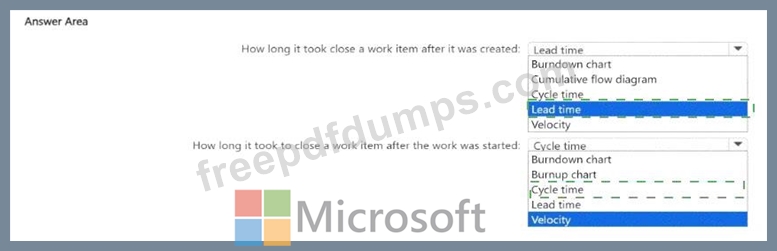
* How long it took to close a work item after it was created.
* How long it took to close a work item after the work was started.
Which type of widget should you use for each work item? To answer, select the appropriate options in the answer area.
NOTE: Each correct selection is worth one point.
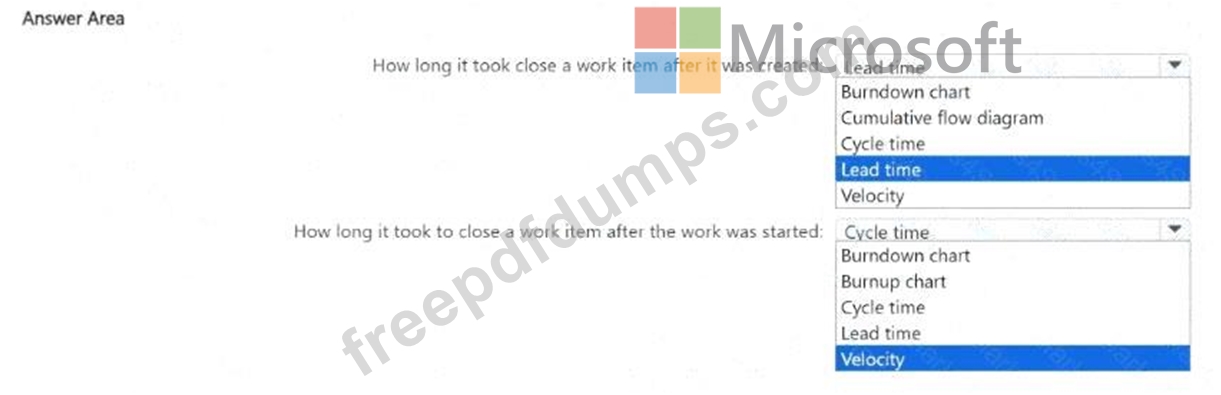
You need to deploy a dashboard that will provide progress reports for the following work items:
* How long it took to close a work item after it was created.
* How long it took to close a work item after the work was started.
Which type of widget should you use for each work item? To answer, select the appropriate options in the answer area.
NOTE: Each correct selection is worth one point.

AZ-400 Exam Question 88
Task 10
For Project1, you need to ensure that artifacts, symbols, and attachments are retained for 60 days.
For Project1, you need to ensure that artifacts, symbols, and attachments are retained for 60 days.
AZ-400 Exam Question 89
You build a Node.js app named App1 by using GitHub.
You need to test App1. The solution must ensure that App1 meets the following requirements.
* Works correctly with versions 10,12, and 14 of Node.js
* Works correctly with Ubuntu versions 22.04and 20-04
* Minimizes the runtime of the test stage
What should you use?
You need to test App1. The solution must ensure that App1 meets the following requirements.
* Works correctly with versions 10,12, and 14 of Node.js
* Works correctly with Ubuntu versions 22.04and 20-04
* Minimizes the runtime of the test stage
What should you use?
AZ-400 Exam Question 90
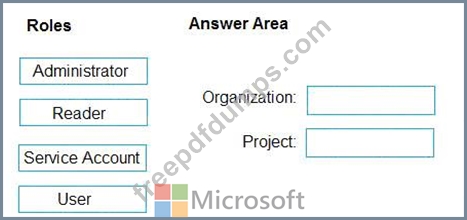
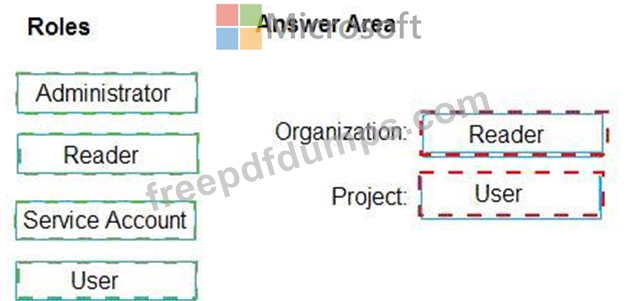
You need to configure access to Azure DevOps Agent pools to meet the forwarding requirements:
* Use a project agent pool when authoring build release pipelines.
* View the agent pool and agents of the organization.
* Use the principle of least privilege.
Which role memberships are required for the Azure 0e%Oos organization and the project? To answer, drag the appropriate role membership to the correct targets. Each role membership may be used once, more than once, or not at all. You may need to drag the split bar between panes or scroll to content NOTE: Each correct selection is worth one point.
* Use a project agent pool when authoring build release pipelines.
* View the agent pool and agents of the organization.
* Use the principle of least privilege.
Which role memberships are required for the Azure 0e%Oos organization and the project? To answer, drag the appropriate role membership to the correct targets. Each role membership may be used once, more than once, or not at all. You may need to drag the split bar between panes or scroll to content NOTE: Each correct selection is worth one point.
Premium Bundle
Newest AZ-400 Exam PDF Dumps shared by Actual4test.com for Helping Passing AZ-400 Exam! Actual4test.com now offer the updated AZ-400 exam dumps, the Actual4test.com AZ-400 exam questions have been updated and answers have been corrected get the latest Actual4test.com AZ-400 pdf dumps with Exam Engine here:
(609 Q&As Dumps, 30%OFF Special Discount: Freepdfdumps)