

AZ-500 Exam Question 191
You are configuring just in time (JIT) VM access to a set of Azure virtual machines.
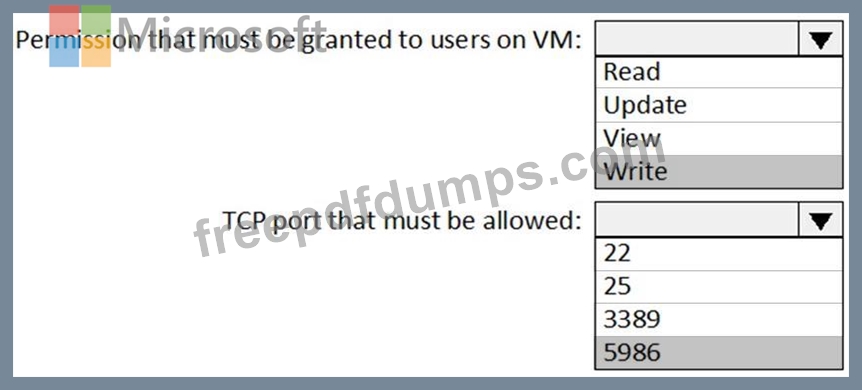
You need to grant users PowerShell access to the virtual machine by using JIT VM access.
What should you configure? To answer, select the appropriate options in the answer area.
NOTE: Each correct selection is worth one point.

You need to grant users PowerShell access to the virtual machine by using JIT VM access.
What should you configure? To answer, select the appropriate options in the answer area.
NOTE: Each correct selection is worth one point.

AZ-500 Exam Question 192
Use the following login credentials as needed:
To enter your username, place your cursor in the Sign in box and click on the username below.
To enter your password, place your cursor in the Enter password box and click on the password below.
Azure Username: [email protected]
Azure Password: Ag1Bh9!#Bd
The following information is for technical support purposes only:
Lab Instance: 10598168


You need to create a new Azure Active Directory (Azure AD) directory named 10598168.onmicrosoft.com.
The new directory must contain a user named [email protected] who is configured to sign in by using Azure Multi-Factor Authentication (MFA).
To complete this task, sign in to the Azure portal.
To enter your username, place your cursor in the Sign in box and click on the username below.
To enter your password, place your cursor in the Enter password box and click on the password below.
Azure Username: [email protected]
Azure Password: Ag1Bh9!#Bd
The following information is for technical support purposes only:
Lab Instance: 10598168
You need to create a new Azure Active Directory (Azure AD) directory named 10598168.onmicrosoft.com.
The new directory must contain a user named [email protected] who is configured to sign in by using Azure Multi-Factor Authentication (MFA).
To complete this task, sign in to the Azure portal.


AZ-500 Exam Question 193
You have the Azure virtual machines shown in the following table.

For which virtual machine can you enable Update Management?
For which virtual machine can you enable Update Management?
AZ-500 Exam Question 194
You have an Azure subscription that contains the custom roles shown in the following table.

In the Azure portal, you plan to create new custom roles by cloning existing roles. The new roles will be configured as shown in the following table.

Which roles can you clone to create each new role? To answer, select the appropriate options in the answer area.
NOTE: Each correct selection is worth one point.

In the Azure portal, you plan to create new custom roles by cloning existing roles. The new roles will be configured as shown in the following table.
Which roles can you clone to create each new role? To answer, select the appropriate options in the answer area.
NOTE: Each correct selection is worth one point.

AZ-500 Exam Question 195
You have an Azure Active Directory (Azure AD) tenant named contoso.com that contains the users shown in the following table.

Azure AD Privileged Identity Management (PIM) is enabled for the tenant.
In PIM, the Password Administrator role has the following settings:
* Maximum activation duration (hours): 2
* Send email notifying admins of activation: Disable
* Require incident/request ticket number during activation: Disable
* Require Azure Multi-Factor Authentication for activation: Enable
* Require approval to activate this role: Enable
* Selected approver: Group1
You assign users the Password Administrator role as shown in the following table.

For each of the following statements, select Yes if the statement is true. Otherwise, select No.
NOTE: Each correct selection is worth one point.

Azure AD Privileged Identity Management (PIM) is enabled for the tenant.
In PIM, the Password Administrator role has the following settings:
* Maximum activation duration (hours): 2
* Send email notifying admins of activation: Disable
* Require incident/request ticket number during activation: Disable
* Require Azure Multi-Factor Authentication for activation: Enable
* Require approval to activate this role: Enable
* Selected approver: Group1
You assign users the Password Administrator role as shown in the following table.
For each of the following statements, select Yes if the statement is true. Otherwise, select No.
NOTE: Each correct selection is worth one point.

