

AZ-500 Exam Question 51
You have an Azure subscription that contains the resources shown in the following table.
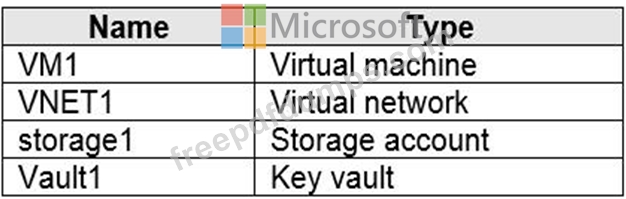
You plan to enable Azure Defender for the subscription.
Which resources can be protected by using Azure Defender?
You plan to enable Azure Defender for the subscription.
Which resources can be protected by using Azure Defender?
AZ-500 Exam Question 52
You have an Azure subscription named Sub1.
In Azure Security Center, you have a workflow automation named WF1. WF1 is configured to send an email message to a user named User1.
You need to modify WF1 to send email messages to a distribution group named Alerts.
What should you use to modify WF1?
In Azure Security Center, you have a workflow automation named WF1. WF1 is configured to send an email message to a user named User1.
You need to modify WF1 to send email messages to a distribution group named Alerts.
What should you use to modify WF1?
AZ-500 Exam Question 53
You have a file named File1.yaml that contains the following contents.

You create an Azure container instance named container1 by using File1.yaml.
You need to identify where you can access the values of Variable1 and Variable2.
What should you identify? To answer, select the appropriate options in the answer area.
NOTE: Each correct selection is worth one point.

You create an Azure container instance named container1 by using File1.yaml.
You need to identify where you can access the values of Variable1 and Variable2.
What should you identify? To answer, select the appropriate options in the answer area.
NOTE: Each correct selection is worth one point.

AZ-500 Exam Question 54
You network contains an on-premises Active Directory domain that syncs to an Azure Active Directory (Azure AD) tenant. The tenant contains the users shown in the following table.

The tenant contains the groups shown in the following table.

You configure a multi-factor authentication (MFA) registration policy that and the following settings:
Assignments:
Include: Group1
Exclude Group2
Controls: Require Azure MFA registration
Enforce Policy: On
For each of the following statements, select Yes if the statement is true. Otherwise, select No.

The tenant contains the groups shown in the following table.
You configure a multi-factor authentication (MFA) registration policy that and the following settings:
Assignments:
Include: Group1
Exclude Group2
Controls: Require Azure MFA registration
Enforce Policy: On
For each of the following statements, select Yes if the statement is true. Otherwise, select No.

AZ-500 Exam Question 55
Lab Task
use the following login credentials as needed:
To enter your username, place your cursor in the Sign in box and click on the username below.
To enter your password. place your cursor in the Enter password box and click on the password below.
Azure Username: Userl [email protected]
Azure Password: GpOAe4@lDg
If the Azure portal does not load successfully in the browser, press CTRL-K to reload the portal in a new browser tab.
The following information is for technical support purposes only:
Lab Instance: 28681041
Task 10
You need to create a new Azure AD directory named 28681041.onmicrosoft.com. The new directory must contain a new user named [email protected].
use the following login credentials as needed:
To enter your username, place your cursor in the Sign in box and click on the username below.
To enter your password. place your cursor in the Enter password box and click on the password below.
Azure Username: Userl [email protected]
Azure Password: GpOAe4@lDg
If the Azure portal does not load successfully in the browser, press CTRL-K to reload the portal in a new browser tab.
The following information is for technical support purposes only:
Lab Instance: 28681041
Task 10
You need to create a new Azure AD directory named 28681041.onmicrosoft.com. The new directory must contain a new user named [email protected].