

AZ-500 Exam Question 101
You have an Azure subscription.
You create a new virtual network named VNet1.
You plan to deploy an Azure web app named App1 that will use VNet1 and will be reachable by using private IP addresses. The solution must support inbound and outbound network traffic.
What should you do?
You create a new virtual network named VNet1.
You plan to deploy an Azure web app named App1 that will use VNet1 and will be reachable by using private IP addresses. The solution must support inbound and outbound network traffic.
What should you do?
AZ-500 Exam Question 102
You have an Azure AD tenant that contains the users shown in the following table.

You enable passwordless authentication for the tenant.
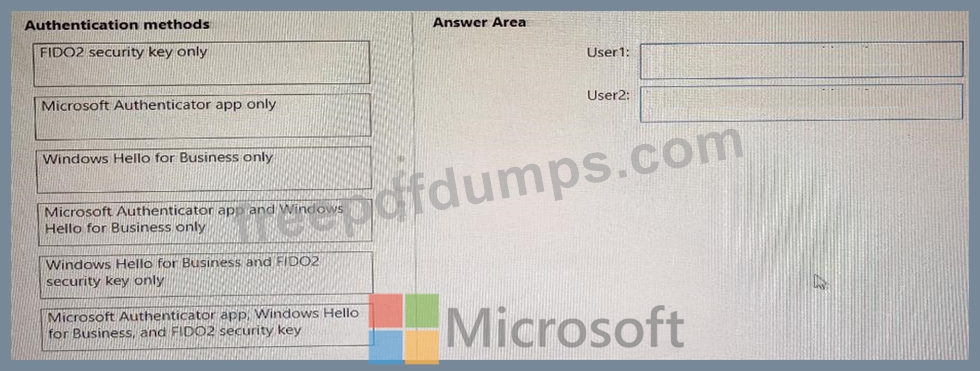
Which authentication method can each user use for passwordless authentication? To answer, drag the appropriate authentication methods to the correct users. Each authentication method may be used once, more than once, or not at all. You may need to drag the split bar between panes or scroll to view content.
NOTE: Each correct selection is worth one point.
You enable passwordless authentication for the tenant.
Which authentication method can each user use for passwordless authentication? To answer, drag the appropriate authentication methods to the correct users. Each authentication method may be used once, more than once, or not at all. You may need to drag the split bar between panes or scroll to view content.
NOTE: Each correct selection is worth one point.

AZ-500 Exam Question 103
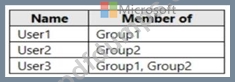
You have an Azure Active Directory (Azure AD) tenant that contains the users shown in the following table.
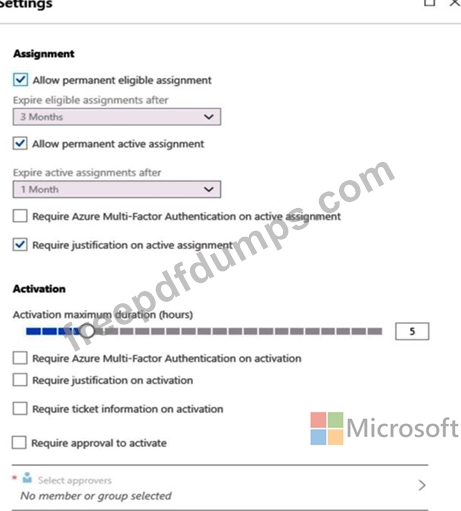
From Azure AD Privileged Identity Management (PIM), you configure the settings for the Security Administrator role as shown in the following exhibit.
From PIM, you assign the Security Administrator role to the following groups:
Group1: Active assignment type, permanently assigned
Group2: Eligible assignment type, permanently eligible
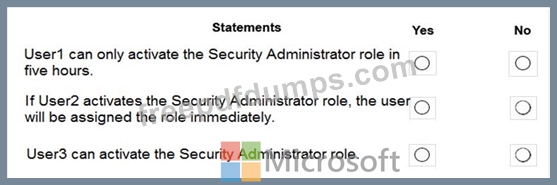
For each of the following statements, select Yes if the statement is true. Otherwise, select No.
NOTE: Each correct selection is worth one point.
From Azure AD Privileged Identity Management (PIM), you configure the settings for the Security Administrator role as shown in the following exhibit.
From PIM, you assign the Security Administrator role to the following groups:
Group1: Active assignment type, permanently assigned
Group2: Eligible assignment type, permanently eligible
For each of the following statements, select Yes if the statement is true. Otherwise, select No.
NOTE: Each correct selection is worth one point.

AZ-500 Exam Question 104
You have a Azure subscription.
You enable Azure Active Directory (Azure AD) Privileged identify (PIM).
Your company's security policy for administrator accounts has the following conditions:
* The accounts must use multi-factor authentication (MFA).
* The account must use 20-character complex passwords.
* The passwords must be changed every 180 days.
* The account must be managed by using PIM.
You receive alerts about administrator who have not changed their password during the last 90 days.
You need to minimize the number of generated alerts.
Which PIM alert should you modify?
You enable Azure Active Directory (Azure AD) Privileged identify (PIM).
Your company's security policy for administrator accounts has the following conditions:
* The accounts must use multi-factor authentication (MFA).
* The account must use 20-character complex passwords.
* The passwords must be changed every 180 days.
* The account must be managed by using PIM.
You receive alerts about administrator who have not changed their password during the last 90 days.
You need to minimize the number of generated alerts.
Which PIM alert should you modify?
AZ-500 Exam Question 105
Lab Task
use the following login credentials as needed:
To enter your username, place your cursor in the Sign in box and click on the username below.
To enter your password. place your cursor in the Enter password box and click on the password below.
Azure Username: Userl [email protected]
Azure Password: GpOAe4@lDg
If the Azure portal does not load successfully in the browser, press CTRL-K to reload the portal in a new browser tab.
The following information is for technical support purposes only:
Lab Instance: 28681041
Task 4
You need to ensure that a user named user2-28681041 can manage the properties of the virtual machines in the RG1lod28681041 resource group. The solution must use the principle of least privilege.
use the following login credentials as needed:
To enter your username, place your cursor in the Sign in box and click on the username below.
To enter your password. place your cursor in the Enter password box and click on the password below.
Azure Username: Userl [email protected]
Azure Password: GpOAe4@lDg
If the Azure portal does not load successfully in the browser, press CTRL-K to reload the portal in a new browser tab.
The following information is for technical support purposes only:
Lab Instance: 28681041
Task 4
You need to ensure that a user named user2-28681041 can manage the properties of the virtual machines in the RG1lod28681041 resource group. The solution must use the principle of least privilege.