AZ-700 Exam Question 96
You have an Azure subscription that contains the resources shown in the following table.
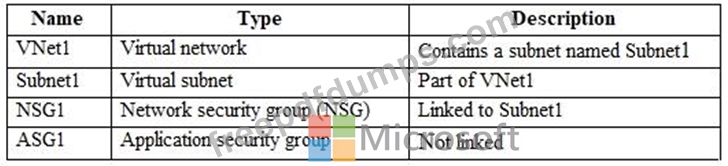
Subnet1 contains three virtual machines that host an app named App1. App1 is accessed by using the SFTP protocol.
From NSG1, you configure an inbound security rule named Rule2 that allows inbound SFTP connections to ASG1.
You need to ensure that the inbound SFTP connections are managed by using ASG1. The solution must minimize administrative effort.
What should you do?
Subnet1 contains three virtual machines that host an app named App1. App1 is accessed by using the SFTP protocol.
From NSG1, you configure an inbound security rule named Rule2 that allows inbound SFTP connections to ASG1.
You need to ensure that the inbound SFTP connections are managed by using ASG1. The solution must minimize administrative effort.
What should you do?
AZ-700 Exam Question 97
SIMULATION

Username and password
Use the following login credentials as needed:
- To enter your username, place your cursor in the Sign in box and click on the username below.
- To enter your password, place your cursor in the Enter password box and click on the password below.
- Azure Username: [email protected]
- Azure Password: xxxxxxxxxx
If the Azure portal does not load successfully in the browser, press CTRL-K to reload the portal in a new browser tab.
The following information is for technical support purposes only:
- Lab Instance: 12345678
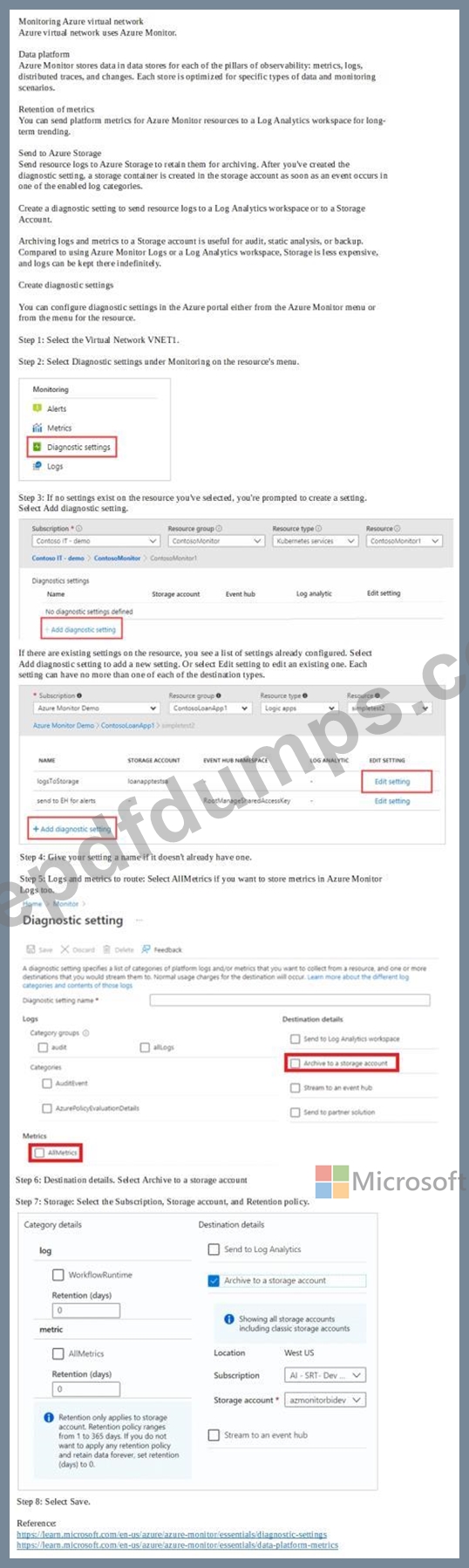
You need to archive all the metrics of VNET1 to an existing storage account.
To complete this task, sign in to the Azure portal.
Username and password
Use the following login credentials as needed:
- To enter your username, place your cursor in the Sign in box and click on the username below.
- To enter your password, place your cursor in the Enter password box and click on the password below.
- Azure Username: [email protected]
- Azure Password: xxxxxxxxxx
If the Azure portal does not load successfully in the browser, press CTRL-K to reload the portal in a new browser tab.
The following information is for technical support purposes only:
- Lab Instance: 12345678
You need to archive all the metrics of VNET1 to an existing storage account.
To complete this task, sign in to the Azure portal.
AZ-700 Exam Question 98
Drag and Drop Question
You have an Azure subscription that contains the resources shown in the following table.
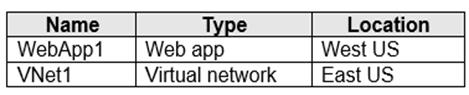
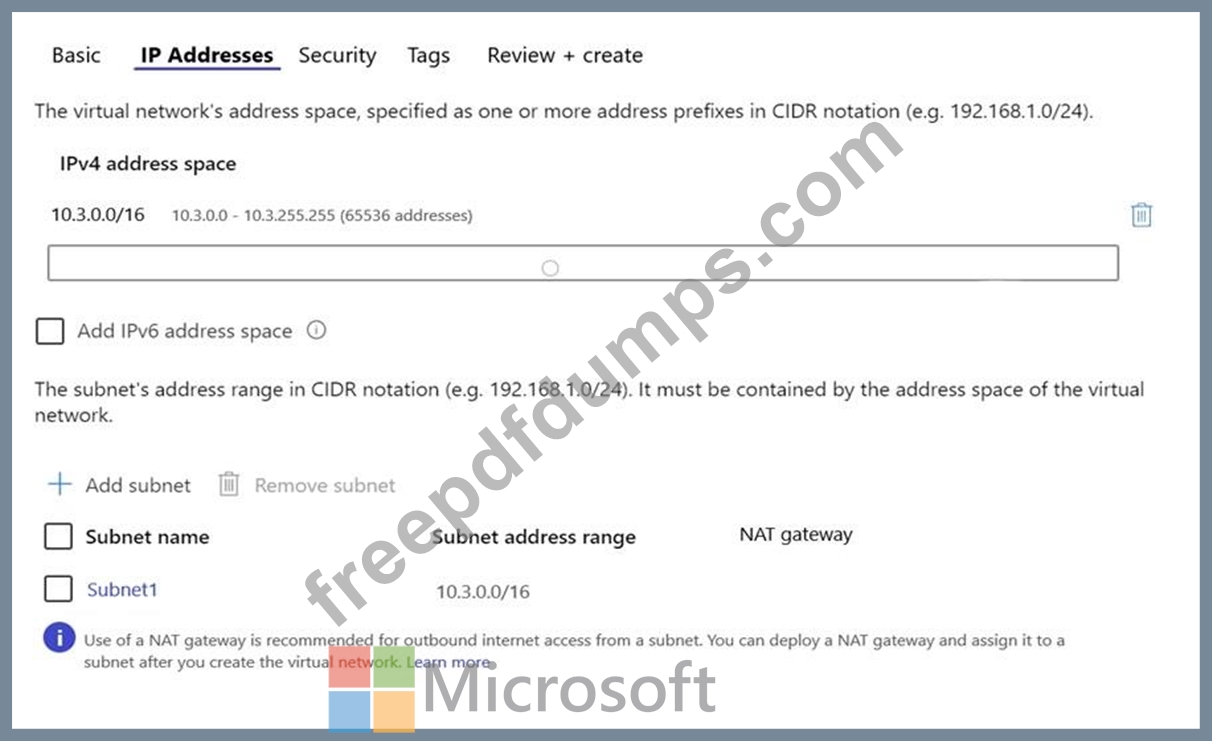
The IP Addresses settings for Vnet1 are configured as shown in the exhibit.
You need to ensure that you can integrate WebApp1 and Vnet1.
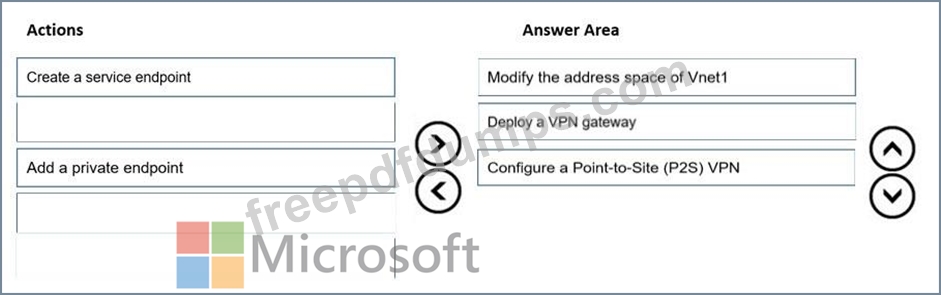
Which three actions should you perform in sequence before you can integrate WebApp1 and Vnet1? To answer, move the appropriate actions from the list of actions to the answer area and arrange them in the correct order.

You have an Azure subscription that contains the resources shown in the following table.
The IP Addresses settings for Vnet1 are configured as shown in the exhibit.
You need to ensure that you can integrate WebApp1 and Vnet1.
Which three actions should you perform in sequence before you can integrate WebApp1 and Vnet1? To answer, move the appropriate actions from the list of actions to the answer area and arrange them in the correct order.
AZ-700 Exam Question 99
Hotspot Question
You have an Azure subscription.
You plan to use Azure Virtual WAN.
You need to deploy a virtual WAN hub that meets the following requirements:
- Supports 4 Gbps of Site-to-Site (S2S) VPN traffic
- Supports 8 Gbps of ExpressRoute traffic
- Minimizes costs
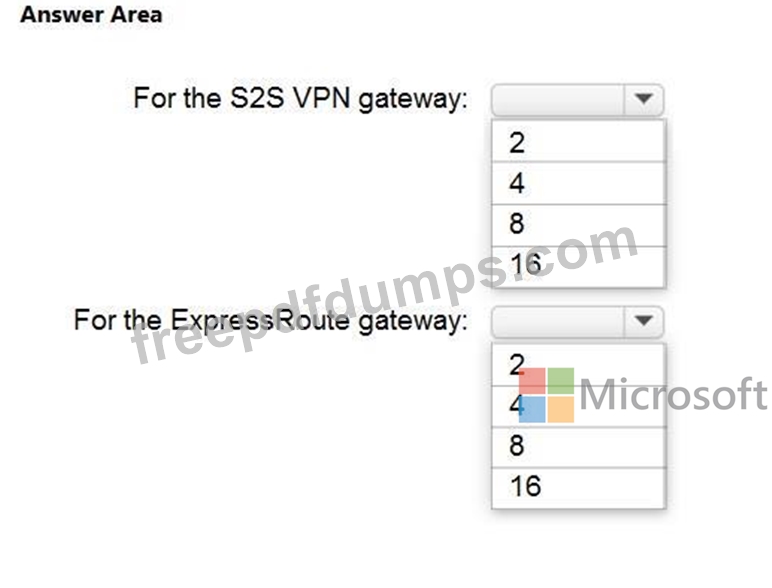
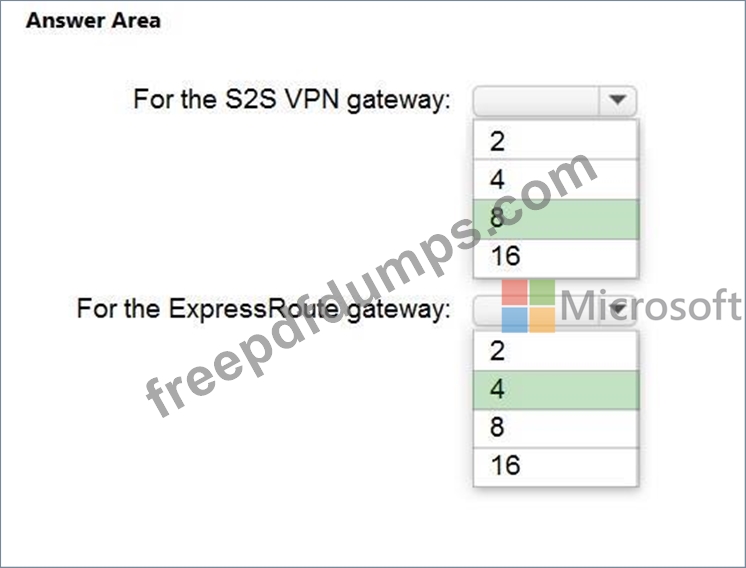
How many scale units should you configure? To answer, select the appropriate options in the answer area.
NOTE: Each correct selection is worth one point.
You have an Azure subscription.
You plan to use Azure Virtual WAN.
You need to deploy a virtual WAN hub that meets the following requirements:
- Supports 4 Gbps of Site-to-Site (S2S) VPN traffic
- Supports 8 Gbps of ExpressRoute traffic
- Minimizes costs
How many scale units should you configure? To answer, select the appropriate options in the answer area.
NOTE: Each correct selection is worth one point.
AZ-700 Exam Question 100
SIMULATION
Username and password
Use the following login credentials as needed:
- To enter your username, place your cursor in the Sign in box and click on the username below.
- To enter your password, place your cursor in the Enter password box and click on the password below.
- Azure Username: [email protected]
- Azure Password: xxxxxxxxxx
If the Azure portal does not load successfully in the browser, press CTRL-K to reload the portal in a new browser tab.
The following information is for technical support purposes only:
- Lab Instance: 12345678
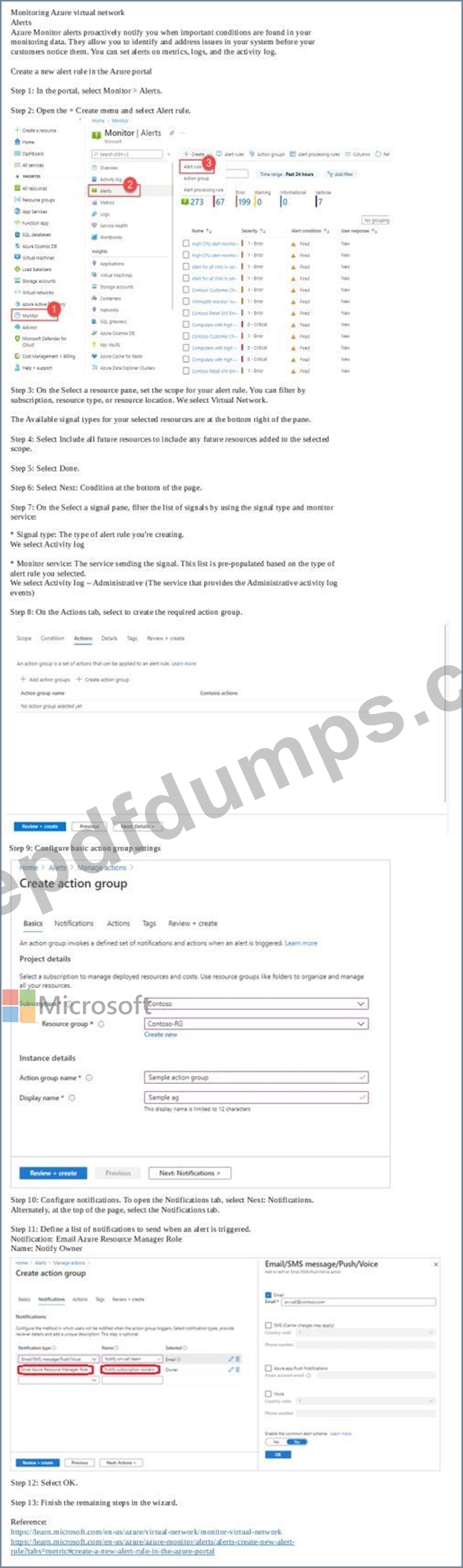
You need to ensure that the owner of VNET3 receives an alert if an administrative operation is performed in the virtual network.
To complete this task, sign in to the Azure portal.
Username and password
Use the following login credentials as needed:
- To enter your username, place your cursor in the Sign in box and click on the username below.
- To enter your password, place your cursor in the Enter password box and click on the password below.
- Azure Username: [email protected]
- Azure Password: xxxxxxxxxx
If the Azure portal does not load successfully in the browser, press CTRL-K to reload the portal in a new browser tab.
The following information is for technical support purposes only:
- Lab Instance: 12345678
You need to ensure that the owner of VNET3 receives an alert if an administrative operation is performed in the virtual network.
To complete this task, sign in to the Azure portal.