AZ-801 Exam Question 66
Your company uses Storage Spaces Direct.
You need to view the available storage in a Storage Space Direct storage pool.
What should you use?
You need to view the available storage in a Storage Space Direct storage pool.
What should you use?
AZ-801 Exam Question 67
You are an administrator at Contoso and you need to create a new VM with a single OS disk and a single data disk. While creating the VM, you use the default options. You don't have a key vault set up in your subscription. Which of the following options most accurately define the encryption state of those disks?
AZ-801 Exam Question 68
Case Study 2 - Contoso, Ltd
Overview
Contoso, Ltd. is a manufacturing company that has a main office in Seattle and branch offices in Los Angeles and Montreal.
Existing Environment
Active Directory Environment
Contoso has an on-premises Active Directory Domain Services (AD DS) domain named contoso.com that syncs with an Azure Active Directory (Azure AD) tenant. The AD DS domain contains the domain controllers shown in the following table.

Contoso recently purchased an Azure subscription.
The functional level of the forest is Windows Server 2012 R2. The functional level of the domain is Windows Server 2012. The forest has the Active Directory Recycle Bin enabled.
The contoso.com domain contains the users shown in the following table.
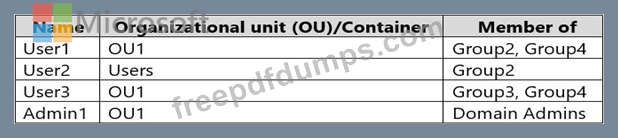
The contoso.com domain has the Group Policy Objects (GPOs) shown in the following table.

The contoso.com domain has the Password Settings Objects (PSOs) shown in the following table.

Server Infrastructure
The contoso.com domain contains servers that run Windows Server 2022 as shown in the following table.
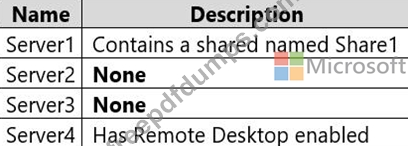
By using Windows Firewall with Advanced Security, the servers have isolation connection security rules configured as shown in the following table.
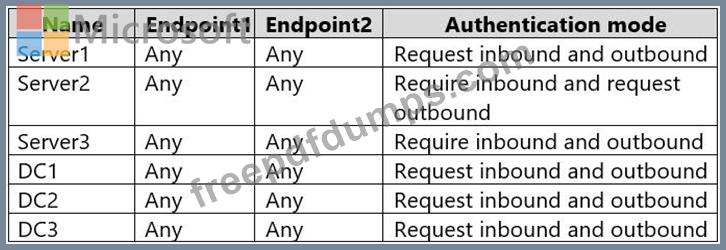
Server4 has no connection security rules.
Server4 Configurations
Server4 has the effective Group Policy settings for user rights as shown in the following table.

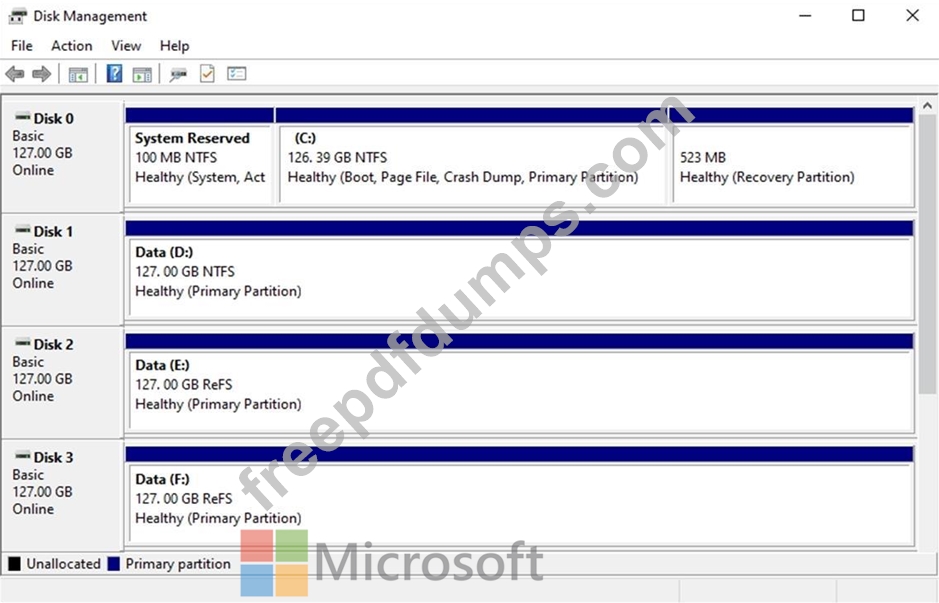
Server4 has the disk configurations shown in the following exhibit.
Virtualization Infrastructure
The contoso.com domain has the Hyper-V failover clusters shown in the following table.

Technical Requirements
Contoso identifies the following technical requirements:
* Promote a new server named DC4 that runs to Windows Server 2022 to a domain controller.
* Replicate the virtual machines from Cluster2 to an Azure Recovery Services vault.
* Centrally manage performance alerts in Azure for all the domain controllers.
* Ensure that User1 can recover objects from the Active Directory Recycle Bin.
* Migrate Share1 to Server2, including all the share and folder permissions.
* Back up Server4 and all data to an Azure Recovery Services vault.
* Use Hyper-V Replica to protect the virtual machines in Cluster3.
* Implement BitLocker Drive Encryption (BitLocker) on Server4.
* Whenever possible, use the principle of least privilege.
Hotspot Question
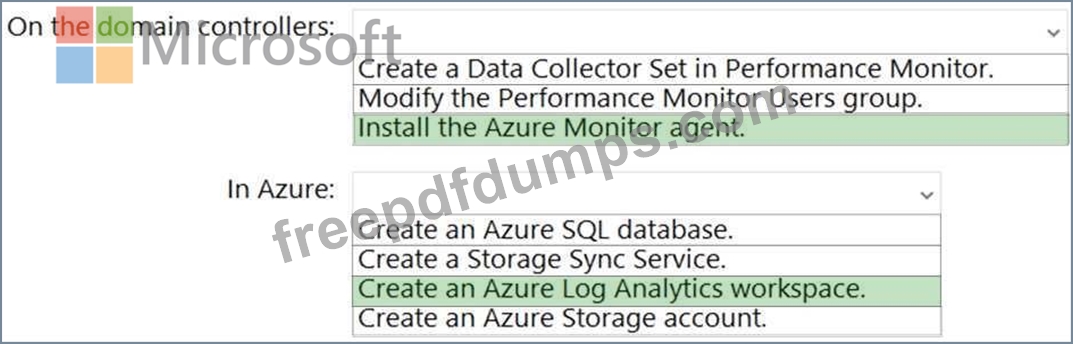
You need to implement alerts for the domain controllers. The solution must meet the technical requirements.
What should you do on the domain controllers, and what should you create on Azure? To answer, select the appropriate options in the answer area.
NOTE: Each correct selection is worth one point.

Overview
Contoso, Ltd. is a manufacturing company that has a main office in Seattle and branch offices in Los Angeles and Montreal.
Existing Environment
Active Directory Environment
Contoso has an on-premises Active Directory Domain Services (AD DS) domain named contoso.com that syncs with an Azure Active Directory (Azure AD) tenant. The AD DS domain contains the domain controllers shown in the following table.
Contoso recently purchased an Azure subscription.
The functional level of the forest is Windows Server 2012 R2. The functional level of the domain is Windows Server 2012. The forest has the Active Directory Recycle Bin enabled.
The contoso.com domain contains the users shown in the following table.
The contoso.com domain has the Group Policy Objects (GPOs) shown in the following table.
The contoso.com domain has the Password Settings Objects (PSOs) shown in the following table.
Server Infrastructure
The contoso.com domain contains servers that run Windows Server 2022 as shown in the following table.
By using Windows Firewall with Advanced Security, the servers have isolation connection security rules configured as shown in the following table.
Server4 has no connection security rules.
Server4 Configurations
Server4 has the effective Group Policy settings for user rights as shown in the following table.
Server4 has the disk configurations shown in the following exhibit.
Virtualization Infrastructure
The contoso.com domain has the Hyper-V failover clusters shown in the following table.
Technical Requirements
Contoso identifies the following technical requirements:
* Promote a new server named DC4 that runs to Windows Server 2022 to a domain controller.
* Replicate the virtual machines from Cluster2 to an Azure Recovery Services vault.
* Centrally manage performance alerts in Azure for all the domain controllers.
* Ensure that User1 can recover objects from the Active Directory Recycle Bin.
* Migrate Share1 to Server2, including all the share and folder permissions.
* Back up Server4 and all data to an Azure Recovery Services vault.
* Use Hyper-V Replica to protect the virtual machines in Cluster3.
* Implement BitLocker Drive Encryption (BitLocker) on Server4.
* Whenever possible, use the principle of least privilege.
Hotspot Question
You need to implement alerts for the domain controllers. The solution must meet the technical requirements.
What should you do on the domain controllers, and what should you create on Azure? To answer, select the appropriate options in the answer area.
NOTE: Each correct selection is worth one point.
AZ-801 Exam Question 69
You have two servers named Host1 and Host2 that run Windows Server and are members of a workgroup named Contoso. Both servers have the Hyper-V server role installed and are identical in hardware and configuration.
Host1 contains three virtual machines. Each server is located in a separate site that connect by using a high-speed WAN link.
You need to replicate the virtual machines from Host1 to Host2 for a disaster recovery solution.
Which three actions should you perform? Each correct answer presents part of the solution.
NOTE: Each correct selection is worth one point.
Host1 contains three virtual machines. Each server is located in a separate site that connect by using a high-speed WAN link.
You need to replicate the virtual machines from Host1 to Host2 for a disaster recovery solution.
Which three actions should you perform? Each correct answer presents part of the solution.
NOTE: Each correct selection is worth one point.
AZ-801 Exam Question 70
Hotspot Question
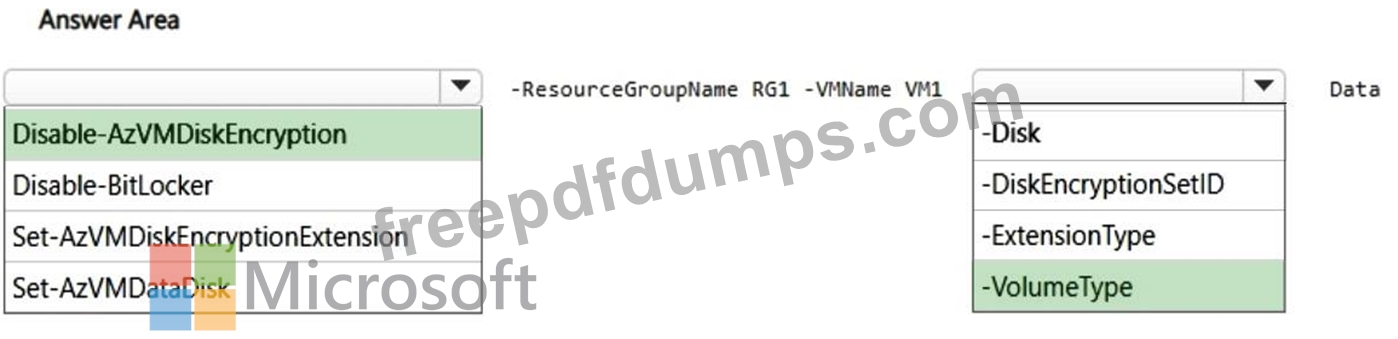
You have an Azure virtual machine named VM1 that runs Windows Server. The disks on VM1 are protected by using Azure Disk Encryption.
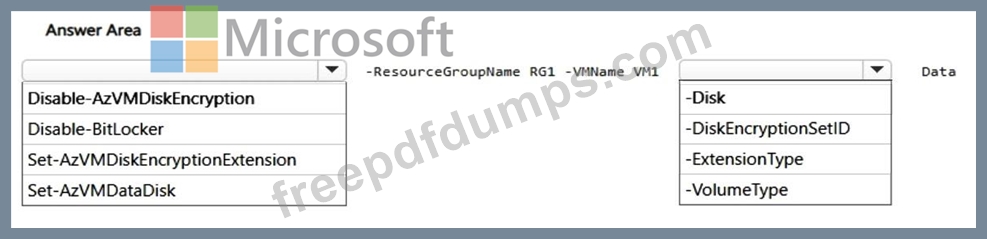
You need to use PowerShell to disable disk encryption on the data disks attached to VM1.
How should you complete the command? To answer, select the appropriate options in the answer area.
NOTE: Each correct selection is worth one point.
You have an Azure virtual machine named VM1 that runs Windows Server. The disks on VM1 are protected by using Azure Disk Encryption.
You need to use PowerShell to disable disk encryption on the data disks attached to VM1.
How should you complete the command? To answer, select the appropriate options in the answer area.
NOTE: Each correct selection is worth one point.