

MD-100 Exam Question 21
You have a computer that runs Windows 10 and is joined to Azure Active Directory (Azure AD).
You attempt to open Control Panel and receive the error message shown on the following exhibit.
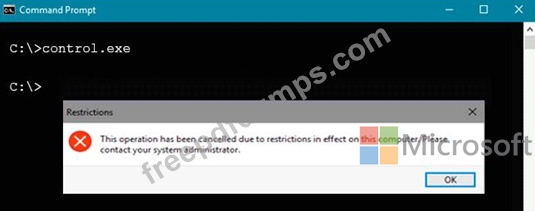
You need to be able to access Control Panel.
What should you modify?
You attempt to open Control Panel and receive the error message shown on the following exhibit.
You need to be able to access Control Panel.
What should you modify?
MD-100 Exam Question 22
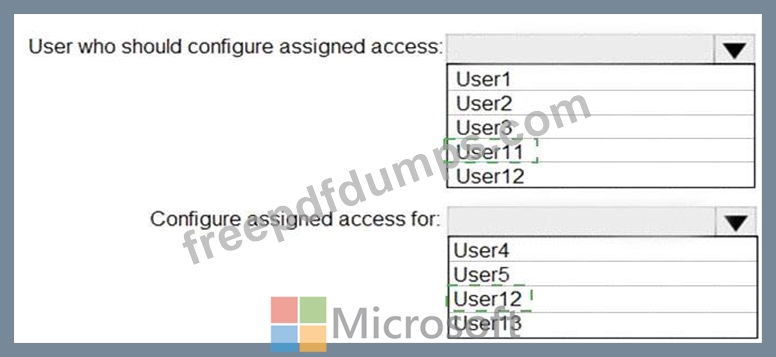
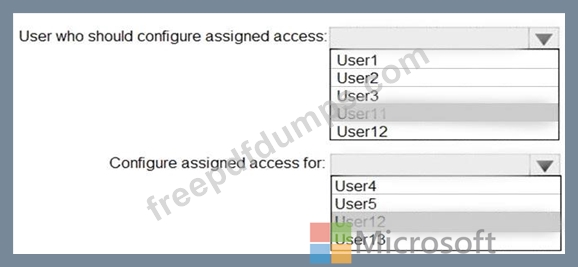
You need to meet the technical requirement for Computer1.
What should you do? To answer, select the appropriate options in the answer area.
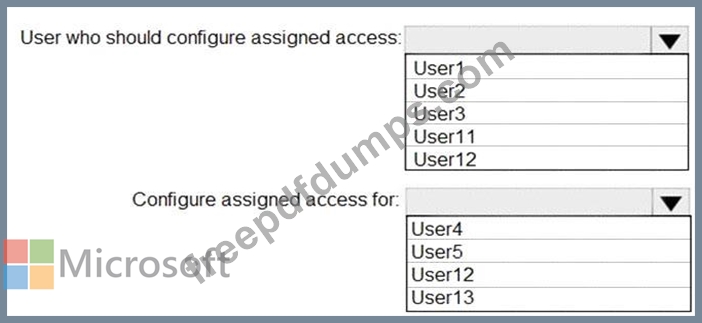
What should you do? To answer, select the appropriate options in the answer area.
MD-100 Exam Question 23
Note: This question is part of a series of questions that present the same scenario. Each question in the series contains a unique solution that might meet the stated goals. Some question sets might have more than one correct solution, while others might not have a correct solution.
After you answer a question in this section, you will NOT be able to return to it. As a result, these questions will not appear in the review screen.
You have a computer that runs Windows 10. The computer contains a folder named D:\Scripts. D:\Scripts contains several PowerShell scripts.
You need to ensure that you can run the PowerShell scripts without specifying the full path to the scripts. The solution must persist between PowerShell sessions.
Solution: At a command prompt, you run set.exe path=d:\scripts.
Does this meet the goal?
After you answer a question in this section, you will NOT be able to return to it. As a result, these questions will not appear in the review screen.
You have a computer that runs Windows 10. The computer contains a folder named D:\Scripts. D:\Scripts contains several PowerShell scripts.
You need to ensure that you can run the PowerShell scripts without specifying the full path to the scripts. The solution must persist between PowerShell sessions.
Solution: At a command prompt, you run set.exe path=d:\scripts.
Does this meet the goal?
MD-100 Exam Question 24
You have three computers that run Windows 10 as shown in the following table.

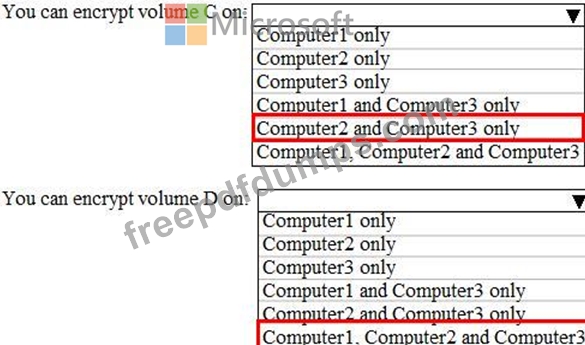
All the computers have C and D volumes. The Require additional authentication at startup Group Policy settings is disabled on all the computers.
Which volumes can you encrypt by using BitLocker Drive Encryption (BitLocker)? To answer, select the appropriate options in the answer area.
NOTE: Each correct selection is worth one point.
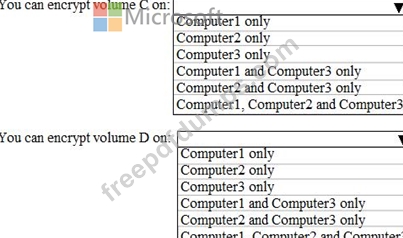
All the computers have C and D volumes. The Require additional authentication at startup Group Policy settings is disabled on all the computers.
Which volumes can you encrypt by using BitLocker Drive Encryption (BitLocker)? To answer, select the appropriate options in the answer area.
NOTE: Each correct selection is worth one point.
MD-100 Exam Question 25
Note: This question is part of a series of questions that present the same scenario. Each question in the series contains a unique solution that might meet the stated goals. Some question sets might have more than one correct solution, while others might not have a correct solution.
After you answer a question in this section, you will NOT be able to return to it. As a result, these questions will not appear in the review screen.
A user named User2 has a computer named Computer2 that runs Windows 10. User2 joins Computer2 to contoso.com by using [email protected].
Computer1 contains a folder named Folder1. Folder1 is in drive C and is shared as Share1. Share1 has the permission shown in the following table.

A user named User2 has a computer named Computer2 that runs Windows 10. User2 joins Computer2 to contoso.com by using [email protected].
User2 attempts to access Share1 and receives the following error message: "The username or password is incorrect." You need to ensure that User2 can connect to Share1.
Solution: You create a local user account on Computer1 and instruct User2 to use the local account to connect to Share1.
Does this meet the goal?
After you answer a question in this section, you will NOT be able to return to it. As a result, these questions will not appear in the review screen.
A user named User2 has a computer named Computer2 that runs Windows 10. User2 joins Computer2 to contoso.com by using [email protected].
Computer1 contains a folder named Folder1. Folder1 is in drive C and is shared as Share1. Share1 has the permission shown in the following table.
A user named User2 has a computer named Computer2 that runs Windows 10. User2 joins Computer2 to contoso.com by using [email protected].
User2 attempts to access Share1 and receives the following error message: "The username or password is incorrect." You need to ensure that User2 can connect to Share1.
Solution: You create a local user account on Computer1 and instruct User2 to use the local account to connect to Share1.
Does this meet the goal?