

MD-100 Exam Question 26
You plan to deploy Windows 10 Enterprise to company-owned devices.
You capture a Windows 10 image file from a reference device.
You need to generate catalog files and answer files for the deployment.
What should you use for each file? To answer, select the appropriate options in the answer area.
NOTE: Each correct selection is worth one point.

You capture a Windows 10 image file from a reference device.
You need to generate catalog files and answer files for the deployment.
What should you use for each file? To answer, select the appropriate options in the answer area.
NOTE: Each correct selection is worth one point.


MD-100 Exam Question 27
You need to meet the technical requirements for the helpdesk users.
What should you do? To answer, select the appropriate options in the answer area.
NOTE: Each correct selection is worth one point.

What should you do? To answer, select the appropriate options in the answer area.
NOTE: Each correct selection is worth one point.


MD-100 Exam Question 28
Your network contains an Active Directory domain named adatum.com, a workgroup, and computers that run Windows 10. The computers are configured as shown in the following table.

The local Administrator accounts on Computer1, Computer2, and Computer3 have the same user name and password.
On Computer1, Windows Defender Firewall is configured as shown in the following exhibit.

The services on Computer1 have the following states.

For each of the following statements, select Yes if the statement is true. Otherwise, select No.
NOTE: Each correct selection is worth one point.

The local Administrator accounts on Computer1, Computer2, and Computer3 have the same user name and password.
On Computer1, Windows Defender Firewall is configured as shown in the following exhibit.
The services on Computer1 have the following states.
For each of the following statements, select Yes if the statement is true. Otherwise, select No.
NOTE: Each correct selection is worth one point.


MD-100 Exam Question 29
Note: This question is part of a series of questions that present the same scenario. Each question in the series contains a unique solution that might meet the stated goals. Some question sets might have more than one correct solution, while others might not have a correct solution.
After you answer a question in this section, you will NOT be able to return to it. As a result, these questions will not appear in the review screen.
You have a computer named Computer1 that runs Windows10.
A service named Application1 is configured as shown in the exhibit.

You discover that a user used the Service1 account to sign in to Computer1 and deleted some files.
You need to ensure that the identity used by Application1 cannot be used by a user to sign in to sign in to the desktop on Computer1. The solution must use the principle of least privilege.
Solution: On Computer1, you configure Application1 to sign in as the LocalSystem account and select the Allow service to interact with desktop check box. You delete the Service1 account.
Does this meet the goal?
After you answer a question in this section, you will NOT be able to return to it. As a result, these questions will not appear in the review screen.
You have a computer named Computer1 that runs Windows10.
A service named Application1 is configured as shown in the exhibit.
You discover that a user used the Service1 account to sign in to Computer1 and deleted some files.
You need to ensure that the identity used by Application1 cannot be used by a user to sign in to sign in to the desktop on Computer1. The solution must use the principle of least privilege.
Solution: On Computer1, you configure Application1 to sign in as the LocalSystem account and select the Allow service to interact with desktop check box. You delete the Service1 account.
Does this meet the goal?
MD-100 Exam Question 30
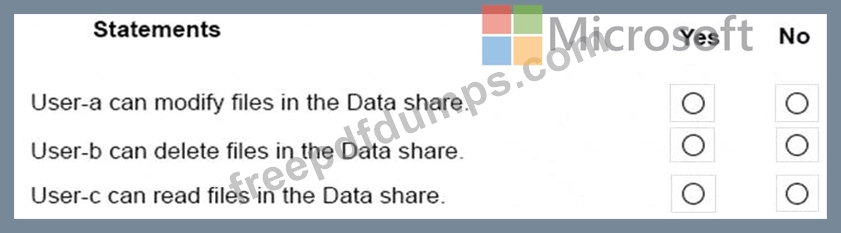
You have a computer named Computer5 that runs Windows 10 that is used to share documents in a workgroup.
You create three users named User-a, User-b, User-c. The users plan to access Computer5 from the network only.
You have a folder named Data. The Advanced Security Settings for the Data folder are shown in the Security exhibit. (Click the Security Exhibit tab).

You share the Data folder. The permission for User-a are shown in the User-a exhibit (Click the User-a tab.)

The permissions for user-b are shown in the User-b exhibit. (Click the User-b tab.)

The permissions for user-c are shown in the User-c exhibit. (Click the tab.)

For each of the following statements, select Yes if the statements is true. Otherwise, select No.
NOTE: Reach correct selection is worth one point.
You create three users named User-a, User-b, User-c. The users plan to access Computer5 from the network only.
You have a folder named Data. The Advanced Security Settings for the Data folder are shown in the Security exhibit. (Click the Security Exhibit tab).
You share the Data folder. The permission for User-a are shown in the User-a exhibit (Click the User-a tab.)
The permissions for user-b are shown in the User-b exhibit. (Click the User-b tab.)
The permissions for user-c are shown in the User-c exhibit. (Click the tab.)
For each of the following statements, select Yes if the statements is true. Otherwise, select No.
NOTE: Reach correct selection is worth one point.
