

MS-100 Exam Question 201
Please wait while the virtual machine loads. Once loaded, you may proceed to the lab section. This may take a few minutes, and the wait time will not be deducted from your overall test time.
When the Next button is available, click it to access the lab section. In this section, you will perform a set of tasks in a live environment. While most functionality will be available to you as it would be in a live environment, some functionality (e.g., copy and paste, ability to navigate to external websites) will not be possible by design.
Scoring is based on the outcome of performing the tasks stated in the lab. In other words, it doesn't matter how you accomplish the task, if you successfully perform it, you will earn credit for that task.
Labs are not timed separately, and this exam may have more than one lab that you must complete. You can use as much time as you would like to complete each lab. But, you should manage your time appropriately to ensure that you are able to complete the lab(s) and all other sections of the exam in the time provided.
Please note that once you submit your work by clicking the Next button within a lab, you will NOT be able to return to the lab.
You may now click next to proceed to the lab.
Lab information
Use the following login credentials as needed:
To enter your username, place your cursor in the Sign in box and click on the username below.
To enter your password, place your cursor in the Enter password box and click on the password below.
Microsoft 365 Username: [email protected]
Microsoft 365 Password: m3t^We$Z7&xy
If the Microsoft 365 portal does not load successfully in the browser, press CTRL-K to reload the portal in a new browser tab.
The following information is for technical support purposes only:
Lab Instance: 11440873

You need to ensure that all the users in your organization are prompted to change their password every 60 days. The solution must ensure that the users are reminded that their password must be changed 10 days before the required change.
To answer, sign in to the Microsoft 365 portal.
When the Next button is available, click it to access the lab section. In this section, you will perform a set of tasks in a live environment. While most functionality will be available to you as it would be in a live environment, some functionality (e.g., copy and paste, ability to navigate to external websites) will not be possible by design.
Scoring is based on the outcome of performing the tasks stated in the lab. In other words, it doesn't matter how you accomplish the task, if you successfully perform it, you will earn credit for that task.
Labs are not timed separately, and this exam may have more than one lab that you must complete. You can use as much time as you would like to complete each lab. But, you should manage your time appropriately to ensure that you are able to complete the lab(s) and all other sections of the exam in the time provided.
Please note that once you submit your work by clicking the Next button within a lab, you will NOT be able to return to the lab.
You may now click next to proceed to the lab.
Lab information
Use the following login credentials as needed:
To enter your username, place your cursor in the Sign in box and click on the username below.
To enter your password, place your cursor in the Enter password box and click on the password below.
Microsoft 365 Username: [email protected]
Microsoft 365 Password: m3t^We$Z7&xy
If the Microsoft 365 portal does not load successfully in the browser, press CTRL-K to reload the portal in a new browser tab.
The following information is for technical support purposes only:
Lab Instance: 11440873
You need to ensure that all the users in your organization are prompted to change their password every 60 days. The solution must ensure that the users are reminded that their password must be changed 10 days before the required change.
To answer, sign in to the Microsoft 365 portal.
MS-100 Exam Question 202
You create a Microsoft 365 subscription.
You plan to deploy Microsoft Office 365 ProPlus applications to all the client computers at your company.
You prepare the following XML file for the planned deployment.

Use the drop-down menus to select the answer choice that completes each statement based on the information presented in the graphic.
NOTE: Each correct selection is worth one point.

You plan to deploy Microsoft Office 365 ProPlus applications to all the client computers at your company.
You prepare the following XML file for the planned deployment.
Use the drop-down menus to select the answer choice that completes each statement based on the information presented in the graphic.
NOTE: Each correct selection is worth one point.

MS-100 Exam Question 203
Your company has a Microsoft 365 subscription.
You need to identify which users performed the following privileged administration tasks:
Deleted a folder from the second-stage Recycle Bin if Microsoft SharePoint Opened a mailbox of which the user was not the owner Reset a user password What should you use?
You need to identify which users performed the following privileged administration tasks:
Deleted a folder from the second-stage Recycle Bin if Microsoft SharePoint Opened a mailbox of which the user was not the owner Reset a user password What should you use?
MS-100 Exam Question 204
You company has a Microsoft Azure Active Directory (Azure AD) tenant that contains the users shown in the following table.

The tenant includes a security group named Admin1. Admin1 will be used to manage administrative accounts.
You need to identify which users can perform the following administrative tasks:
Create guest user accounts.
Add User3 to Admin1.
Which users should you identify for each task? To answer, select the appropriate options in the answer area.
NOTE: Each correct selection is worth one point.

The tenant includes a security group named Admin1. Admin1 will be used to manage administrative accounts.
You need to identify which users can perform the following administrative tasks:
Create guest user accounts.
Add User3 to Admin1.
Which users should you identify for each task? To answer, select the appropriate options in the answer area.
NOTE: Each correct selection is worth one point.

MS-100 Exam Question 205
You have a Microsoft 365 subscription.
You have the devices shown in the following table.
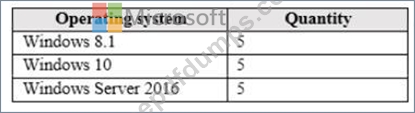
You need to onboard the devices to Windows Defender Advanced Threat Protection (ATP). The solution must avoid installing software on the devices whenever possible.
Which onboarding method should you use for each operating system? To answer, drag the appropriate methods to the correct operating systems. Each method may be used once, more than once, or not at all. You may need to drag the split bar between panes or scroll to view content.
NOTE: Each correct selection is worth one point.

You have the devices shown in the following table.
You need to onboard the devices to Windows Defender Advanced Threat Protection (ATP). The solution must avoid installing software on the devices whenever possible.
Which onboarding method should you use for each operating system? To answer, drag the appropriate methods to the correct operating systems. Each method may be used once, more than once, or not at all. You may need to drag the split bar between panes or scroll to view content.
NOTE: Each correct selection is worth one point.

