MS-100 Exam Question 36
Your company has three main offices and one branch office. The branch office is used for research.
The company plans to implement a Microsoft 365 tenant and to deploy multi-factor authentication.
You need to recommend a Microsoft 365 solution to ensure that multi-factor authentication is enforced only for users in the branch office What should you include in the recommendation?
The company plans to implement a Microsoft 365 tenant and to deploy multi-factor authentication.
You need to recommend a Microsoft 365 solution to ensure that multi-factor authentication is enforced only for users in the branch office What should you include in the recommendation?
MS-100 Exam Question 37
Please wait while the virtual machine loads. Once loaded, you may proceed to the lab section. This may take a few minutes, and the wait time will not be deducted from your overall test time.
When the Next button is available, click it to access the lab section. In this section, you will perform a set of tasks in a live environment. While most functionality will be available to you as it would be in a live environment, some functionality (e.g., copy and paste, ability to navigate to external websites) will not be possible by design.
Scoring is based on the outcome of performing the tasks stated in the lab. In other words, it doesn't matter how you accomplish the task, if you successfully perform it, you will earn credit for that task.
Labs are not timed separately, and this exam may have more than one lab that you must complete. You can use as much time as you would like to complete each lab. But, you should manage your time appropriately to ensure that you are able to complete the lab(s) and all other sections of the exam in the time provided.
Please note that once you submit your work by clicking the Next button within a lab, you will NOT be able to return to the lab.
You may now click next to proceed to the lab.
Lab information
Use the following login credentials as needed:
To enter your username, place your cursor in the Sign in box and click on the username below.
To enter your password, place your cursor in the Enter password box and click on the password below.
Microsoft 365 Username:
[email protected]
Microsoft 365 Password: oL9z0=?Nq@ox
If the Microsoft 365 portal does not load successfully in the browser, press CTRL-K to reload the portal in a new browser tab.
The following information is for technical support purposes only:
Lab Instance: 11098651

You recently discovered that several users in your organization have permissions on the mailbox of another user in the organization.
You need to ensure that Lee Gu receives a notification when a user is granted permissions on another user's mailbox.
To answer the question, sign in to the Microsoft 365 portal.
When the Next button is available, click it to access the lab section. In this section, you will perform a set of tasks in a live environment. While most functionality will be available to you as it would be in a live environment, some functionality (e.g., copy and paste, ability to navigate to external websites) will not be possible by design.
Scoring is based on the outcome of performing the tasks stated in the lab. In other words, it doesn't matter how you accomplish the task, if you successfully perform it, you will earn credit for that task.
Labs are not timed separately, and this exam may have more than one lab that you must complete. You can use as much time as you would like to complete each lab. But, you should manage your time appropriately to ensure that you are able to complete the lab(s) and all other sections of the exam in the time provided.
Please note that once you submit your work by clicking the Next button within a lab, you will NOT be able to return to the lab.
You may now click next to proceed to the lab.
Lab information
Use the following login credentials as needed:
To enter your username, place your cursor in the Sign in box and click on the username below.
To enter your password, place your cursor in the Enter password box and click on the password below.
Microsoft 365 Username:
[email protected]
Microsoft 365 Password: oL9z0=?Nq@ox
If the Microsoft 365 portal does not load successfully in the browser, press CTRL-K to reload the portal in a new browser tab.
The following information is for technical support purposes only:
Lab Instance: 11098651
You recently discovered that several users in your organization have permissions on the mailbox of another user in the organization.
You need to ensure that Lee Gu receives a notification when a user is granted permissions on another user's mailbox.
To answer the question, sign in to the Microsoft 365 portal.


MS-100 Exam Question 38
You have a Microsoft Azure Active Directory (Azure AD) tenant named contoso.onmicrosoft.com.
An external user has a Microsoft account that uses an email address of [email protected].
An administrator named Admin1 attempts to create a user account for the external user and receives the error message shown in the following exhibit.

You need to ensure that Admin1 can add the user.
What should you do from the Azure Active Directory admin center?
An external user has a Microsoft account that uses an email address of [email protected].
An administrator named Admin1 attempts to create a user account for the external user and receives the error message shown in the following exhibit.
You need to ensure that Admin1 can add the user.
What should you do from the Azure Active Directory admin center?
MS-100 Exam Question 39
You are creating a report that will query Azure Active Directory (Azure AD) for group information by using the Microsoft Graph API. You need to retrieve an ordered list of groups by title. The solution must minimize the amount of data returned m the response.
How should you complete the Graph API call? To answer, select the appropriate options in the answer area.
NOTE: Each correct selection is worth one point.

How should you complete the Graph API call? To answer, select the appropriate options in the answer area.
NOTE: Each correct selection is worth one point.

MS-100 Exam Question 40
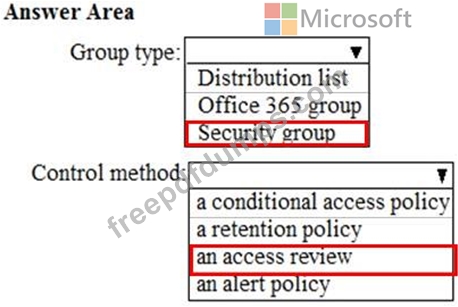
You need to create the UserLicenses group. The solution must meet the security requirements.
Which group type and control method should you use? To answer, select the appropriate options in the answer area.
NOTE: Each correct selection is worth one point.
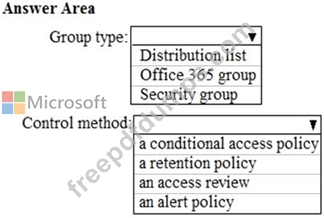
Which group type and control method should you use? To answer, select the appropriate options in the answer area.
NOTE: Each correct selection is worth one point.