

MS-100 Exam Question 136
Your company has a Microsoft Azure Active Directory (Azure AD) tenant named contoso.com that includes the users shown in the following table.

Group2 is a member of Group1.
You assign a Microsoft Office 365 Enterprise E3 license to User2 as shown in the following exhibit.

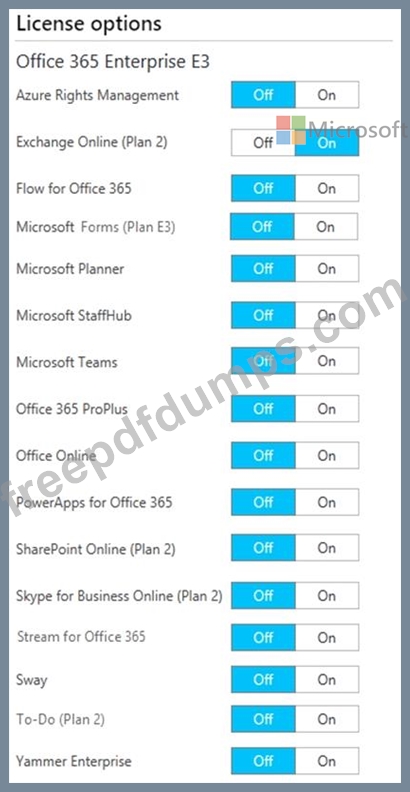
You assign Office 365 Enterprise E3 licenses to Group1 as shown in the following exhibit.
For each of the following statements, select Yes if the statement is true. Otherwise, select No.
NOTE: Each correct selection is worth one point.

Group2 is a member of Group1.
You assign a Microsoft Office 365 Enterprise E3 license to User2 as shown in the following exhibit.
You assign Office 365 Enterprise E3 licenses to Group1 as shown in the following exhibit.
For each of the following statements, select Yes if the statement is true. Otherwise, select No.
NOTE: Each correct selection is worth one point.

MS-100 Exam Question 137
You have a Microsoft 365 E5 subscription.
You have an Azure AD tenant named contoso.com that contains the following users:
* Admin 1
* Admin2
* User1
Contoso.com contains an administrative unit named AU1 that has no role assignments. User1 is a member of AU1.
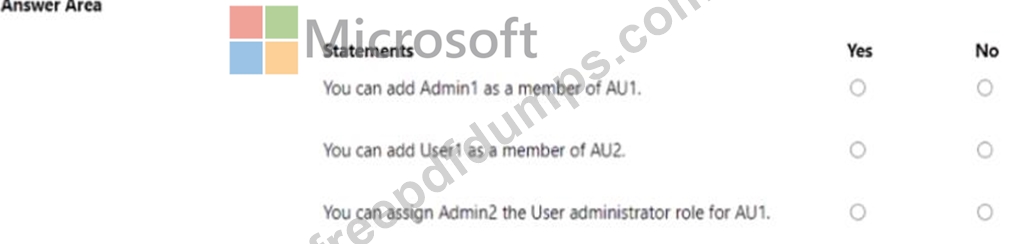
You have an Azure AD tenant named contoso.com that contains the following users:
* Admin 1
* Admin2
* User1
Contoso.com contains an administrative unit named AU1 that has no role assignments. User1 is a member of AU1.

MS-100 Exam Question 138
You are developing a Microsoft Teams tab that will capture coordinates from mobile devices and send notifications to users.
The relevant portion of the app manifest is shown in the App Manifest exhibit (Click the App Manifest tab.) The relevant portion of the JavaScript code for the tab is shown in the JavaScript exhibit (Click the JavaScript tab) While testing the tab. a user receives the message shown in the Message exhibit (Click the Message tab.) For each of the following statements, select Yes if the statement is true. Otherwise, select No.
NOTE; Each correct selection is worth one point.

The relevant portion of the app manifest is shown in the App Manifest exhibit (Click the App Manifest tab.) The relevant portion of the JavaScript code for the tab is shown in the JavaScript exhibit (Click the JavaScript tab) While testing the tab. a user receives the message shown in the Message exhibit (Click the Message tab.) For each of the following statements, select Yes if the statement is true. Otherwise, select No.
NOTE; Each correct selection is worth one point.

MS-100 Exam Question 139
You need to meet the security requirement for the vendors.
What should you do?
What should you do?
MS-100 Exam Question 140
Note: This question is part of a series of questions that present the same scenario. Each question in the series contains a unique solution that might meet the stated goals. Some question sets might have more than one correct solution, while others might not have a correct solution.
After you answer a question in this section, you will NOT be able to return to it. As a result, these questions will not appear in the review screen.
Your network contains an Active Directory domain named contoso.com that is synced to Microsoft Azure Active Directory (Azure AD).
You manage Windows 10 devices by using Microsoft System Center Configuration Manager (Current Branch).
You configure a pilot for co-management.
You add a new device named Device1 to the domain. You install the Configuration Manager client on Device1.
You need to ensure that you can manage Device1 by using Microsoft Intune and Configuration Manager.
Solution: You create a device configuration profile from the Intune admin center.
Does this meet the goal?
After you answer a question in this section, you will NOT be able to return to it. As a result, these questions will not appear in the review screen.
Your network contains an Active Directory domain named contoso.com that is synced to Microsoft Azure Active Directory (Azure AD).
You manage Windows 10 devices by using Microsoft System Center Configuration Manager (Current Branch).
You configure a pilot for co-management.
You add a new device named Device1 to the domain. You install the Configuration Manager client on Device1.
You need to ensure that you can manage Device1 by using Microsoft Intune and Configuration Manager.
Solution: You create a device configuration profile from the Intune admin center.
Does this meet the goal?