

MS-102 Exam Question 26
You have a Microsoft 365 E5 subscription. You need to create a mail-enabled contact. Which portal should you use?
MS-102 Exam Question 27
You have a Microsoft 365 subscription that contains the users shown in the following table.

You plan to use Exchange Online to manage email for a DNS domain.
An administrator adds the DNS domain to the subscription.
The DNS domain has a status of Incomplete setup.
You need to identify which user can complete the setup of the DNS domain. The solution must use the principle of least privilege.
Which user should you identify?
MS-102 Exam Question 28
You have a Microsoft 365 E5 subscription that uses Microsoft Defender for Endpoint.
When users attempt to access the portal of a partner company, they receive the message shown in the following exhibit.

You need to enable user access to the partner company ' s portal.
Which Microsoft Defender for Endpoint setting should you modify?
When users attempt to access the portal of a partner company, they receive the message shown in the following exhibit.
You need to enable user access to the partner company ' s portal.
Which Microsoft Defender for Endpoint setting should you modify?

MS-102 Exam Question 29
You have a Microsoft 365 E5 subscription and use Microsoft Defender for Cloud Apps. The subscription contains users that have Windows 11 devices.
You need to use the Cloud Discovery snapshot report to analyze cloud app usage on the devices. What should you do before generating a report?
You need to use the Cloud Discovery snapshot report to analyze cloud app usage on the devices. What should you do before generating a report?
MS-102 Exam Question 30
You have a Microsoft 365 E5 subscription that uses Microsoft Defender for Endpoint and contains the devices shown in the following table.
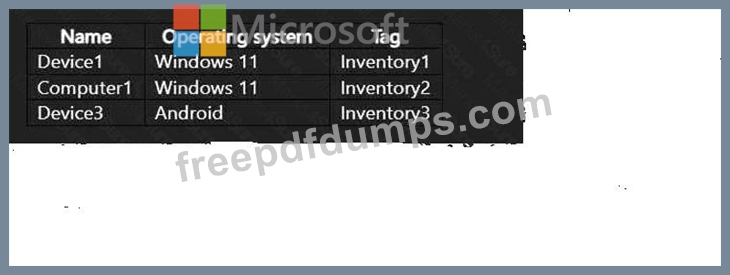
Defender for Endpoint has the device groups shown in the following table.

You create an incident email notification rule configured as shown in the following table.
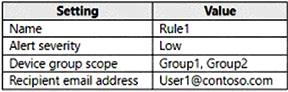
For each of the following statements, select Yes if the statement is true. Otherwise, select No.
NOTE: Each correct selection is worth one point.

Defender for Endpoint has the device groups shown in the following table.
You create an incident email notification rule configured as shown in the following table.
For each of the following statements, select Yes if the statement is true. Otherwise, select No.
NOTE: Each correct selection is worth one point.

