

MS-203 Exam Question 21
You have a Microsoft Exchange Online tenant that contains three users named User1, User2, and User3.
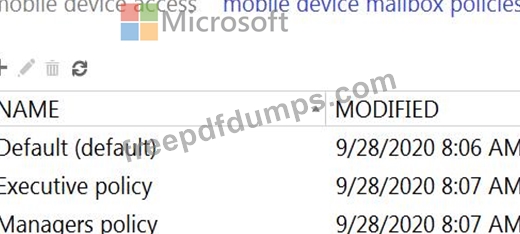
Mobile device mailbox policies are configured as shown in the following exhibit.
The users are configured as shown in the following table.

You create a new mobile device mailbox policy as shown in the following exhibit.

For each of the following statements, select Yes if the statement is true. Otherwise, select No.
NOTE: Each correct selection is worth one point.

Mobile device mailbox policies are configured as shown in the following exhibit.
The users are configured as shown in the following table.
You create a new mobile device mailbox policy as shown in the following exhibit.
For each of the following statements, select Yes if the statement is true. Otherwise, select No.
NOTE: Each correct selection is worth one point.

MS-203 Exam Question 22
Note: This question is part of a series of questions that present the same scenario. Each question in the series contains a unique solution that might meet the stated goals. Some question sets might have more than one correct solution, while others might not have a correct solution.
After you answer a question in this section, you will NOT be able to return to it. As a result, these questions will not appear in the review screen.
Your company has a Microsoft Exchange Server 2019 hybrid deployment that contains two Mailbox servers named MBX1 and MBX2.
The company has the departments shown in the following table.

From the on-premises organization, outbound email is sent directly to the Internet by using DNS lookups.
You are informed that some sales department users send email messages that are identified as spam.
You need to automatically block the sales department users from repeatedly sending spam.
Solution: You run the Install-AntispamAgents.psl PowerShell script on the MBX1 Mailbox server.
Does this meet the goal?
After you answer a question in this section, you will NOT be able to return to it. As a result, these questions will not appear in the review screen.
Your company has a Microsoft Exchange Server 2019 hybrid deployment that contains two Mailbox servers named MBX1 and MBX2.
The company has the departments shown in the following table.
From the on-premises organization, outbound email is sent directly to the Internet by using DNS lookups.
You are informed that some sales department users send email messages that are identified as spam.
You need to automatically block the sales department users from repeatedly sending spam.
Solution: You run the Install-AntispamAgents.psl PowerShell script on the MBX1 Mailbox server.
Does this meet the goal?
MS-203 Exam Question 23
Please wait while the virtual machine loads. Once loaded, you may proceed to the lab section. This may take a few minutes, and the wait time will not be deducted from your overall test time.
When the Next button is available, click it to access the lab section. In this section, you will perform a set of tasks in a live environment. While most functionality will be available to you as it would be in a live environment, some functionality (e.g., copy and paste, ability to navigate to external websites) will not be possible by design.
Scoring is based on the outcome of performing the tasks stated in the lab. In other words, it doesn't matter how you accomplish the task, if you successfully perform it, you will earn credit for that task.
Labs are not timed separately, and this exam may have more than one lab that you must complete. You can use as much time as you would like to complete each lab. But, you should manage your time appropriately to ensure that you are able to complete the lab(s) and all other sections of the exam in the time provided.
Please note that once you submit your work by clicking the Next button within a lab, you will NOT be able to return to the lab.
Use the following login credentials as needed:
To enter your username, place your cursor in the Sign in box and click on the username below.
To enter your password, place your cursor in the Enter password box and click on the password below.
Microsoft 365 Username: [email protected]
Microsoft 365 Password: xxxxxx
If the Microsoft 365 portal does not load successfully in the browser, press CTRL-K to reload the portal in a new browser tab.
The following information is for technical support purposes only.
Lab Instance: XXXXXX
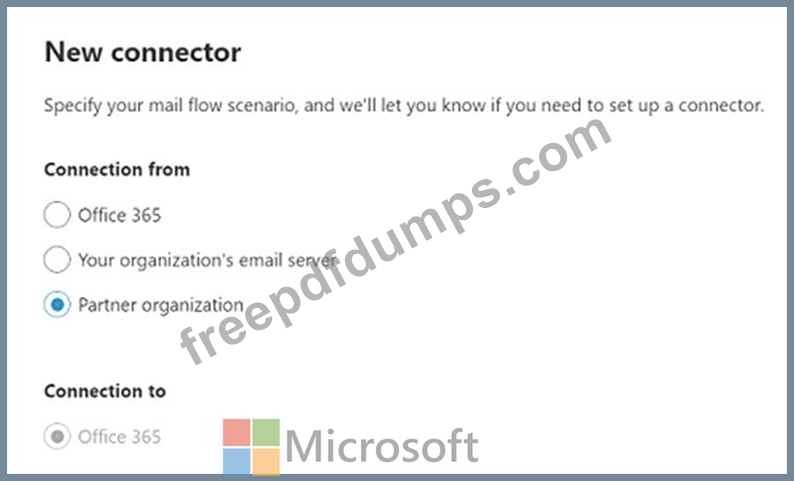
You need to ensure that all email messages received from an organization named contoso.com are encrypted by using TLS.
To complete this task, sign in to the Microsoft 365 admin center.
When the Next button is available, click it to access the lab section. In this section, you will perform a set of tasks in a live environment. While most functionality will be available to you as it would be in a live environment, some functionality (e.g., copy and paste, ability to navigate to external websites) will not be possible by design.
Scoring is based on the outcome of performing the tasks stated in the lab. In other words, it doesn't matter how you accomplish the task, if you successfully perform it, you will earn credit for that task.
Labs are not timed separately, and this exam may have more than one lab that you must complete. You can use as much time as you would like to complete each lab. But, you should manage your time appropriately to ensure that you are able to complete the lab(s) and all other sections of the exam in the time provided.
Please note that once you submit your work by clicking the Next button within a lab, you will NOT be able to return to the lab.
Use the following login credentials as needed:
To enter your username, place your cursor in the Sign in box and click on the username below.
To enter your password, place your cursor in the Enter password box and click on the password below.
Microsoft 365 Username: [email protected]
Microsoft 365 Password: xxxxxx
If the Microsoft 365 portal does not load successfully in the browser, press CTRL-K to reload the portal in a new browser tab.
The following information is for technical support purposes only.
Lab Instance: XXXXXX
You need to ensure that all email messages received from an organization named contoso.com are encrypted by using TLS.
To complete this task, sign in to the Microsoft 365 admin center.

MS-203 Exam Question 24
You have a Microsoft Exchange Server 2019 organization.
You purchase a Microsoft Office 365 E5 subscription.
You plan to implement Exchange Modern Hybrid and free/busy sharing.
Which two components should you configure for the planned implementations? Each correct answer presents part of the solution.
NOTE: Each correct selection is worth one point.
You purchase a Microsoft Office 365 E5 subscription.
You plan to implement Exchange Modern Hybrid and free/busy sharing.
Which two components should you configure for the planned implementations? Each correct answer presents part of the solution.
NOTE: Each correct selection is worth one point.
MS-203 Exam Question 25
Please wait while the virtual machine loads. Once loaded, you may proceed to the lab section. This may take a few minutes, and the wait time will not be deducted from your overall test time.
When the Next button is available, click it to access the lab section. In this section, you will perform a set of tasks in a live environment. While most functionality will be available to you as it would be in a live environment, some functionality (e.g., copy and paste, ability to navigate to external websites) will not be possible by design.
Scoring is based on the outcome of performing the tasks stated in the lab. In other words, it doesn't matter how you accomplish the task, if you successfully perform it, you will earn credit for that task.
Labs are not timed separately, and this exam may have more than one lab that you must complete. You can use as much time as you would like to complete each lab. But, you should manage your time appropriately to ensure that you are able to complete the lab(s) and all other sections of the exam in the time provided.
Please note that once you submit your work by clicking the Next button within a lab, you will NOT be able to return to the lab.

Use the following login credentials as needed:
To enter your username, place your cursor in the Sign in box and click on the username below.
To enter your password, place your cursor in the Enter password box and click on the password below.
Microsoft 365 Username: [email protected]
Microsoft 365 Password: xxxxxx
If the Microsoft 365 portal does not load successfully in the browser, press CTRL-K to reload the portal in a new browser tab.
The following information is for technical support purposes only.
Lab Instance: XXXXXX
You need to reduce the likelihood that malicious links contained in emails received by mailboxes in @lab.CloudCredential(1).TenantName are opened.
To complete this task, sign in to the Exchange admin center.
When the Next button is available, click it to access the lab section. In this section, you will perform a set of tasks in a live environment. While most functionality will be available to you as it would be in a live environment, some functionality (e.g., copy and paste, ability to navigate to external websites) will not be possible by design.
Scoring is based on the outcome of performing the tasks stated in the lab. In other words, it doesn't matter how you accomplish the task, if you successfully perform it, you will earn credit for that task.
Labs are not timed separately, and this exam may have more than one lab that you must complete. You can use as much time as you would like to complete each lab. But, you should manage your time appropriately to ensure that you are able to complete the lab(s) and all other sections of the exam in the time provided.
Please note that once you submit your work by clicking the Next button within a lab, you will NOT be able to return to the lab.
Use the following login credentials as needed:
To enter your username, place your cursor in the Sign in box and click on the username below.
To enter your password, place your cursor in the Enter password box and click on the password below.
Microsoft 365 Username: [email protected]
Microsoft 365 Password: xxxxxx
If the Microsoft 365 portal does not load successfully in the browser, press CTRL-K to reload the portal in a new browser tab.
The following information is for technical support purposes only.
Lab Instance: XXXXXX
You need to reduce the likelihood that malicious links contained in emails received by mailboxes in @lab.CloudCredential(1).TenantName are opened.
To complete this task, sign in to the Exchange admin center.