

MS-203 Exam Question 41
Please wait while the virtual machine loads. Once loaded, you may proceed to the lab section. This may take a few minutes, and the wait time will not be deducted from your overall test time.
When the Next button is available, click it to access the lab section. In this section, you will perform a set of tasks in a live environment. While most functionality will be available to you as it would be in a live environment, some functionality (e.g., copy and paste, ability to navigate to external websites) will not be possible by design.
Scoring is based on the outcome of performing the tasks stated in the lab. In other words, it doesn't matter how you accomplish the task, if you successfully perform it, you will earn credit for that task.
Labs are not timed separately, and this exam may have more than one lab that you must complete. You can use as much time as you would like to complete each lab. But, you should manage your time appropriately to ensure that you are able to complete the lab(s) and all other sections of the exam in the time provided.
Please note that once you submit your work by clicking the Next button within a lab, you will NOT be able to return to the lab.
Use the following login credentials as needed:
To enter your username, place your cursor in the Sign in box and click on the username below.
To enter your password, place your cursor in the Enter password box and click on the password below.
Microsoft 365 Username: [email protected]
Microsoft 365 Password: xxxxxx
If the Microsoft 365 portal does not load successfully in the browser, press CTRL-K to reload the portal in a new browser tab.
The following information is for technical support purposes only.
Lab Instance: XXXXXX
You need to ensure that the users in your company can schedule a conference room named Room1 in the company's office by using Microsoft Outlook.
To complete this task, sign in to the Exchange admin center.
When the Next button is available, click it to access the lab section. In this section, you will perform a set of tasks in a live environment. While most functionality will be available to you as it would be in a live environment, some functionality (e.g., copy and paste, ability to navigate to external websites) will not be possible by design.
Scoring is based on the outcome of performing the tasks stated in the lab. In other words, it doesn't matter how you accomplish the task, if you successfully perform it, you will earn credit for that task.
Labs are not timed separately, and this exam may have more than one lab that you must complete. You can use as much time as you would like to complete each lab. But, you should manage your time appropriately to ensure that you are able to complete the lab(s) and all other sections of the exam in the time provided.
Please note that once you submit your work by clicking the Next button within a lab, you will NOT be able to return to the lab.
Use the following login credentials as needed:
To enter your username, place your cursor in the Sign in box and click on the username below.
To enter your password, place your cursor in the Enter password box and click on the password below.
Microsoft 365 Username: [email protected]
Microsoft 365 Password: xxxxxx
If the Microsoft 365 portal does not load successfully in the browser, press CTRL-K to reload the portal in a new browser tab.
The following information is for technical support purposes only.
Lab Instance: XXXXXX
You need to ensure that the users in your company can schedule a conference room named Room1 in the company's office by using Microsoft Outlook.
To complete this task, sign in to the Exchange admin center.
MS-203 Exam Question 42
You have a Microsoft Exchange Server 2019 hybrid deployment.
You have the on-premises mailboxes shown in the following table.

You add the mailbox permissions shown in the following table.

You plan to migrate the mailboxes to Exchange Online by using remote mailbox move requests. The mailboxes will be migrated according to the schedule shown in the following table.

Mailboxes migrated the same week will have their mailbox move requests included in the same batch and will be cut over simultaneously.
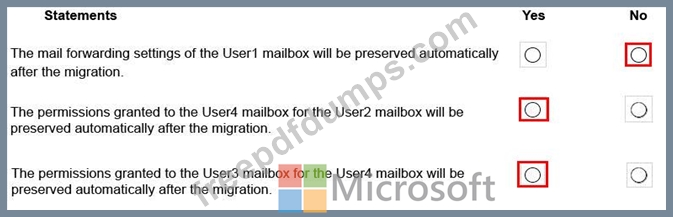
For each of the following statements, select Yes if the statement is true. Otherwise, select No.
NOTE: Each correct selection is worth one point.

You have the on-premises mailboxes shown in the following table.
You add the mailbox permissions shown in the following table.
You plan to migrate the mailboxes to Exchange Online by using remote mailbox move requests. The mailboxes will be migrated according to the schedule shown in the following table.
Mailboxes migrated the same week will have their mailbox move requests included in the same batch and will be cut over simultaneously.
For each of the following statements, select Yes if the statement is true. Otherwise, select No.
NOTE: Each correct selection is worth one point.
MS-203 Exam Question 43
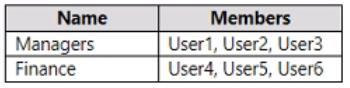
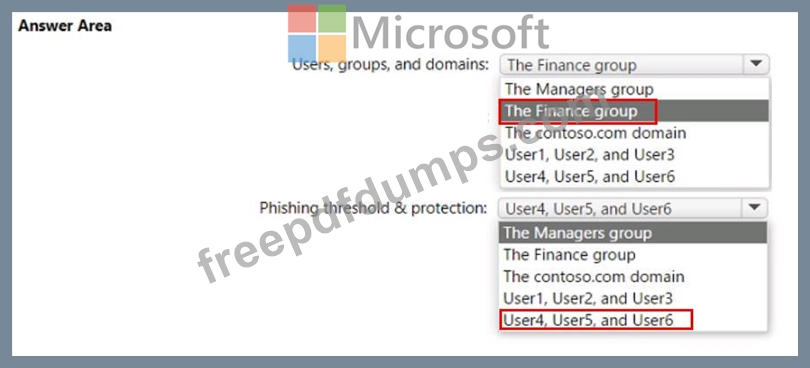
You have a Microsoft 365 subscription that contains the mail-enabled groups shown in the following table.
All users have an email address with a suffix of @contoso.com.
You plan to create an anti-phishing policy named Policy1 to meet the following requirements:
* Apply to all email messages sent to current and future users in the Finance group.
* Prevent email messages from impersonating users in the Managers group.
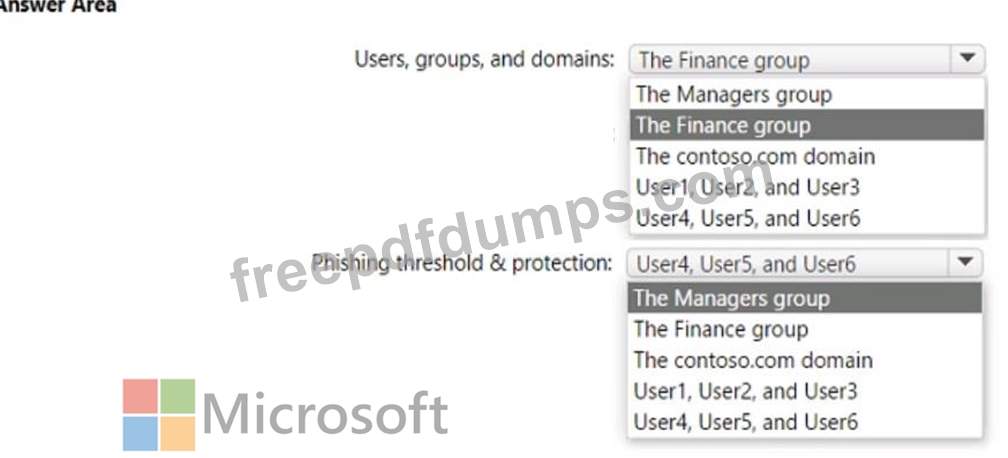
How should you configure Policy1? To answer, select the appropriate options in the answer are a. NOTE: Each correct selection is worth one point.
All users have an email address with a suffix of @contoso.com.
You plan to create an anti-phishing policy named Policy1 to meet the following requirements:
* Apply to all email messages sent to current and future users in the Finance group.
* Prevent email messages from impersonating users in the Managers group.
How should you configure Policy1? To answer, select the appropriate options in the answer are a. NOTE: Each correct selection is worth one point.
MS-203 Exam Question 44
Note: This question is part of a series of questions that present the same scenario. Each question in the series contains a unique solution that might meet the stated goals. Some question sets might have more than one correct solution, while others might not have a correct solution.
After you answer a question in this section, you will NOT be able to return to it. As a result, these questions will not appear in the review screen.
Your company has a Microsoft Exchange Server 2019 hybrid deployment that contains two Mailbox servers named MBX1 and MBX2.
The company has the departments shown in the following table.

From the on-premises organization, outbound email is sent directly to the Internet by using DNS lookups.
You are informed that some sales department users send email messages that are identified as spam.
You need to automatically block the sales department users from repeatedly sending spam.
Solution: You migrate all the mailboxes of the sales department to Exchange Online.
Does this meet the goal?
After you answer a question in this section, you will NOT be able to return to it. As a result, these questions will not appear in the review screen.
Your company has a Microsoft Exchange Server 2019 hybrid deployment that contains two Mailbox servers named MBX1 and MBX2.
The company has the departments shown in the following table.
From the on-premises organization, outbound email is sent directly to the Internet by using DNS lookups.
You are informed that some sales department users send email messages that are identified as spam.
You need to automatically block the sales department users from repeatedly sending spam.
Solution: You migrate all the mailboxes of the sales department to Exchange Online.
Does this meet the goal?
MS-203 Exam Question 45
Please wait while the virtual machine loads. Once loaded, you may proceed to the lab section. This may take a few minutes, and the wait time will not be deducted from your overall test time.
When the Next button is available, click it to access the lab section. In this section, you will perform a set of tasks in a live environment. While most functionality will be available to you as it would be in a live environment, some functionality (e.g., copy and paste, ability to navigate to external websites) will not be possible by design.
Scoring is based on the outcome of performing the tasks stated in the lab. In other words, it doesn't matter how you accomplish the task, if you successfully perform it, you will earn credit for that task.
Labs are not timed separately, and this exam may have more than one lab that you must complete. You can use as much time as you would like to complete each lab. But, you should manage your time appropriately to ensure that you are able to complete the lab(s) and all other sections of the exam in the time provided.
Please note that once you submit your work by clicking the Next button within a lab, you will NOT be able to return to the lab.
Use the following login credentials as needed:
To enter your username, place your cursor in the Sign in box and click on the username below.
To enter your password, place your cursor in the Enter password box and click on the password below.
Microsoft 365 Username: [email protected]
Microsoft 365 Password: xxxxxx
If the Microsoft 365 portal does not load successfully in the browser, press CTRL-K to reload the portal in a new browser tab.
The following information is for technical support purposes only.
Lab Instance: XXXXXX
Another administrator at contoso.com plans to deploy an SMTP smart host that uses an IP address of 131.107.2.200.
You need to prepare a solution to route all emails sent to users in the @contoso.com domain from your organization by using the SMTP host. The solution must have a status set to Off until the administrator deploys the smart host.
To complete this task, sign in to the Exchange admin center.
When the Next button is available, click it to access the lab section. In this section, you will perform a set of tasks in a live environment. While most functionality will be available to you as it would be in a live environment, some functionality (e.g., copy and paste, ability to navigate to external websites) will not be possible by design.
Scoring is based on the outcome of performing the tasks stated in the lab. In other words, it doesn't matter how you accomplish the task, if you successfully perform it, you will earn credit for that task.
Labs are not timed separately, and this exam may have more than one lab that you must complete. You can use as much time as you would like to complete each lab. But, you should manage your time appropriately to ensure that you are able to complete the lab(s) and all other sections of the exam in the time provided.
Please note that once you submit your work by clicking the Next button within a lab, you will NOT be able to return to the lab.
Use the following login credentials as needed:
To enter your username, place your cursor in the Sign in box and click on the username below.
To enter your password, place your cursor in the Enter password box and click on the password below.
Microsoft 365 Username: [email protected]
Microsoft 365 Password: xxxxxx
If the Microsoft 365 portal does not load successfully in the browser, press CTRL-K to reload the portal in a new browser tab.
The following information is for technical support purposes only.
Lab Instance: XXXXXX
Another administrator at contoso.com plans to deploy an SMTP smart host that uses an IP address of 131.107.2.200.
You need to prepare a solution to route all emails sent to users in the @contoso.com domain from your organization by using the SMTP host. The solution must have a status set to Off until the administrator deploys the smart host.
To complete this task, sign in to the Exchange admin center.
Premium Bundle
Newest MS-203 Exam PDF Dumps shared by Actual4test.com for Helping Passing MS-203 Exam! Actual4test.com now offer the updated MS-203 exam dumps, the Actual4test.com MS-203 exam questions have been updated and answers have been corrected get the latest Actual4test.com MS-203 pdf dumps with Exam Engine here:
(396 Q&As Dumps, 30%OFF Special Discount: Freepdfdumps)