

MS-700 Exam Question 96
Your company has a Microsoft 365 subscription that contains a Microsoft Teams auto attendant.
Calls to the auto attendant will be redirected to a shared voicemail.
You need to create a group for the shared voicemail.
Which type of group should you create?
Calls to the auto attendant will be redirected to a shared voicemail.
You need to create a group for the shared voicemail.
Which type of group should you create?
MS-700 Exam Question 97
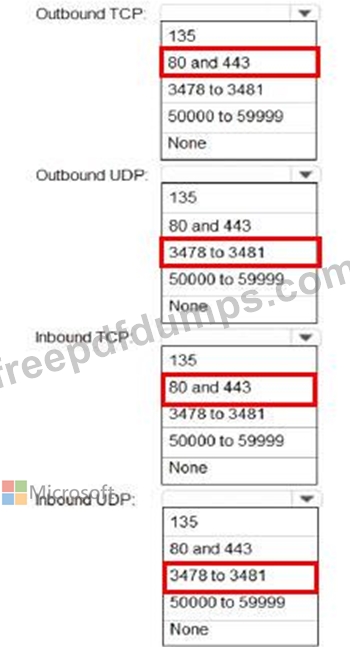
You need to recommend which inbound ports to the network and outbound ports to Office 365 must be allowed on the company's firewall after the planned upgrade. The solution must meet the security requirements.
Which inbound and outbound ports should you recommend? To answer, select the appropriate options in the answer area.
NOTE: Each correct selection is worth one point.
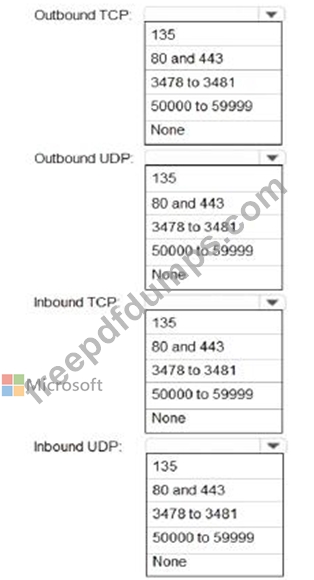
Which inbound and outbound ports should you recommend? To answer, select the appropriate options in the answer area.
NOTE: Each correct selection is worth one point.
MS-700 Exam Question 98
Your company has a Microsoft 365 subscription.
The company has a group named Sales.
You need to configure Microsoft Teams for the Sales group. The solution must meet the following requirements:
* Ensure that only the Activity, Shifts, Chat, and Calling apps are always visible in the app bar of the Microsoft Teams client.
* Prevent only the users in the company's sales department from adding other apps to Microsoft Teams.
Which two actions should you perform for the Sales group? Each correct answer presents part of the solution.
NOTE: Each correct selection is worth one point.
The company has a group named Sales.
You need to configure Microsoft Teams for the Sales group. The solution must meet the following requirements:
* Ensure that only the Activity, Shifts, Chat, and Calling apps are always visible in the app bar of the Microsoft Teams client.
* Prevent only the users in the company's sales department from adding other apps to Microsoft Teams.
Which two actions should you perform for the Sales group? Each correct answer presents part of the solution.
NOTE: Each correct selection is worth one point.
MS-700 Exam Question 99
You need to configure the user accounts of the sales department users to meet the security requirements.
What should you do for each user?
What should you do for each user?
MS-700 Exam Question 100
Note: This question is part of a series of questions that present the same scenario. Each question in the series contains a unique solution that might meet the stated goals. Some question sets might have more than one correct solution, while others might not have a correct solution.
After you answer a question in this section, you will NOT be able to return to it. As a result, these questions will not appear in the review screen.
You company has a Microsoft 365 subscription and a Virtual Desktop Infrastructure (VDI) solution.
The company's Microsoft Teams upgrade policy is set to Teams only coexistence mode.
You deploy the Microsoft Installer (MSI) package for Microsoft Teams to the VDI solution.
Several months later, users of the VDI solution report that their workstation is missing several new Microsoft Teams features.
You need to ensure that the VDI solution users can use the new Microsoft Teams features.
Solution: You run the Get-WUInstall cmdlet and specify the -AcceptAll parameter.
Does this meet the goal?
After you answer a question in this section, you will NOT be able to return to it. As a result, these questions will not appear in the review screen.
You company has a Microsoft 365 subscription and a Virtual Desktop Infrastructure (VDI) solution.
The company's Microsoft Teams upgrade policy is set to Teams only coexistence mode.
You deploy the Microsoft Installer (MSI) package for Microsoft Teams to the VDI solution.
Several months later, users of the VDI solution report that their workstation is missing several new Microsoft Teams features.
You need to ensure that the VDI solution users can use the new Microsoft Teams features.
Solution: You run the Get-WUInstall cmdlet and specify the -AcceptAll parameter.
Does this meet the goal?