

MS-700 Exam Question 21
SIMULATION
Please wait while the virtual machine loads. Once loaded, you may proceed to the lab section.
This may take a few minutes, and the wait time will not be deducted from your overall test time.
When the Next button is available, click it to access the lab section. In this section, you will perform a set of tasks in a live environment. While most functionality will be available to you as it would be in a live environment, some functionality (e.g. copy and paste, ability to navigate to external websites) will not be possible by design.
Scoring is based on the outcome of performing the tasks stated in the lab. In other words it doesn't matter how you accomplish the task, if you successfully perform it, you will earn credit for that task.
Labs are not timed separately, and this exam may have more than one lab that you must complete. You can use as much time as you would like to complete each lab. But you should manage your time appropriately to ensure that you are able to complete the lab(s) and all other sections of the exam in the time provided.
Please not that once you submit your work by clicking the Next button within a lab, you will NOT be able to return to the lab.
You may now click next to proceed to the lab.
Username and password.
Use the following login credentials as needed:
To enter your username, place your cursor in the Sign in box and click on the username below.
To enter your password, place your cursor in the Enter password box and click on the password below.
Microsoft 365 Username:
[email protected]
Microsoft 365 Password: XXXXXXXXXXXX
If the Microsoft 365 portal does not load successfully in the browser, press CTRL-K to reload the portal in a new browser tab.
The following information is for technical support purposes only:
Lab Instance: 26178313
Task 8
You need to enable shared channel collaboration with microsoft.com. The solution must meet the following requirements:
- Users must be able to participate in shared channels created by microsoft.com.
- Users must be able to invite Microsoft contacts to shared channels created by users at your company.
To complete this task, sign in to the Microsoft 365 portal.
Please wait while the virtual machine loads. Once loaded, you may proceed to the lab section.
This may take a few minutes, and the wait time will not be deducted from your overall test time.
When the Next button is available, click it to access the lab section. In this section, you will perform a set of tasks in a live environment. While most functionality will be available to you as it would be in a live environment, some functionality (e.g. copy and paste, ability to navigate to external websites) will not be possible by design.
Scoring is based on the outcome of performing the tasks stated in the lab. In other words it doesn't matter how you accomplish the task, if you successfully perform it, you will earn credit for that task.
Labs are not timed separately, and this exam may have more than one lab that you must complete. You can use as much time as you would like to complete each lab. But you should manage your time appropriately to ensure that you are able to complete the lab(s) and all other sections of the exam in the time provided.
Please not that once you submit your work by clicking the Next button within a lab, you will NOT be able to return to the lab.
You may now click next to proceed to the lab.
Username and password.
Use the following login credentials as needed:
To enter your username, place your cursor in the Sign in box and click on the username below.
To enter your password, place your cursor in the Enter password box and click on the password below.
Microsoft 365 Username:
[email protected]
Microsoft 365 Password: XXXXXXXXXXXX
If the Microsoft 365 portal does not load successfully in the browser, press CTRL-K to reload the portal in a new browser tab.
The following information is for technical support purposes only:
Lab Instance: 26178313
Task 8
You need to enable shared channel collaboration with microsoft.com. The solution must meet the following requirements:
- Users must be able to participate in shared channels created by microsoft.com.
- Users must be able to invite Microsoft contacts to shared channels created by users at your company.
To complete this task, sign in to the Microsoft 365 portal.

MS-700 Exam Question 22
Hotspot Question
Your company has the users shown in the following table.

The company uses Teams.
You have Teams update policies configured as shown in the following table.

The Teams update policies are assigned to departments as shown in the following table.

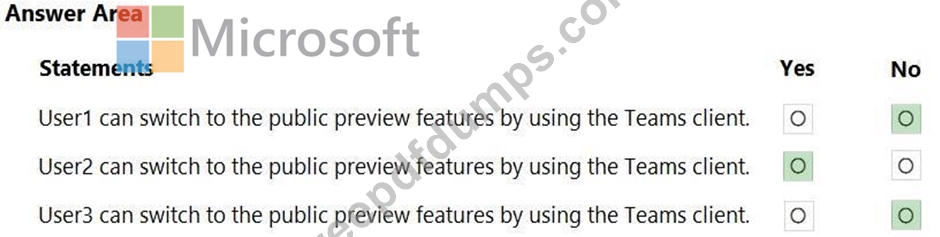
For each of the following statements, select Yes if True. Otherwise select No.
NOTE: Each correct selection is worth one point.

Your company has the users shown in the following table.
The company uses Teams.
You have Teams update policies configured as shown in the following table.
The Teams update policies are assigned to departments as shown in the following table.
For each of the following statements, select Yes if True. Otherwise select No.
NOTE: Each correct selection is worth one point.
MS-700 Exam Question 23
You work as a Systems Administrator for your company. The company has a subscription to Microsoft 365. All users in your company have a Microsoft 365 E3 license.
You have been migrating users from Microsoft Skype for Business Online to Microsoft Teams over the last two months. Most users are now using Microsoft Teams.
The coexistence mode is currently set to Islands.
You plan to change the coexistence mode to Teams Only to force all users to use Microsoft Teams.
You need to ensure that if any users have online meetings scheduled to use Skype for Business, the meetings are converted to use Microsoft Teams.
Which of the following actions should you perform?
You have been migrating users from Microsoft Skype for Business Online to Microsoft Teams over the last two months. Most users are now using Microsoft Teams.
The coexistence mode is currently set to Islands.
You plan to change the coexistence mode to Teams Only to force all users to use Microsoft Teams.
You need to ensure that if any users have online meetings scheduled to use Skype for Business, the meetings are converted to use Microsoft Teams.
Which of the following actions should you perform?
MS-700 Exam Question 24
Case Study 1 - Contoso, Ltd
Overview
Contoso, Ltd. is a pharmaceutical company that has 3,000 users in offices across North America.
Existing Environment
Active Directory
The network contains an on-premises Active Directory domain. All user accounts are in departmental organizational units (OUs).
Microsoft Office 365
All users are assigned a Microsoft Office 365 E5 license and are enabled for the following services:
Microsoft Yammer
Microsoft Exchange Online
Microsoft SharePoint Online
Microsoft OneDrive for Business
Azure Active Directory (Azure AD)
Azure AD
dynamic group membership
Microsoft Skype for Business
Contoso has an on-premises deployment of Microsoft Skype for Business Server 2015. All the latest cumulative updates are installed on all the servers. The following services are used in Skype for Business Server 2015:
Meetings
PSTN calling
Instant messaging (IM)
Federation to external companies
Departments
Contoso has the following departments:
IT
Sales
Human resources (HR)
Research and deployment (R&D)
All groups are created by using dynamic group membership that use the department attribute.
Requirements
Business goals
Contoso identifies the following business goals:
Migrate the maximum number of users to Microsoft Teams.
Minimize administrative effort.
Device requirements
Contoso identifies the following device requirements:
Replace Skype for Business IP phones with Microsoft Teams phones.
All Microsoft Teams phones must be set to lock automatically after 60 seconds.
Meeting and Live Event Requirements
Contoso identifies the following meeting and live event requirements:
Requirement1: Guest users must be able to join live events.
Requirement2: Guest users must always wait in a meeting lobby.
Requirement3: Contoso users must always bypass the meeting lobby when they join by using the Microsoft Teams client.
Requirement4: After the upgrade to Microsoft Teams, all meetings must be scheduled by using Microsoft Teams.
Calling Requirements
Contoso identifies the following calling requirements:
Migrate all existing auto attendants and response groups to Office 365.
Minimize the on-premises PSTN infrastructure.
Technical Requirements
Guest users must be prevented from making private calls.
Security Requirements
Contoso has the following security requirements for the Microsoft Teams deployment:
The number of ports allowed on the company's firewall must be limited.
Team names must be prevented from containing the name of any products produced by Contoso.
Users in the R&D group must be prevented from sending chat messages to users in other departments.
To meet the company's compliance policy, users in the sales department must continue to use on-premises Skype for Business for IM and calling only.
Pilot Project
Contoso begins a pilot project for the upgrade to Microsoft Teams.
You identify the following issues during the pilot project:
Microsoft Teams users report that they often receive continuous notifications from the Microsoft Teams client for 20 minutes.
Two pilot users in the HR department report that they are not members of the HR team.
Hotspot Question
During the pilot project, you review the global policies in the Microsoft Teams admin center.
Contoso has a global meeting policy configured as shown in the following exhibit.

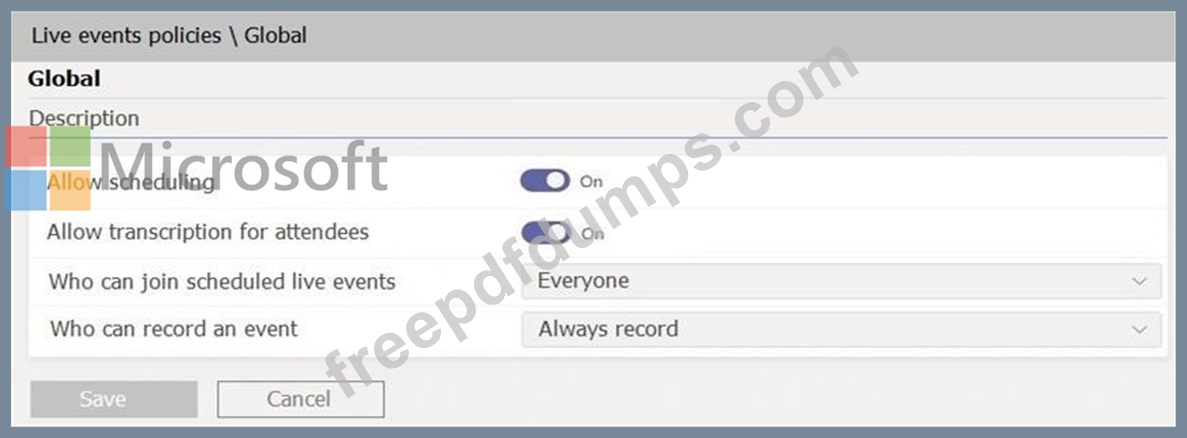
Contoso has a global live events policy configured as shown in the following exhibit.
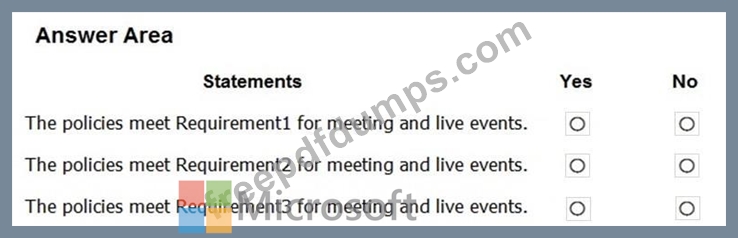
For each of the following statements, select Yes if the statement is true. Otherwise, select No.
NOTE: Each correct selection is worth one point.
Overview
Contoso, Ltd. is a pharmaceutical company that has 3,000 users in offices across North America.
Existing Environment
Active Directory
The network contains an on-premises Active Directory domain. All user accounts are in departmental organizational units (OUs).
Microsoft Office 365
All users are assigned a Microsoft Office 365 E5 license and are enabled for the following services:
Microsoft Yammer
Microsoft Exchange Online
Microsoft SharePoint Online
Microsoft OneDrive for Business
Azure Active Directory (Azure AD)
Azure AD
dynamic group membership
Microsoft Skype for Business
Contoso has an on-premises deployment of Microsoft Skype for Business Server 2015. All the latest cumulative updates are installed on all the servers. The following services are used in Skype for Business Server 2015:
Meetings
PSTN calling
Instant messaging (IM)
Federation to external companies
Departments
Contoso has the following departments:
IT
Sales
Human resources (HR)
Research and deployment (R&D)
All groups are created by using dynamic group membership that use the department attribute.
Requirements
Business goals
Contoso identifies the following business goals:
Migrate the maximum number of users to Microsoft Teams.
Minimize administrative effort.
Device requirements
Contoso identifies the following device requirements:
Replace Skype for Business IP phones with Microsoft Teams phones.
All Microsoft Teams phones must be set to lock automatically after 60 seconds.
Meeting and Live Event Requirements
Contoso identifies the following meeting and live event requirements:
Requirement1: Guest users must be able to join live events.
Requirement2: Guest users must always wait in a meeting lobby.
Requirement3: Contoso users must always bypass the meeting lobby when they join by using the Microsoft Teams client.
Requirement4: After the upgrade to Microsoft Teams, all meetings must be scheduled by using Microsoft Teams.
Calling Requirements
Contoso identifies the following calling requirements:
Migrate all existing auto attendants and response groups to Office 365.
Minimize the on-premises PSTN infrastructure.
Technical Requirements
Guest users must be prevented from making private calls.
Security Requirements
Contoso has the following security requirements for the Microsoft Teams deployment:
The number of ports allowed on the company's firewall must be limited.
Team names must be prevented from containing the name of any products produced by Contoso.
Users in the R&D group must be prevented from sending chat messages to users in other departments.
To meet the company's compliance policy, users in the sales department must continue to use on-premises Skype for Business for IM and calling only.
Pilot Project
Contoso begins a pilot project for the upgrade to Microsoft Teams.
You identify the following issues during the pilot project:
Microsoft Teams users report that they often receive continuous notifications from the Microsoft Teams client for 20 minutes.
Two pilot users in the HR department report that they are not members of the HR team.
Hotspot Question
During the pilot project, you review the global policies in the Microsoft Teams admin center.
Contoso has a global meeting policy configured as shown in the following exhibit.
Contoso has a global live events policy configured as shown in the following exhibit.
For each of the following statements, select Yes if the statement is true. Otherwise, select No.
NOTE: Each correct selection is worth one point.

MS-700 Exam Question 25
You have a Microsoft Office 365 subscription that contains a user named User1.
You need to ensure that User1 can view Usage reports in the Microsoft Teams admin center. The solution must use the principle of least privilege.
Which role should you assign to User1?
You need to ensure that User1 can view Usage reports in the Microsoft Teams admin center. The solution must use the principle of least privilege.
Which role should you assign to User1?