PL-100 Exam Question 36
You need to modify the entity form to resolve the customer request number issue.
What should you do?
What should you do?
PL-100 Exam Question 37
You are creating a canvas app for a company that delivers packages. The app will display one screen for each delivery attempt.
Drivers must make three attempts to deliver a package before returning the package back to a warehouse. Drivers must enter details about delivery on a second screen in the app.
You need to display a list of delivery attempts on the delivery screen.
Which two components can you add to the app to display details about the delivery attempts? Each correct answer presents a complete solution.
NOTE: Each correct selection is worth one point.
Drivers must make three attempts to deliver a package before returning the package back to a warehouse. Drivers must enter details about delivery on a second screen in the app.
You need to display a list of delivery attempts on the delivery screen.
Which two components can you add to the app to display details about the delivery attempts? Each correct answer presents a complete solution.
NOTE: Each correct selection is worth one point.
PL-100 Exam Question 38
A company uses Microsoft Power Platform. All users in the company have read/write and create access to SharePoint.
You create a canvas app that displays data from a SharePoint list. A group of users must use the app without the ability to change the data source.
You need to shore the app with the users.
What should you do? To answer, drag the appropriate actions to the correct components. Each action may be used once, more than once, or not at all. You may need to drag the split bar between panes or scroll to view content.
NOTE: Each correct selection is worth one point.

You create a canvas app that displays data from a SharePoint list. A group of users must use the app without the ability to change the data source.
You need to shore the app with the users.
What should you do? To answer, drag the appropriate actions to the correct components. Each action may be used once, more than once, or not at all. You may need to drag the split bar between panes or scroll to view content.
NOTE: Each correct selection is worth one point.

PL-100 Exam Question 39
Note: This question is part of a series of questions that present the same scenario. Each question in the series contains a unique solution that might meet the stated goals. Some question sets might have more than one correct solution, while others might not have a correct solution.
After you answer a question in this section, you will NOT be able to return to it. As a result, these questions will not appear in the review screen.
You are creating a canvas app that displays a list of accounts.
Users must be able to select an account and view details for the account. The app must include a feature that brings the user back to the list of accounts.
You add a blank screen named Screen_Accounts and add a gallery named Gallery_Accounts to the screen. You set the data source of Gallery_Accounts to Accounts and add another blank screen named Screen_AccountDetail.
You need to complete the app.
Solution:
* Add an edit form to Screen_AccountDetail and set the Default Mode of the form to View.
* Set the OnSelect property of Gallery_Accounts to Navigate(Screen_AccountDetail).
* Set the data source of the form to Accounts.
* Set the Item property of the form to Selected.
* Add a back icon on Screen_AccountDetail and set its OnSelect property to Navigate(Screen_Accounts).
Does the solution meet the goal?
After you answer a question in this section, you will NOT be able to return to it. As a result, these questions will not appear in the review screen.
You are creating a canvas app that displays a list of accounts.
Users must be able to select an account and view details for the account. The app must include a feature that brings the user back to the list of accounts.
You add a blank screen named Screen_Accounts and add a gallery named Gallery_Accounts to the screen. You set the data source of Gallery_Accounts to Accounts and add another blank screen named Screen_AccountDetail.
You need to complete the app.
Solution:
* Add an edit form to Screen_AccountDetail and set the Default Mode of the form to View.
* Set the OnSelect property of Gallery_Accounts to Navigate(Screen_AccountDetail).
* Set the data source of the form to Accounts.
* Set the Item property of the form to Selected.
* Add a back icon on Screen_AccountDetail and set its OnSelect property to Navigate(Screen_Accounts).
Does the solution meet the goal?
PL-100 Exam Question 40
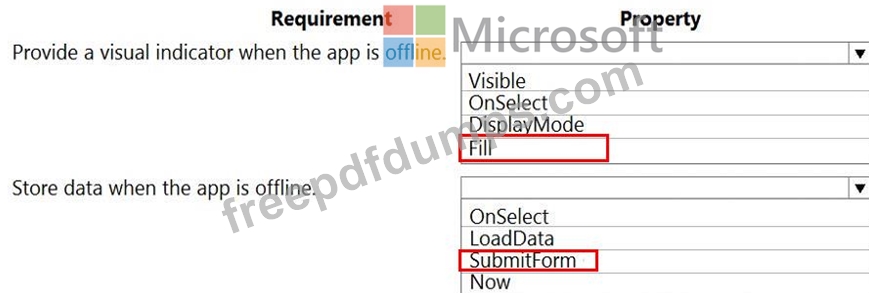
You need to configure the app to meet the requirements.
Which object properties should you configure? To answer, select the appropriate options in the answer area.
NOTE: Each correct selection is worth one point.
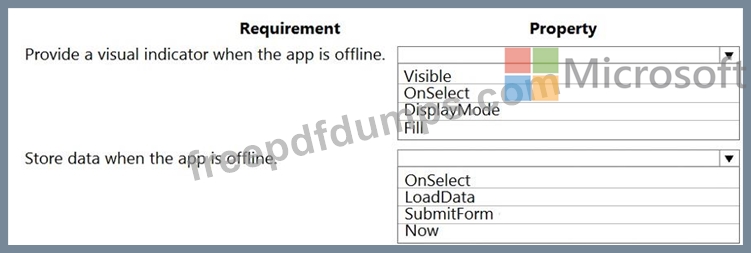
Which object properties should you configure? To answer, select the appropriate options in the answer area.
NOTE: Each correct selection is worth one point.