

SC-200 Exam Question 66
You have a Microsoft Sentinel workspace named SW1.
In SW1. you enable User and Entity Behavior Analytics (UEBA).
You need to use KQL to perform the following tasks:
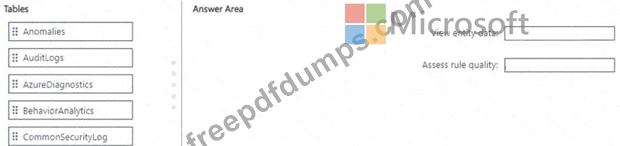
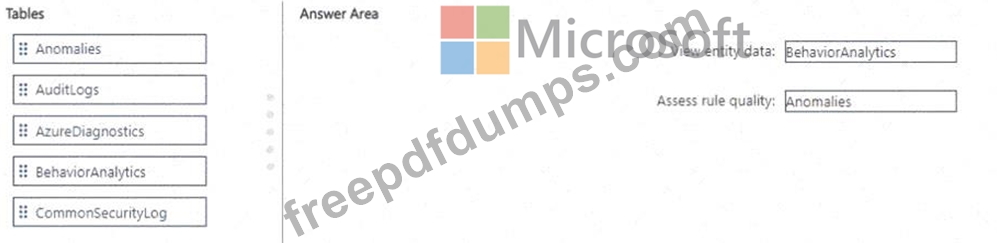
* View the entity data that has fields for each type of entity.
* Assess the quality of rules by analyzing how well a rule performs.
Which table should you use in KQL for each task? To answer, drag the appropriate tables to the correct tasks.
Each table may be used once, more than once, or not at all. You may need to drag the split bar between panes or scroll to view content.
NOTE: Each correct selection is worth one point.
In SW1. you enable User and Entity Behavior Analytics (UEBA).
You need to use KQL to perform the following tasks:
* View the entity data that has fields for each type of entity.
* Assess the quality of rules by analyzing how well a rule performs.
Which table should you use in KQL for each task? To answer, drag the appropriate tables to the correct tasks.
Each table may be used once, more than once, or not at all. You may need to drag the split bar between panes or scroll to view content.
NOTE: Each correct selection is worth one point.

SC-200 Exam Question 67
You have an Azure subscription that uses Azure Defender.
You plan to use Azure Security Center workflow automation to respond to Azure Defender threat alerts.
You need to create an Azure policy that will perform threat remediation automatically.
What should you include in the solution? To answer, select the appropriate options in the answer area.
NOTE: Each correct selection is worth one point.

You plan to use Azure Security Center workflow automation to respond to Azure Defender threat alerts.
You need to create an Azure policy that will perform threat remediation automatically.
What should you include in the solution? To answer, select the appropriate options in the answer area.
NOTE: Each correct selection is worth one point.


SC-200 Exam Question 68
Note: This question is part of a series of questions that present the same scenario. Each question in the series contains a unique solution that might meet the stated goals. Some question sets might have more than one correct solution, while others might not have a correct solution.
After you answer a question in this section, you will NOT be able to return to it. As a result, these questions will not appear in the review screen.
You are configuring Azure Sentinel.
You need to create an incident in Azure Sentinel when a sign-in to an Azure virtual machine from a malicious IP address is detected.
Solution: You create a Microsoft incident creation rule for a data connector.
Does this meet the goal?
After you answer a question in this section, you will NOT be able to return to it. As a result, these questions will not appear in the review screen.
You are configuring Azure Sentinel.
You need to create an incident in Azure Sentinel when a sign-in to an Azure virtual machine from a malicious IP address is detected.
Solution: You create a Microsoft incident creation rule for a data connector.
Does this meet the goal?
SC-200 Exam Question 69
You have a Microsoft 365 B5 subscription that uses Microsoft Defender XDR. You are investigating an incident You need to review the incident tasks that were performed. What can you use on the Incident page?
SC-200 Exam Question 70
You have a Microsoft 365 tenant that uses Microsoft Exchange Online and Microsoft Defender for Office 365.
What should you use to identify whether zero-hour auto purge (ZAP) moved an email message from the mailbox of a user?
What should you use to identify whether zero-hour auto purge (ZAP) moved an email message from the mailbox of a user?