

SC-401 Exam Question 41
You have a Microsoft 365 E5 tenant.
You create a data loss prevention (DLP) policy.
You need to ensure that the policy protects documents in Microsoft Teams chat sessions.
Which location should you enable in the policy?
You create a data loss prevention (DLP) policy.
You need to ensure that the policy protects documents in Microsoft Teams chat sessions.
Which location should you enable in the policy?
SC-401 Exam Question 42
You have a Microsoft 365 E5 subscription that contains a Microsoft SharePoint Online site named Site! and the data loss prevention (DLP) policies shown in the following table.

The DLP rules are configured as shown In the following table.

All the policies are assigned to Site1.
You need to ensure that if a user uploads a document to Site1 that matches all the rules, the user will be shown the Tip 2 policy tip. What should you do?
The DLP rules are configured as shown In the following table.
All the policies are assigned to Site1.
You need to ensure that if a user uploads a document to Site1 that matches all the rules, the user will be shown the Tip 2 policy tip. What should you do?
SC-401 Exam Question 43
You need to create a retention policy to delete content after seven years from the following locations:
* Exchange Online email
* SharePoint Online sites
* OneDrive accounts
* Microsoft 365 Groups
* Teams channel messages
* Teams chats
What is the minimum number of retention policies that you should create?
* Exchange Online email
* SharePoint Online sites
* OneDrive accounts
* Microsoft 365 Groups
* Teams channel messages
* Teams chats
What is the minimum number of retention policies that you should create?
SC-401 Exam Question 44
You have a Microsoft 365 subscription that contains two Microsoft SharePoint Online sites named Site1 and Site2. You plan to use policies to meet the following requirements:
* Add a watermark of Confidential to a document if the document contains the words Project1 or Project2.
* Retain a document for seven years if the document contains credit card information.
* Add a watermark of Internal Use Only to all the documents stored on Site2.
* Add a watermark of Confidential to all the documents stored on Site1.
You need to recommend the minimum number of sensitive info types required.
How many sensitive info types should you recommend?
* Add a watermark of Confidential to a document if the document contains the words Project1 or Project2.
* Retain a document for seven years if the document contains credit card information.
* Add a watermark of Internal Use Only to all the documents stored on Site2.
* Add a watermark of Confidential to all the documents stored on Site1.
You need to recommend the minimum number of sensitive info types required.
How many sensitive info types should you recommend?
SC-401 Exam Question 45
You have a Microsoft 365 subscription that contains a sensitivity label named Contoso Confidential.
You publish Contoso Confidential to all users.
Contoso Confidential is configured as shown in the Configuration exhibit. (Click the Configuration tab.)

The Access control settings of Contoso Confidential are configured as shown in the Access control exhibit.
(Click the Access control tab.)
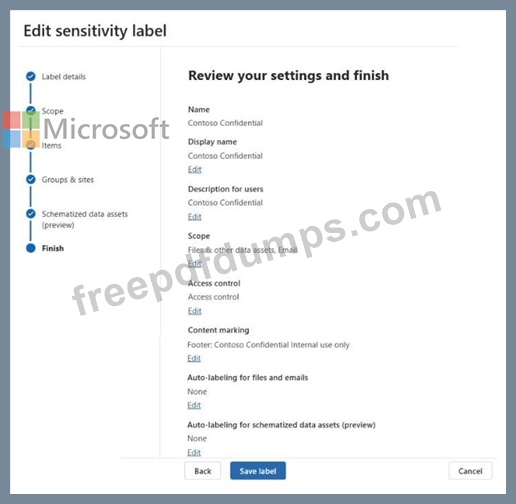

For each of the following statements, select Yes if the statement is true. Otherwise, select No.
NOTE: Each correct selection is worth one point.

You publish Contoso Confidential to all users.
Contoso Confidential is configured as shown in the Configuration exhibit. (Click the Configuration tab.)
The Access control settings of Contoso Confidential are configured as shown in the Access control exhibit.
(Click the Access control tab.)
For each of the following statements, select Yes if the statement is true. Otherwise, select No.
NOTE: Each correct selection is worth one point.

