An engineer manages a high availability network and requires fast failover of the routing protocols. The engineer decides to implement BFD. Which three dynamic routing protocols support BFD? (Choose three.)
A firewall engineer needs to update a company's Panorama-managed firewalls to the latest version of PAN- OS. Strict security requirements are blocking internet access to Panorama and to the firewalls. The PAN-OS images have previously been downloaded to a secure host on the network. Which path should the engineer follow to deploy the PAN-OS images to the firewalls?
Correct Answer: D
In a situation where Panorama and its managed firewalls lack internet access, updating PAN-OS requires a manual upload of the downloaded PAN-OS images. The process involves: D: Upload the image to Panorama > Device Deployment > Software menu, and deploy it to the firewalls: * The engineer first uploads the downloaded PAN-OS images to Panorama. This is done through the "Device Deployment" section, specifically under the "Software" menu. This area of Panorama's interface is designed for managing PAN-OS versions and software updates for the managed devices. * Once the PAN-OS images are uploaded to Panorama, the engineer can then deploy these images to the firewalls directly from Panorama. This process allows for centralized management of software updates, ensuring that all firewalls can be updated to the latest PAN-OS version in a consistent and controlled manner, even without direct internet access. This method streamlines the update process for environments with strict security requirements, allowing for the efficient deployment of necessary PAN-OS updates to maintain security and functionality.
PCNSE Exam Question 18
A firewall engineer at a company is researching the Device Telemetry feature of PAN-OS. Which two aspects of the feature require further action for the company to remain compliant with local laws regarding privacy and data storage? (Choose two.)
Correct Answer: A,C
To address the question about the Device Telemetry feature in PAN-OS and its compliance with privacy and data storage laws, let's examine the details thoroughly. Understanding Device Telemetry in PAN-OS Device Telemetry is a feature in Palo Alto Networks' PAN-OS that collects data from the firewall to provide insights for: * Product usage trends. * Threat analysis. * Operational optimizations. Telemetry may include: * Configuration data. * Threat logs. * Performance metrics. However, specific aspects of this feature require attention to ensure compliance with local privacy laws. Explanation of Options A: Telemetry feature is automatically enabled during PAN-OS installation * Why It Requires Action: * Telemetry may be enabled by default when upgrading or installing PAN-OS. Local privacy laws (e.g., GDPR in Europe, CCPA in California) often require explicit user consent before enabling data collection. * Relevant Action: * Administrators must review and disable telemetry if required or configure it to align with local compliance laws. PAN-OS 11.0 Admin Guide: Telemetry configuration is detailed under the "Device Telemetry" section. PCNSA Study Guide (Domain 1: Device Management): Covers the importance of managing device settings, including Telemetry. B: Telemetry data is uploaded into Strata Logging Service Why It Does Not Require Immediate Action: Data sent to the Strata Logging Service is anonymized and typically adheres to Palo Alto Networks' privacy guidelines. Administrators can disable Strata Logging uploads if necessary. Optional Action: Ensure the data is anonymized or disable the service if the organization does not agree with external data storage. References: PAN-OS 11.0 Admin Guide: Details on Strata Logging and its integration with telemetry. C: Telemetry feature is using Traffic logs and packet captures to collect data Why It Requires Action: If the telemetry feature collects detailed Traffic Logs or Packet Captures, it could include sensitive user data (e.g., IP addresses, URLs). Many privacy laws prohibit sharing this type of identifiable information unless anonymized. Relevant Action: Administrators should ensure traffic logs are anonymized or exclude sensitive data fields to meet privacy requirements. References: PAN-OS 11.0 Admin Guide: Outlines telemetry data collection and traffic log inclusion. PNSE Study Guide (Domain 3: Logging and Reporting): Emphasizes securing and managing logs in compliance with privacy standards. D: Telemetry data is shared in real time with Palo Alto Networks Why It Does Not Require Immediate Action: While data is shared in real time, this process is often anonymized and only includes operational and diagnostic data. Administrators can configure or disable real-time sharing if deemed non-compliant. References: PAN-OS 11.0 Admin Guide: Covers real-time telemetry sharing configuration. Key Objectives in PCNSA and PCNSE Study Guides PCNSA Study Guide: Domain 1: Device Management: Emphasizes understanding and configuring administrative functions such as telemetry and privacy settings. Domain 4: Securing Traffic: Stresses compliance with local laws when collecting and forwarding logs. PCNSE Study Guide: Domain 2: Logging and Reporting: Highlights secure log collection and forwarding to external services. Domain 5: Security Operations: Focuses on privacy and regulatory compliance in operational activities. Actions to Ensure Compliance Review Privacy Regulations: Check local laws like GDPR (Europe) or CCPA (California) to identify restrictions on data collection and sharing. Disable Default Telemetry: During installation or upgrade, explicitly review telemetry settings in Device > Setup > Telemetry. Customize Data Collection: Use the PAN-OS telemetry interface to include/exclude sensitive data like packet captures or detailed traffic logs. Educate Administrators: Ensure staff managing firewalls are familiar with compliance requirements through PCNSA and PCNSE training. PAN-OS 11.0 Documentation References Device Telemetry Overview:PAN-OS 11.0 Admin Guide - Device Telemetry Telemetry Configuration Settings:PAN-OS 11.0 Admin Guide - Telemetry Configuration Logging and Privacy Compliance:PAN-OS Logging Configuration
PCNSE Exam Question 19
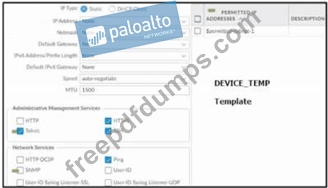
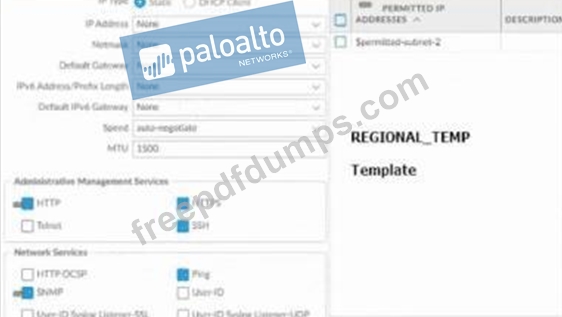
Based on the images below, and with no configuration inside the Template Stack itself, what access will the device permit on its management port?
Correct Answer: B
PCNSE Exam Question 20
An engineer is configuring a Protection profile to defend specific endpoints and resources against malicious activity. The profile is configured to provide granular defense against targeted flood attacks for specific critical systems that are accessed by users from the internet. Which profile is the engineer configuring?
Correct Answer: D
The engineer is configuring a DoS Protection profile to defend specific endpoints and resources against malicious activity. A DoS Protection profile is a feature that enables the firewall to detect and prevent denial-of-service (DoS) attacks that attempt to overwhelm network resources or disrupt services. A DoS Protection profile can provide granular defense against targeted flood attacks for specific critical systems that are accessed by users from the internet, such as web servers, DNS servers, or VPN gateways. A DoS Protection profile can be applied to a security policy rule that matches the traffic to and from the protected systems, and can specify the thresholds and actions for different types of flood attacks, such as SYN, UDP, ICMP, or other IP floods12. References: DoS Protection, PCNSE Study Guide (page 58)