Which syntax is used to represent an argument in a macro definition?
Correct Answer: D
Explanation The correct answer is D. A search macro is a way to reuse a piece of SPL code in different searches. A search macro can take arguments, which are variables that can be replaced by different values when the macro is called. A search macro can also contain another search macro within it, which is called a nested macro1. To represent an argument in a macro definition, you need to use the dollar sign ($) character to enclose the argument name. For example, if you want to create a search macro that takes one argument named "object", you can use the following syntax: [my_macro(object)] search sourcetype= object This will create a search macro named my_macro that takes one argument named object. When you call the macro in a search, you need to provide a value for the object argument, such as: my_macro(web) This will replace the object argument with the value web and run the following SPL code: search sourcetype=web The other options are not correct because they use quotation marks (' or ") or percentage signs (%) to represent arguments, which are not valid syntax for macro arguments. These characters will be interpreted as literal values instead of variables. References: Use search macros in searches
SPLK-1002 Exam Question 32
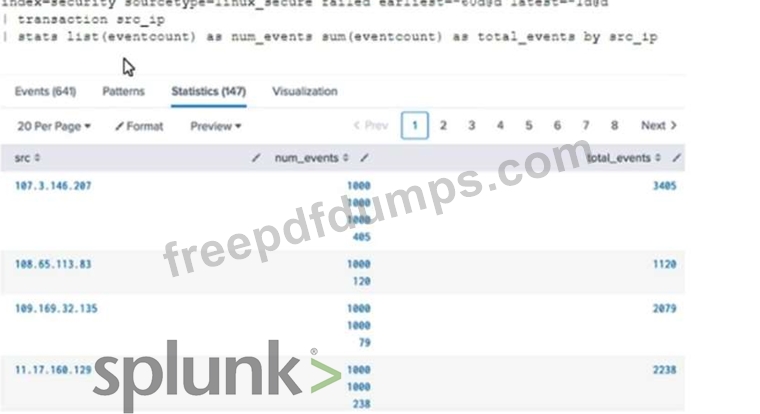
Why would the following search produce multiple transactions instead of one? The maxspan option is not included. The transaction command has a limit of 1000 events per transaction. The transaction and commands cannot be used together. The stats list () function is used.
Correct Answer: A
In Splunk, the transaction command is used to group events that share common characteristics into a single transaction1. By default, the transaction command groups all matching events into a single transaction1. However, you can use the maxspan option to limit the time span of the transactions1. If the time span between the first and last event in a transaction exceeds the maxspan value, the transaction command will start a new transaction1. Therefore, if the maxspan option is not included in the search, the transaction command might produce multiple transactions instead of one if the time span between the first and last event in a transaction exceeds the default maxspan value1. Here is an example of how you can use the maxspan option in a search: index=main sourcetype=access_combined | transaction someuniqefield maxspan=1h In this search, the transaction command groups events that share the same someuniqefield value into a single transaction, but only if the time span between the first and last event in the transaction does not exceed 1 hour1. If the time span exceeds 1 hour, the transaction command will start a new transaction1. Explanation: The correct answer is
SPLK-1002 Exam Question 33
Which of the following statements describe GET workflow actions?
Correct Answer: D
Explanation GET workflow actions are custom actions that open a URL link when you click on a field value in your search results. GET workflow actions can be configured with various options, such as label name, base URL, URI parameters, app context, etc. One of the options is to choose whether to open the URL link in the current window or in a new window. GET workflow actions do not have to be configured with POST arguments, as they use GET method to send requests to web servers. Configuration of GET workflow actions does not include choosing a sourcetype, as they do not generate any data in Splunk. Label names for GET workflow actions must include a field name surrounded by dollar signs, as this indicates the field value that will be used to replace the variable in the URL link.
SPLK-1002 Exam Question 34
Which of the following eval command function is valid?
Correct Answer: B
SPLK-1002 Exam Question 35
When using the transaction command, how are evicted transactions identified?
Correct Answer: A
The transaction command is a Splunk command that finds transactions based on events that meet various constraints1. Transactions are made up of the raw text (the _raw field) of each member, the time and date fields of the earliest member, as well as the union of all other fields of each member1. The transaction command adds some fields to the raw events that are part of the transaction12. These fields are: duration: The difference, in seconds, between the timestamps for the first and last events in the transaction12. eventcount: The number of events in the transaction12. closed_txn: A Boolean field that indicates whether the transaction is closed or evicted2. A transaction is closed if it meets one of the following conditions: maxevents, maxpause, maxspan, or startswith2. A transaction is evicted if it does not meet any of these conditions and exceeds the memory limit specified by maxopentxn or maxopenevents23. Therefore, evicted transactions can be distinguished from non-evicted transactions by checking the value of the closed_txn field. The closed_txn field is set to 0, or false, for evicted transactions and 1, or true for non-evicted, or closed, transactions23.