In most large Splunk environments, what is the most efficient command that can be used to group events by fields/
Correct Answer: B
https://docs.splunk.com/Documentation/Splunk/8.0.2/Search/Abouttransactions In other cases, it's usually better to use the stats command, which performs more efficiently, especially in a distributed environment. Often there is a unique ID in the events and stats can be used.
SPLK-1002 Exam Question 52
Which of the following statements describes macros?
Correct Answer: C
Reference: https://docs.splunk.com/Documentation/Splunk/8.0.3/Knowledge/Definesearchmacros A macro is a reusable search string that can contain any part of a search, such as search terms, commands, arguments, etc. A macro can have a flexible time range that can be specified when the macro is executed. A macro can also have arguments that can be passed to the macro when it is executed. A macro can be created by using the Settings menu or by editing the macros.conf file. A macro does not have to contain the full search, but only the part that needs to be reused. A macro does not have to have a fixed time range, but can use a relative or absolute time range modifier. A macro does not have to contain only a portion of the search, but can contain multiple parts of the search.
SPLK-1002 Exam Question 53
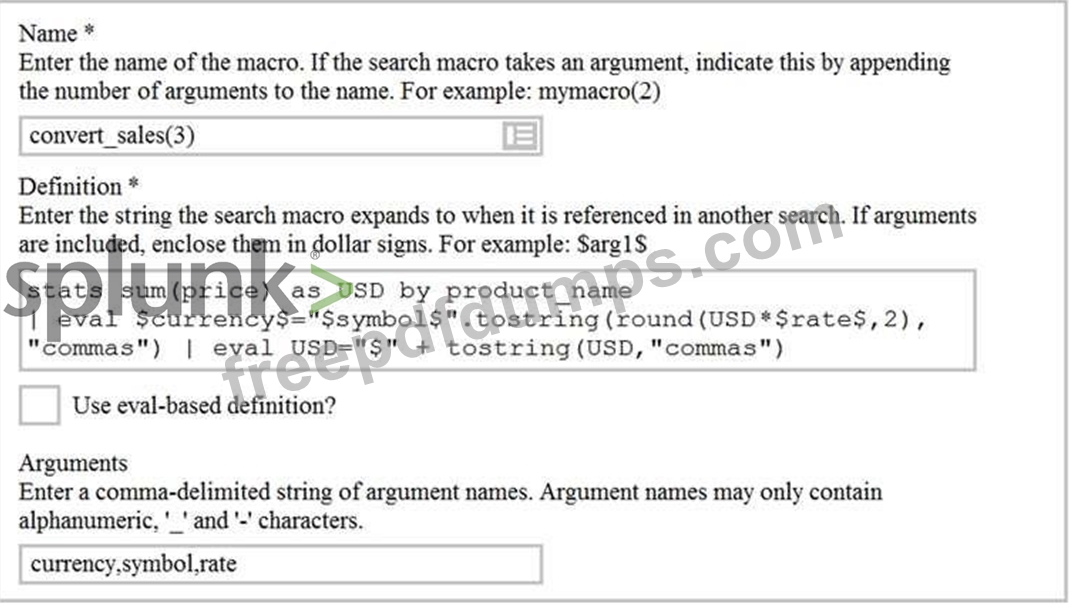
Based on the macro definition shown below, what is the correct way to execute the macro in a search string?
Information needed to create a GET workflow action includes which of the following? (select all that apply.)
Correct Answer: A,B,C
Reference:https://docs.splunk.com/Documentation/Splunk/8.0.3/Knowledge/SetupaGETworkflowaction Information needed to create a GET workflow action includes the following: a name of the workflow action, a URI where the user will be directed at search time, and a label that will appear in the Event Action menu at search time. A GET workflow action is a type of workflow action that performs a GET request when you click on a field value in your search results. A GET workflow action can be configured with various options, such as: A name of the workflow action: This is a unique identifier for the workflow action that is used internally by Splunk. The name should be descriptive and meaningful for the purpose of the workflow action. A URI where the user will be directed at search time: This is the base URL of the external web service or application that will receive the GET request. The URI can include field value variables that will be replaced by the actual field values at search time. For example, if you have a field value variable ip, you can write it as http://example.com/ip=$ip to send the IP address as a parameter to the external web service or application. A label that will appear in the Event Action menu at search time: This is the display name of the workflow action that will be shown in the Event Action menu when you click on a field value in your search results. The label should be clear and concise for the user to understand what the workflow action does. Therefore, options A, B, and C are correct.
SPLK-1002 Exam Question 55
Which of the following statements about tags is true? (select all that apply.)
Correct Answer: B,D
The following statements about tags are true: tags are based on field/value pairs and tags categorize events based on a search. Tags are custom labels that can be applied to fields or field values to provide additional context or meaning for your data. Tags can be used to filter or analyze your data based on common concepts or themes. Tags can be created by using various methods, such as search commands, configuration files, user interfaces, etc. Some of the characteristics of tags are: Tags are based on field/value pairs: This means that tags are associated with a specific field name and a specific field value. For example, you can create a tag called "alert" for the field name "status" and the field value "critical". This means that only events that have status=critical will have the "alert" tag applied to them. Tags categorize events based on a search: This means that tags are defined by a search string that matches the events that you want to tag. For example, you can create a tag called "web" for the search string sourcetype=access_combined. This means that only events that match the search string sourcetype=access_combined will have the "web" tag applied to them. The following statements about tags are false: tags are case-insensitive and tags are designed to make data more understandable. Tags are case-sensitive and tags are designed to make data more searchable. Tags are case-sensitive: This means that tags must match the exact case of the field name and field value that they are associated with. For example, if you create a tag called "alert" for the field name "status" and the field value "critical", it will not apply to events that have status=CRITICAL or Status=critical. Tags are designed to make data more searchable: This means that tags can help you find relevant events or patterns in your data by using common concepts or themes. For example, if you create a tag called "web" for the search string sourcetype=access_combined, you can use tag=web to find all events related to web activity.