When using Profile Execution to analyze performance, what should you keep in mind about the data generated during debugging versus data generated during production runs?
Correct Answer: B
TheProfile Executiontool in Studio can be used in bothRunandDebugmodes. However, it's important to note thatprofiling data may vary between debugging and production runsdue to differences in execution behavior (e.g., breakpoints, step-by-step execution, and extra logging during debugging). Reference:UiPath Studio Guide > Debugging > Profile Execution
UiPath-ADPv1 Exam Question 77
What is the main function of the UiPath Remote Runtime component?
Correct Answer: A
The UiPath Remote Runtime component is a component that facilitates the communication between a remote application or desktop, such as Citrix Virtual Apps, and the dedicated UiPath extension - the UiPath Extension for Citrix, the UiPath Extension for Windows Remote Desktop and Apps, or the UiPath Extension for VMware Horizon1. It gathers information about the targeted UI elements of the remote applications and sends them to the corresponding extension, so that selectors are natively generated in UiExplorer1. The UiPath Remote Runtime component is required to establish the connection between an application or desktop server and a corresponding UiPath extension installed on a client machine, where Studio is installed1. This way, selectors are natively generated on the client machine, without having to rely on OCR and image recognition activities1. .
UiPath-ADPv1 Exam Question 78
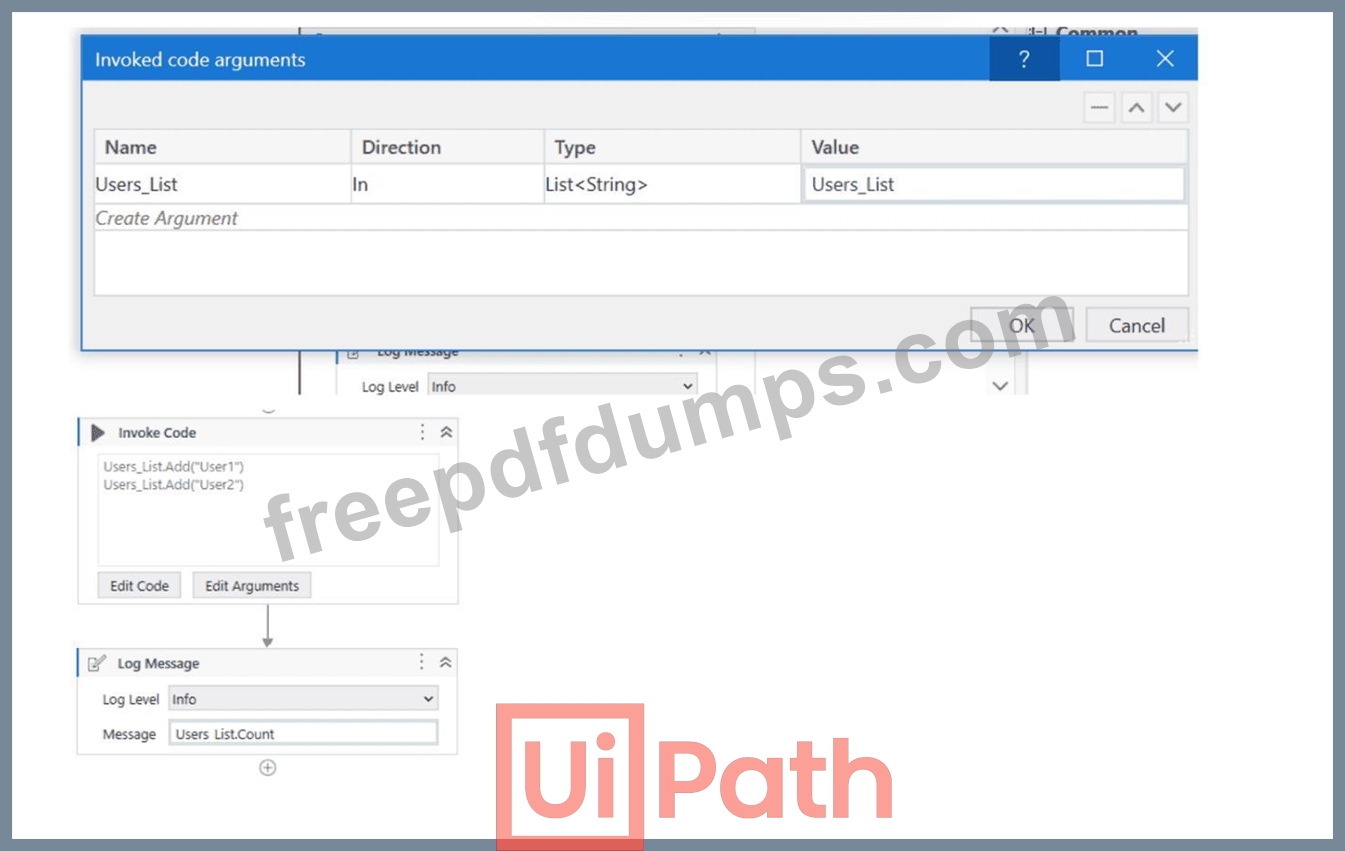
A developer has created a variable of type List of Strings named "Users_List", and initialized it with an empty list: "Users_List = new List(Of String)". What is printed in the log message after the following Invoke Code is executed?
Correct Answer: B
The screenshot shows an "Invoke Code" activity in UiPath with the following VB.NET code: Users_List.Add("User1") Users_List.Add("User2") According to the given information, the "Users_List" variable is a List of Strings that has been initialized with an empty list before the Invoke Code activity is run. The code within the Invoke Code activity is adding two strings: "User1" and "User2" to the "Users_List". The Log Message activity following the Invoke Code is attempting to log the count of items in "Users_List", which would be the number of elements contained in the list at that time. Given the steps that have been described, after the Invoke Code activity has run, the "Users_List" will contain two elements ("User1" and "User2"). Therefore, the log message will print the count of items in the list, which is: B:2 So the correct answer is B, as the "Users_List" will have two elements and Users_List.Count will return the number 2. The Invoke Code activity is used to execute VB.NET or C# code within a UiPath workflow1. The activity has the following properties: * Code: The code that is to be executed. This field supports only strings and String variables1. * Language: The language that the code is written in. The available options are VBNet and CSharp1. * Arguments: The parameters that can be passed to and from the code1. In this question, the developer has created a variable of type List of Strings named "Users_List", and initialized it with an empty list: "Users_List = new List(Of String)". Then, the developer has used the Invoke Code activity to execute the following code: Users_List.Add("User1") Users_List.Add("User2") This code adds two items ("User1" and "User2") to the "Users_List" variable. After the Invoke Code activity, the developer has used the Log Message activity to print the count of items in the "Users_List" variable, using the expression "Users_List.Count.ToString". This expression returns the number of items in the list as a string2. Therefore, the log message will print "2", as there are two items in the list
UiPath-ADPv1 Exam Question 79
A developer is working on an automation using the REFramework. Each transaction item represents a piece of client information. For each customer, the automated procedure must click the "Generate Shipment Details" button. This generates a table of shipment records for each customer. What type of exception occurs when the data is not accessible, the created table displays only the header row, and processing for that client must be halted?
Correct Answer: A
When the data is not accessible, the created table displays only the header row, and processing for that client must be halted, a BusinessRuleException occurs. A BusinessRuleException is a type of exception that indicates a business logic error or a validation error that cannot be resolved by retrying the transaction. For example, if the input data is incorrect, incomplete, or outdated, a BusinessRuleException should be thrown. A BusinessRuleException can be thrown by using the Throw activity with the following expression: VB New BusinessRuleException("Message") where Message is a string that describes the error. A BusinessRuleException can be caught by using the Catch activity with the following expression: VB ex As BusinessRuleException where ex is a variable that stores the exception object. A BusinessRuleException can be handled differently from other types of exceptions, such as SystemException or ApplicationException, depending on the logic of the automation. For example, in the REFramework, a BusinessRuleException sets the status of the transaction item to Failed and does not retry the transaction, whereas a SystemException sets the status of the transaction item to Retry and retries the transaction up to a specified number of times. References: [BusinessRuleException], [Throw], [Catch], [REFramework]
UiPath-ADPv1 Exam Question 80
What specific combination of permissions is required to disable errors from the Error Feed widget on the Monitoring > Jobs page in UiPath Orchestrator Monitoring-7
Correct Answer: A
The Error Feed widget on the Monitoring > Jobs page in UiPath Orchestrator Monitoring-7 shows the errors that occurred during the execution of jobs in the selected folder1. You can disable errors from the Error Feed widget by clicking the Disable button next to each error1. However, to do this, you need to have the following permissions: View on Monitoring: This permission allows you to see the content of the Monitoring pages, such as Machines, Processes, Queues, and Jobs2. Without this permission, you cannot access the Monitoring > Jobs page at all. Edit on Jobs: This permission allows you to perform actions on jobs, such as starting, stopping, resuming, or killing them3. It also allows you to disable errors from the Error Feed widget on the Monitoring > Jobs page1. Therefore, the correct answer is A. View on Monitoring and Edit on Jobs. The other options are incorrect because: Option B is incorrect because it does not include the Edit on Jobs permission, which is required to disable errors from the Error Feed widget. Option C is incorrect because it includes the Edit on Monitoring permission, which is not required to disable errors from the Error Feed widget. The Edit on Monitoring permission is only required to disable errors from the Error Feed widget on the Monitoring > Queues page4. Option D is incorrect because it does not include the Edit on Jobs permission, which is required to disable errors from the Error Feed widget. References: Orchestrator - About Monitoring - UiPath Documentation Portal Orchestrator - Roles - UiPath Documentation Portal Orchestrator - Jobs - UiPath Documentation Portal Orchestrator - Queues - UiPath Documentation Portal