

200-301 Exam Question 66
When a client and server are not on the same physical network, which device is used to forward requests and replies between client and server for DHCP?
200-301 Exam Question 67
Refer to the exhibit.

For security reasons, automatic neighbor discovery must be disabled on the R5 Gi0/1 interface. These tasks must be completed:
* Disable all neighbor discovery methods on R5 interface GiO/1.
* Permit neighbor discovery on R5 interface GiO/2.
* Verify there are no dynamically learned neighbors on R5 interface Gi0/1.
* Display the IP address of R6*s interface Gi0/2.
Which configuration must be used?
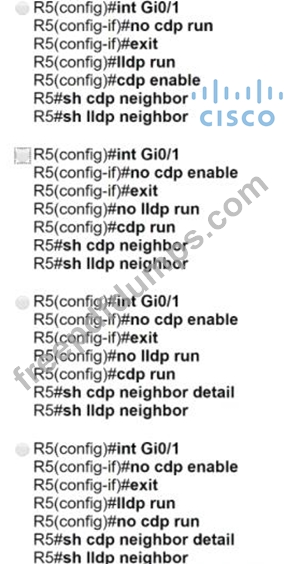
For security reasons, automatic neighbor discovery must be disabled on the R5 Gi0/1 interface. These tasks must be completed:
* Disable all neighbor discovery methods on R5 interface GiO/1.
* Permit neighbor discovery on R5 interface GiO/2.
* Verify there are no dynamically learned neighbors on R5 interface Gi0/1.
* Display the IP address of R6*s interface Gi0/2.
Which configuration must be used?
200-301 Exam Question 68
Which resource is able to be shared among virtual machines deployed on the same physical server?
200-301 Exam Question 69
Refer to the exhibit.
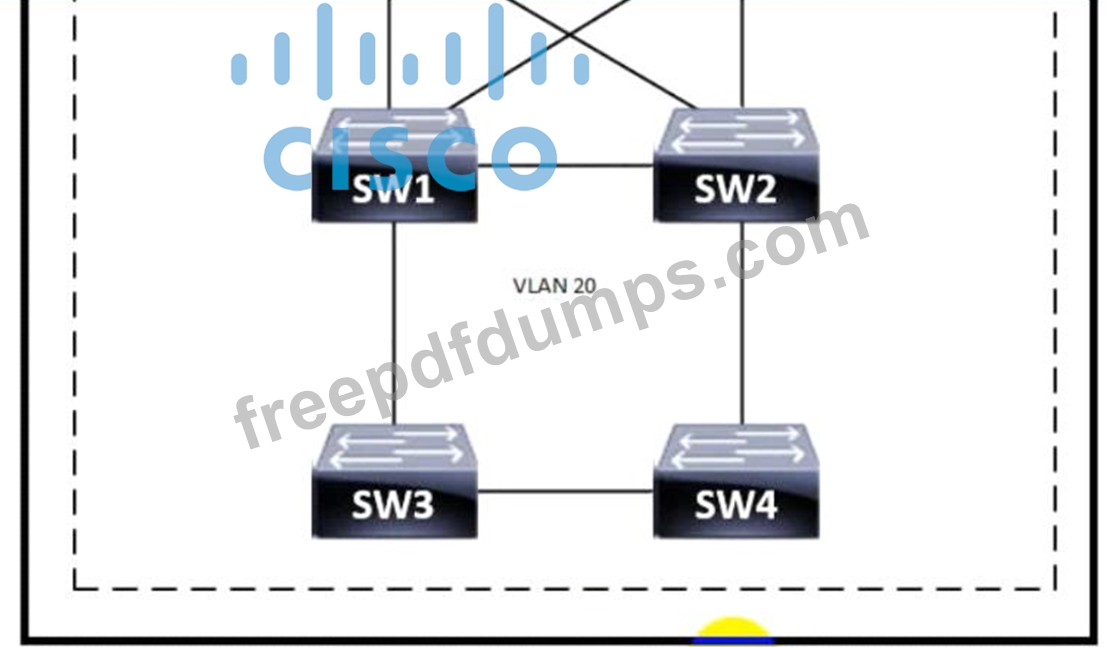
Which switch becomes the root of a spanning tree for VLAN 20 if all li links are of equal speed?
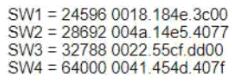
Which switch becomes the root of a spanning tree for VLAN 20 if all li links are of equal speed?
200-301 Exam Question 70
Physical connectivity is implemented between the two Layer 2 switches, and the network connectivity between them must be configured
1. Configure an LACP EtherChannel and number it as 1; configure it between switches SW1 and SVV2 using interfaces Ethernet0/0 and Ethernet0/1 on both sides. The LACP mode must match on both ends
2 Configure the EtherChannel as a trunk link.
3. Configure the trunk link with 802.1 q tags.
4. Configure the native VLAN of the EtherChannel as VLAN 15.
1. Configure an LACP EtherChannel and number it as 1; configure it between switches SW1 and SVV2 using interfaces Ethernet0/0 and Ethernet0/1 on both sides. The LACP mode must match on both ends
2 Configure the EtherChannel as a trunk link.
3. Configure the trunk link with 802.1 q tags.
4. Configure the native VLAN of the EtherChannel as VLAN 15.