

CS0-002 Exam Question 26
The threat intelligence department recently learned of an advanced persistent threat that is leveraging a new strain of malware, exploiting a system router. The company currently uses the same device mentioned in the threat report. Which of the following configuration changes would BEST improve the organization's security posture?
CS0-002 Exam Question 27
Following a recent security breach, a company decides to investigate account usage to ensure privileged accounts are only being utilized during typical business hours. During the investigation, a security analyst determines an account was consistently utilized in the middle of the night.
Which of the following actions should the analyst take NEXT?
Which of the following actions should the analyst take NEXT?
CS0-002 Exam Question 28
Which of the following BEST articulates the benefit of leveraging SCAP in an organization's cybersecurity analysis toolset?
CS0-002 Exam Question 29
A network attack that is exploiting a vulnerability in the SNMP is detected.
Which of the following should the cybersecurity analyst do FIRST?
Which of the following should the cybersecurity analyst do FIRST?
CS0-002 Exam Question 30
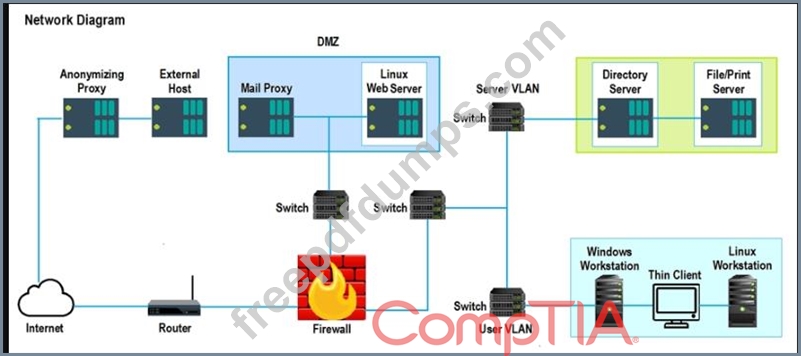
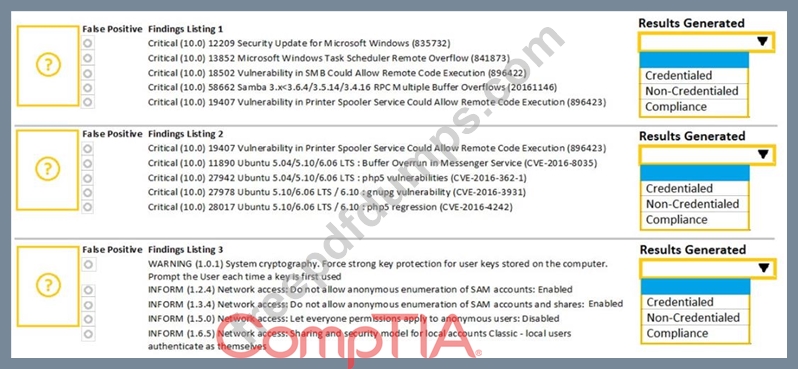
A security analyst performs various types of vulnerability scans. Review the vulnerability scan results to determine the type of scan that was executed and if a false positive occurred for each device.
Instructions:
Select the Results Generated drop-down option to determine if the results were generated from a credentialed scan, non-credentialed scan, or a compliance scan.
For ONLY the credentialed and non-credentialed scans, evaluate the results for false positives and check the findings that display false positives. NOTE: If you would like to uncheck an option that is currently selected, click on the option a second time.
Lastly, based on the vulnerability scan results, identify the type of Server by dragging the Server to the results.
The Linux Web Server, File-Print Server and Directory Server are draggable.
If at any time you would like to bring back the initial state of the simulation, please select the Reset All button. When you have completed the simulation, please select the Done button to submit. Once the simulation is submitted, please select the Next button to continue.
Instructions:
Select the Results Generated drop-down option to determine if the results were generated from a credentialed scan, non-credentialed scan, or a compliance scan.
For ONLY the credentialed and non-credentialed scans, evaluate the results for false positives and check the findings that display false positives. NOTE: If you would like to uncheck an option that is currently selected, click on the option a second time.
Lastly, based on the vulnerability scan results, identify the type of Server by dragging the Server to the results.
The Linux Web Server, File-Print Server and Directory Server are draggable.
If at any time you would like to bring back the initial state of the simulation, please select the Reset All button. When you have completed the simulation, please select the Done button to submit. Once the simulation is submitted, please select the Next button to continue.
