A Linux software developer wants to use AI to optimize source code used in a commercial product. Which of the following steps should the developer take first?
Correct Answer: B
Linux+ V8 emphasizes security, compliance, and governance when introducing new automation technologies, including AI. Before using AI tools to optimize commercial source code, the developer must ensure that such usage complies with organizational policies. Option B is correct because verifying company policy is the first and most critical step. AI tools may introduce risks such as intellectual property leakage, licensing conflicts, or regulatory violations. Many organizations restrict how source code can be shared with external systems, including AI services. The other options are premature. Selecting tools or deploying models should only occur after policy approval. Linux+ V8 highlights governance-first approaches when adopting automation technologies. Therefore, the correct answer is B.
XK0-006 Exam Question 22
A technician wants to temporarily use a Linux virtual machine as a router for the network segment 10.10.204.0 /24. Which of the following commands should the technician issue? (Select three).
Correct Answer: A,B,G
Comprehensive and Detailed Explanation From Exact Extract: To temporarily configure a Linux virtual machine as a router, the technician must enable IP forwarding and set up iptables rules to allow and masquerade traffic: * A. echo "1" > /proc/sys/net/ipv4/ip_forward: Enables IPv4 forwarding in the Linux kernel, allowing the VM to forward packets between interfaces. * B. iptables -A FORWARD -j ACCEPT: Adds a rule to the iptables firewall to accept all forwarded packets (allows traffic to be routed). * G. iptables -t nat -s 10.10.204.0/24 -A POSTROUTING -j MASQUERADE: Sets up network address translation (NAT) for outgoing packets from the 10.10.204.0/24 subnet, masquerading them as if they are coming from the VM's external IP. Other options: * C. and H. are not relevant for routing/NAT in this context (PREROUTING is generally used for DNAT, not for standard source NAT). * D. is syntactically incorrect and mixes PREROUTING with MASQUERADE, which is not the proper combination for SNAT. * E. disables forwarding. * F. is not related to IP forwarding. Reference: CompTIA Linux+ Study Guide: Exam XK0-006, Sybex, Chapter 9: "Networking", Section: "Configuring Linux as a Router" CompTIA Linux+ XK0-006 Objectives: Domain 2.0 - Networking Official CompTIA Linux+ Cert Guide, Chapter 12: "Firewall and NAT configuration"
XK0-006 Exam Question 23
A Linux administrator needs to securely erase the contents of a hard disk. Which of the following commands is the best for this task?
Correct Answer: B
Secure data destruction is an important security requirement addressed in Linux+ V8 objectives. When data must be permanently erased, standard file deletion commands are insufficient because they do not overwrite the data on disk. The shred command is specifically designed to securely erase files or block devices by overwriting them multiple times with random data. Using sudo shred /dev/sda1 overwrites the entire partition, making data recovery extremely difficult or impossible. This aligns directly with Linux+ V8 best practices for secure data sanitization. The other options are incorrect. rm -rf removes directory entries but does not overwrite disk data. parted rm deletes partition entries but leaves the underlying data intact. dd if=/dev/null writes zero bytes and does not overwrite existing data blocks. Linux+ V8 documentation identifies shred as the most appropriate tool for secure erasure when compliance or confidentiality is required. Therefore, the correct answer is B.
XK0-006 Exam Question 24
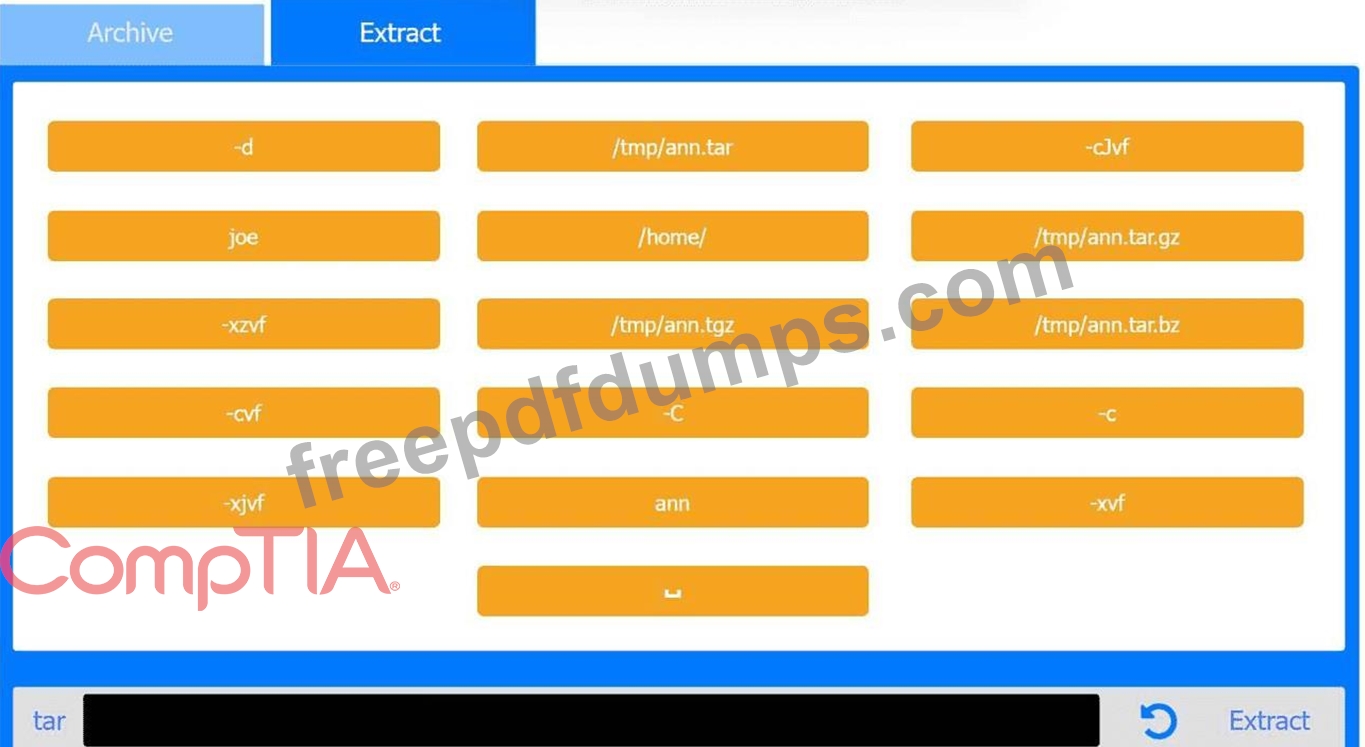
Joe, a user, has taken a position previously held by Ann. As a systems administrator, you need to archive all the files from Ann's home directory and extract them into Joe's home directory. INSTRUCTIONS Within each tab, click on an object to form the appropriate commands. Command objects may only be used once, but the spacebar _ object may be used multiple times. Not all objects will be used. If at any time you would like to bring back the initial state of the simulation, please click the Reset All button.
Correct Answer:
See the solution in Explanation below. Explanation: Archive Tab - Create the archive from Ann's home directory Correct Command: tar -cvf /tmp/ann.tar -C /home/ ann Extract Tab - Extract the archive into Joe's home directory Correct Command: tar -xvf /tmp/ann.tar -C /home/ joe This performance-based question tests file archiving and restoration using tar, a core System Management skill in the CompTIA Linux+ V8 objectives. The task requires preserving Ann's files and placing them correctly into Joe's home directory. # Archive Phase Explanation The goal of the first step is to archive Ann's entire home directory without embedding the full path (/home /ann) inside the archive. This is accomplished using the -C option. Command breakdown: * tar # archive utility * -c # create an archive * -v # verbose output (optional but allowed) * -f /tmp/ann.tar # specifies the archive file * -C /home/ # changes directory before archiving * ann # archives the ann directory only This results in a clean archive containing Ann's files without absolute paths, which is best practice and explicitly covered in Linux+ V8 documentation. # Extract Phase Explanation The second step extracts the archived files into Joe's home directory. Command breakdown: * -x # extract * -v # verbose * -f /tmp/ann.tar # specifies the archive * -C /home/joe # extracts files directly into Joe's home directory This ensures Joe receives Ann's files correctly under /home/joe/ann or directly under /home/joe depending on post-extraction handling, which matches Linux+ expectations for administrative user transitions.
XK0-006 Exam Question 25
Users report that a Linux system is unresponsive and simple commands take too long to complete. The Linux administrator logs in to the system and sees the following: Output 1: 10:06:29 up 235 day, 19:23, 2 users, load average: 8.71, 8.24, 7.71 Which of the following is the system experiencing?
Correct Answer: C
This scenario is a classic performance troubleshooting case covered under the Troubleshooting domain of the CompTIA Linux+ V8 objectives. The key indicators to analyze are the load average values and the CPU utilization statistics. The uptime command shows load averages of 8.71, 8.24, and 7.71 over the 1-, 5-, and 15-minute intervals. Load average represents the average number of processes that are either running on the CPU or waiting to run. On a system with 4 CPU cores, a healthy load average would typically be close to or below 4. Load averages consistently near or above 8 indicate that there are significantly more runnable processes than available CPU resources, causing processes to wait and resulting in poor system responsiveness. The CPU output further confirms this condition. The %idle value is 0, meaning the CPU has no idle time available. The majority of CPU time is spent in user space (65.88%) and system/kernel space (20.54%), indicating heavy computational and kernel activity. While %iowait is present at 5.65%, it is not high enough to suggest that disk I/O is the primary bottleneck. Option C, high CPU load, best explains the symptoms. High CPU load causes commands to execute slowly because processes are competing for limited CPU time. This directly matches the observed behavior of the system being unresponsive. The other options are incorrect. High uptime simply indicates how long the system has been running and does not cause performance issues by itself. High latency is a general term and not a specific diagnosis shown by the metrics provided. High I/O wait times would require a significantly higher %iowait value. According to Linux+ V8 documentation, correlating load averages with CPU core count and utilization is essential for accurate performance diagnosis. Therefore, the correct answer is C. High CPU load.