

HPE6-A85 Exam Question 6
What is the ideal Aruba access switch for a cost-effective connection to 200-380 clients, printers and APs per distribution rack?
Correct Answer: B
Explanation
The ideal Aruba access switch for a cost-effective connection to 200-380 clients, printers and APs per distribution rack is the Aruba CX 6200. This switch series is a cloud-manageable, stackable access switch series that is ideal for enterprise branch offices and campus networks, as well as SMBs. The CX 6200 series offers the following benefits:
Enterprise-class connectivity: The CX 6200 series supports ACLs, robust QoS, and common protocols such as static and Access OSPF routing.
Power and speed for users and IoT: The CX 6200 series provides built-in 1/10GbE uplinks and 30W to
60W of Class 4 to Class 6 PoE for powering devices such as APs and cameras.
Scalable growth made simple: The CX 6200 series supports Aruba Virtual Switching Framework (VSF) that allows you to quickly grow your network to eight members in a single stack using high-performance built-in 10G SFP ports.
Management flexibility: The CX 6200 series supports a choice of management, including cloud-based and on-prem Central, CLI, switch Web GUI and programmability with AOS-CX operating system, and REST APIs.
The other options are not ideal because:
Aruba CX 6400: This switch series is a high-availability modular switch series that is ideal for versatile edge access to data center deployments. It offers more performance, scalability, and modularity than the CX 6200 series, but it is also more expensive and complex to deploy and manage. It may not be cost-effective for connecting 200-380 clients per distribution rack.
Aruba CX 6300: This switch series is a layer 3 stackable access and aggregation switch series that offers Smart Rate and High Power PoE. It offers more features and performance than the CX 6200 series, but it is also more expensive and may not be necessary for connecting 200-380 clients per distribution rack.
Aruba CX 6000: This switch series is a layer 2 access switch series that offers PoE. It offers less features and performance than the CX 6200 series, and it does not support VSF stacking or routing protocols. It may not be sufficient for connecting 200-380 clients per distribution rack.
References: https://www.arubanetworks.com/products/switches/access/
https://www.arubanetworks.com/products/switches/access/6200-series/
https://www.arubanetworks.com/products/switches/access/6400-series/
https://www.arubanetworks.com/products/switches/access/6300-series/
https://www.arubanetworks.com/products/switches/access/6000-series/
The ideal Aruba access switch for a cost-effective connection to 200-380 clients, printers and APs per distribution rack is the Aruba CX 6200. This switch series is a cloud-manageable, stackable access switch series that is ideal for enterprise branch offices and campus networks, as well as SMBs. The CX 6200 series offers the following benefits:
Enterprise-class connectivity: The CX 6200 series supports ACLs, robust QoS, and common protocols such as static and Access OSPF routing.
Power and speed for users and IoT: The CX 6200 series provides built-in 1/10GbE uplinks and 30W to
60W of Class 4 to Class 6 PoE for powering devices such as APs and cameras.
Scalable growth made simple: The CX 6200 series supports Aruba Virtual Switching Framework (VSF) that allows you to quickly grow your network to eight members in a single stack using high-performance built-in 10G SFP ports.
Management flexibility: The CX 6200 series supports a choice of management, including cloud-based and on-prem Central, CLI, switch Web GUI and programmability with AOS-CX operating system, and REST APIs.
The other options are not ideal because:
Aruba CX 6400: This switch series is a high-availability modular switch series that is ideal for versatile edge access to data center deployments. It offers more performance, scalability, and modularity than the CX 6200 series, but it is also more expensive and complex to deploy and manage. It may not be cost-effective for connecting 200-380 clients per distribution rack.
Aruba CX 6300: This switch series is a layer 3 stackable access and aggregation switch series that offers Smart Rate and High Power PoE. It offers more features and performance than the CX 6200 series, but it is also more expensive and may not be necessary for connecting 200-380 clients per distribution rack.
Aruba CX 6000: This switch series is a layer 2 access switch series that offers PoE. It offers less features and performance than the CX 6200 series, and it does not support VSF stacking or routing protocols. It may not be sufficient for connecting 200-380 clients per distribution rack.
References: https://www.arubanetworks.com/products/switches/access/
https://www.arubanetworks.com/products/switches/access/6200-series/
https://www.arubanetworks.com/products/switches/access/6400-series/
https://www.arubanetworks.com/products/switches/access/6300-series/
https://www.arubanetworks.com/products/switches/access/6000-series/
HPE6-A85 Exam Question 7
A network technician has successfully connected to the employee SSID via 802 1X Which RADIUS message should you look for to ensure a successful connection?
Correct Answer: B
Explanation
The RADIUS message that you should look for to ensure a successful connection via 802.1X is Access-Accept. This message indicates that the RADIUS server has authenticated and authorized the supplicant (the device that wants to access thenetwork) and has granted it access to the network resources. The Access-Accept message may also contain additional attributes such as VLAN ID, session timeout, or filter ID that specify how the authenticator (the device that controls access to the network, such as a switch) should treat the supplicant's traffic.
The other options are not RADIUS messages because:
Authorized: This is not a RADIUS message, but a state that indicates that a port on an authenticator is allowed to pass traffic from a supplicant after successful authentication and authorization.
Success: This is not a RADIUS message, but a status that indicates that an EAP Extensible Authentication Protocol (EAP) is an authentication framework that provides support for multiple authentication methods, such as passwords, certificates, tokens, or biometrics. EAP is used in wireless networks and point-to-point connections to provide secure authentication between a supplicant (a device that wants to access the network) and an authentication server (a device that verifies the credentials of the supplicant). exchange has completed successfully between a supplicant and an authentication server.
Authenticated: This is not a RADIUS message, but a state that indicates that a port on an authenticator has received an EAP-Success message from an authentication server after successful authentication of a supplicant.
References: https://en.wikipedia.org/wiki/RADIUS#Access-Accept
https://www.cisco.com/c/en/us/support/docs/security-vpn/remote-authentication-dial-user-service-radius/13838-1
https://en.wikipedia.org/wiki/IEEE_802.1X#Port-based_network_access_control
https://en.wikipedia.org/wiki/Extensible_Authentication_Protocol#EAP_exchange
The RADIUS message that you should look for to ensure a successful connection via 802.1X is Access-Accept. This message indicates that the RADIUS server has authenticated and authorized the supplicant (the device that wants to access thenetwork) and has granted it access to the network resources. The Access-Accept message may also contain additional attributes such as VLAN ID, session timeout, or filter ID that specify how the authenticator (the device that controls access to the network, such as a switch) should treat the supplicant's traffic.
The other options are not RADIUS messages because:
Authorized: This is not a RADIUS message, but a state that indicates that a port on an authenticator is allowed to pass traffic from a supplicant after successful authentication and authorization.
Success: This is not a RADIUS message, but a status that indicates that an EAP Extensible Authentication Protocol (EAP) is an authentication framework that provides support for multiple authentication methods, such as passwords, certificates, tokens, or biometrics. EAP is used in wireless networks and point-to-point connections to provide secure authentication between a supplicant (a device that wants to access the network) and an authentication server (a device that verifies the credentials of the supplicant). exchange has completed successfully between a supplicant and an authentication server.
Authenticated: This is not a RADIUS message, but a state that indicates that a port on an authenticator has received an EAP-Success message from an authentication server after successful authentication of a supplicant.
References: https://en.wikipedia.org/wiki/RADIUS#Access-Accept
https://www.cisco.com/c/en/us/support/docs/security-vpn/remote-authentication-dial-user-service-radius/13838-1
https://en.wikipedia.org/wiki/IEEE_802.1X#Port-based_network_access_control
https://en.wikipedia.org/wiki/Extensible_Authentication_Protocol#EAP_exchange
HPE6-A85 Exam Question 8
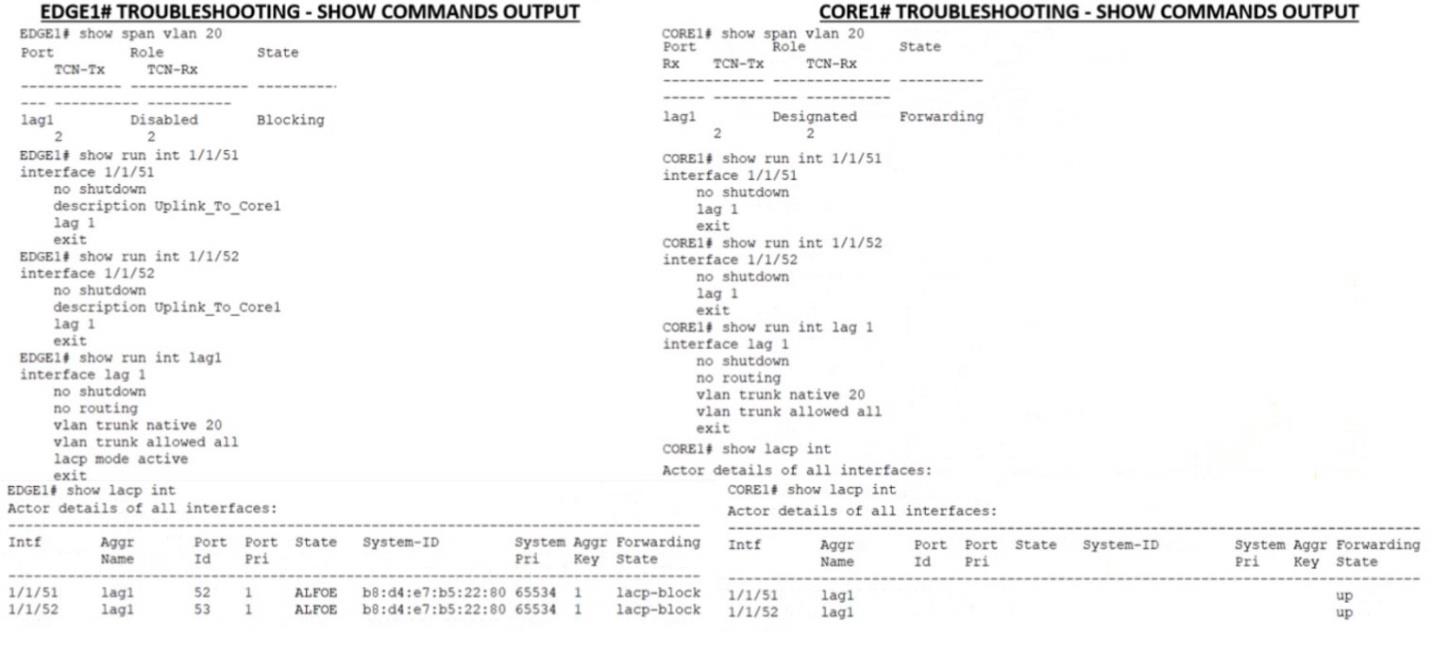
You put in a few show commands on switches EDGE1 and CORE1 to attempt to gather information to troubleshoot the issue Use the show command output images to determine the reason for the EDGE1 uplink being down
Correct Answer: D
Explanation
LACP is a protocol that allows multiple physical links to be aggregated into a single logical link for increased bandwidth and redundancy. LACP must be configured on both ends of the link for it to work properly. In this case, EDGE1 has LACP configured on its uplink port-channel 1, but CORE1 does not have LACP configured on its corresponding port-channel 1. This causes a mismatch and prevents the link from coming up.
References:https://www.arubanetworks.com/techdocs/ArubaOS_86_Web_Help/Content/arubaos-solutions/1-ove
LACP is a protocol that allows multiple physical links to be aggregated into a single logical link for increased bandwidth and redundancy. LACP must be configured on both ends of the link for it to work properly. In this case, EDGE1 has LACP configured on its uplink port-channel 1, but CORE1 does not have LACP configured on its corresponding port-channel 1. This causes a mismatch and prevents the link from coming up.
References:https://www.arubanetworks.com/techdocs/ArubaOS_86_Web_Help/Content/arubaos-solutions/1-ove
HPE6-A85 Exam Question 9
You need to drop excessive broadcast traffic on ingress to an ArubaOS-CX switch What is the best technology to use for this task?
Correct Answer: A
Explanation
The best technology to use for dropping excessive broadcast traffic on ingress to an ArubaOS-CX switch is rate limiting. Rate limiting is a feature that allows network administrators to control the amount of traffic that enters or leaves a port or a VLAN on a switch by setting bandwidth thresholds or limits. Rate limiting can be used to prevent network congestion, improve network performance, enforce service level agreements(SLAs), or mitigate denial-of-service (DoS) attacks. Rate limiting can be applied to broadcast traffic on ingress to an ArubaOS-CX switch by using the storm-control command in interface configuration mode. This command allows network administrators to specify the percentage of bandwidth or packets per second that can be used by broadcast traffic on an ingress port. If the broadcast traffic exceeds the specified threshold, the switch will drop the excess packets.
The other options are not technologies for dropping excessive broadcast traffic on ingress because:
DWRR queuing: DWRR stands for Deficit Weighted Round Robin, which is a queuing algorithm that assigns different weights or priorities to different traffic classes or queues on an egress port. DWRR ensures that each queue gets its fair share of bandwidth based on its weight while avoiding starvation of lower priority queues. DWRR does not drop excessive broadcast traffic on ingress, but rather schedules outgoing traffic on egress.
QoS shaping: QoS stands for Quality of Service, which is a set of techniques that manage network resources and provide different levels of service to different types of traffic based on their requirements.
QoS shaping is a technique that delays or buffers outgoing traffic on an egress port to match the available bandwidth or rate limit. QoS shaping does not drop excessive broadcast traffic on ingress, but rather smooths outgoing traffic on egress.
Strict queuing: Strict queuing is another queuing algorithm that assigns different priorities to different traffic classes or queues on an egress port. Strict queuing ensures that higher priority queues are always served before lower priority queues regardless of their bandwidth requirements or weights. Strict queuing does not drop excessive broadcast traffic on ingress, but rather schedules outgoing traffic on egress.
References: https://en.wikipedia.org/wiki/Rate_limiting
https://www.arubanetworks.com/techdocs/AOS-CX_10_08/NOSCG/Content/cx-noscg/qos/storm-control.htm
https://www.arubanetworks.com/techdocs/AOS-CX_10_08/NOSCG/Content/cx-noscg/qos/dwrr.htm
https://www.arubanetworks.com/techdocs/AOS-CX_10_08/NOSCG/Content/cx-noscg/qos/shaping.htm
https://www.arubanetworks.com/techdocs/AOS-CX_10_08/NOSCG/Content/cx-noscg/qos/strict.htm
The best technology to use for dropping excessive broadcast traffic on ingress to an ArubaOS-CX switch is rate limiting. Rate limiting is a feature that allows network administrators to control the amount of traffic that enters or leaves a port or a VLAN on a switch by setting bandwidth thresholds or limits. Rate limiting can be used to prevent network congestion, improve network performance, enforce service level agreements(SLAs), or mitigate denial-of-service (DoS) attacks. Rate limiting can be applied to broadcast traffic on ingress to an ArubaOS-CX switch by using the storm-control command in interface configuration mode. This command allows network administrators to specify the percentage of bandwidth or packets per second that can be used by broadcast traffic on an ingress port. If the broadcast traffic exceeds the specified threshold, the switch will drop the excess packets.
The other options are not technologies for dropping excessive broadcast traffic on ingress because:
DWRR queuing: DWRR stands for Deficit Weighted Round Robin, which is a queuing algorithm that assigns different weights or priorities to different traffic classes or queues on an egress port. DWRR ensures that each queue gets its fair share of bandwidth based on its weight while avoiding starvation of lower priority queues. DWRR does not drop excessive broadcast traffic on ingress, but rather schedules outgoing traffic on egress.
QoS shaping: QoS stands for Quality of Service, which is a set of techniques that manage network resources and provide different levels of service to different types of traffic based on their requirements.
QoS shaping is a technique that delays or buffers outgoing traffic on an egress port to match the available bandwidth or rate limit. QoS shaping does not drop excessive broadcast traffic on ingress, but rather smooths outgoing traffic on egress.
Strict queuing: Strict queuing is another queuing algorithm that assigns different priorities to different traffic classes or queues on an egress port. Strict queuing ensures that higher priority queues are always served before lower priority queues regardless of their bandwidth requirements or weights. Strict queuing does not drop excessive broadcast traffic on ingress, but rather schedules outgoing traffic on egress.
References: https://en.wikipedia.org/wiki/Rate_limiting
https://www.arubanetworks.com/techdocs/AOS-CX_10_08/NOSCG/Content/cx-noscg/qos/storm-control.htm
https://www.arubanetworks.com/techdocs/AOS-CX_10_08/NOSCG/Content/cx-noscg/qos/dwrr.htm
https://www.arubanetworks.com/techdocs/AOS-CX_10_08/NOSCG/Content/cx-noscg/qos/shaping.htm
https://www.arubanetworks.com/techdocs/AOS-CX_10_08/NOSCG/Content/cx-noscg/qos/strict.htm
HPE6-A85 Exam Question 10
Which flew in a Layer 3 IPv4 packet header is used to mitigate Layer 3 route loops?
Correct Answer: B
Explanation
The field in a Layer 3 IPv4 packet header that is used to mitigate Layer 3 route loops is Time To Live (TTL).
TTL is an 8-bit field that indicates the maximum number of hops that a packet can traverse before being discarded. TTL is set by the source device and decremented by one by each router that forwards the packet. If TTL reaches zero, the packet is dropped and an ICMP Internet Control Message Protocol (ICMP) Internet Control Message Protocol (ICMP) is a network protocol that provides error reporting and diagnostic functions for IP networks. ICMP is used to send messages such as echo requests and replies (ping), destination unreachable, time exceeded, parameter problem, source quench, redirect, etc. ICMP messages are encapsulated in IP datagrams and have a specific format that contains fields such as type, code, checksum, identifier, sequence number, data, etc. ICMP messages can be verified by using commands such as ping , traceroute , debug ip icmp , etc . message is sent back to the source device. TTL is used to mitigate Layer 3 route loops because it prevents packets from circulating indefinitely in a looped network topology. TTL also helps to conserve network resources and avoid congestion caused by looped packets.
The other options are not fields in a Layer 3 IPv4 packet header because:
Checksum: Checksum is a 16-bit field that is used to verify the integrity of the IP header. Checksum is calculated by the source device and verified by the destination device based on the values of all fields in the IP header. Checksum does not mitigate Layer 3 route loops because it does not limit the number of hops that a packet can traverse.
Protocol: Protocol is an 8-bit field that indicates the type of payload carried by the IP datagram. Protocol identifies the upper-layer protocol that uses IP for data transmission, such as TCP Transmission Control Protocol (TCP) Transmission Control Protocol (TCP) is a connection-oriented transport layer protocol that provides reliable, ordered, and error-checked delivery of data between applications on different devices . TCP uses a three-way handshake to establish a connection between two endpoints , and uses sequence numbers , acknowledgments , and windowing to ensure data delivery and flow control . TCP also uses mechanisms such as retransmission , congestion avoidance , and fast recovery to handle packet loss and congestion . TCP segments data into smaller units called segments , which are encapsulated in IP datagrams and have a specific format that contains fields such as source port , destination port , sequence number , acknowledgment number , header length , flags , window size , checksum , urgent pointer , options , data , etc . TCP segments can be verified by using commands such as telnet , ftp , ssh , debug ip tcp transactions , etc . , UDP User Datagram Protocol (UDP) User Datagram Protocol (UDP) is a connectionless transport layer protocol that provides
The field in a Layer 3 IPv4 packet header that is used to mitigate Layer 3 route loops is Time To Live (TTL).
TTL is an 8-bit field that indicates the maximum number of hops that a packet can traverse before being discarded. TTL is set by the source device and decremented by one by each router that forwards the packet. If TTL reaches zero, the packet is dropped and an ICMP Internet Control Message Protocol (ICMP) Internet Control Message Protocol (ICMP) is a network protocol that provides error reporting and diagnostic functions for IP networks. ICMP is used to send messages such as echo requests and replies (ping), destination unreachable, time exceeded, parameter problem, source quench, redirect, etc. ICMP messages are encapsulated in IP datagrams and have a specific format that contains fields such as type, code, checksum, identifier, sequence number, data, etc. ICMP messages can be verified by using commands such as ping , traceroute , debug ip icmp , etc . message is sent back to the source device. TTL is used to mitigate Layer 3 route loops because it prevents packets from circulating indefinitely in a looped network topology. TTL also helps to conserve network resources and avoid congestion caused by looped packets.
The other options are not fields in a Layer 3 IPv4 packet header because:
Checksum: Checksum is a 16-bit field that is used to verify the integrity of the IP header. Checksum is calculated by the source device and verified by the destination device based on the values of all fields in the IP header. Checksum does not mitigate Layer 3 route loops because it does not limit the number of hops that a packet can traverse.
Protocol: Protocol is an 8-bit field that indicates the type of payload carried by the IP datagram. Protocol identifies the upper-layer protocol that uses IP for data transmission, such as TCP Transmission Control Protocol (TCP) Transmission Control Protocol (TCP) is a connection-oriented transport layer protocol that provides reliable, ordered, and error-checked delivery of data between applications on different devices . TCP uses a three-way handshake to establish a connection between two endpoints , and uses sequence numbers , acknowledgments , and windowing to ensure data delivery and flow control . TCP also uses mechanisms such as retransmission , congestion avoidance , and fast recovery to handle packet loss and congestion . TCP segments data into smaller units called segments , which are encapsulated in IP datagrams and have a specific format that contains fields such as source port , destination port , sequence number , acknowledgment number , header length , flags , window size , checksum , urgent pointer , options , data , etc . TCP segments can be verified by using commands such as telnet , ftp , ssh , debug ip tcp transactions , etc . , UDP User Datagram Protocol (UDP) User Datagram Protocol (UDP) is a connectionless transport layer protocol that provides
- Other Version
- 659HP.HPE6-A85.v2026-09-23.q64
- 2115HP.HPE6-A85.v2025-10-09.q102
- 883HP.HPE6-A85.v2024-09-20.q46
- 1132HP.HPE6-A85.v2024-08-21.q58
- Latest Upload
- 138Fortinet.NSE6_FNC_AD-7.6.v2026-11-09.q39
- 133Salesforce.AP-222.v2026-11-09.q64
- 126VMware.3V0-12.26.v2026-11-09.q29
- 268Cisco.350-901.v2026-11-07.q332
- 246Cisco.200-201.v2026-11-07.q272
- 212Microsoft.AI-901.v2026-11-07.q56
- 234Microsoft.AZ-700.v2026-11-06.q141
- 187CWNP.CWNA-109.v2026-11-06.q84
- 155Databricks.Databricks-Generative-AI-Engineer-Associate.v2026-11-06.q42
- 205EC-COUNCIL.312-40.v2026-11-05.q82
[×]
Download PDF File
Enter your email address to download HP.HPE6-A85.v2023-07-31.q28 Practice Test