

HPE6-A85 Exam Question 11
What is indicated by a solid amber radio status LED on an Aruba AP?
Correct Answer: D
Explanation
The solid amber radio status LED on an Aruba AP Access Point (AP) Access Point (AP) is a device that connects wireless devices to a wired network using Wi-Fi or other wireless standards . APs act as transmitters and receivers of wireless signals and provide wireless coverage for a specific area . APs can operate in different modes such as root , repeater , bridge , mesh , etc . APs can also support different features such as security , QoS , roaming , load balancing , etc . APs can be standalone devices or managed by controllers or cloud services . APs can be verified by using commands such as show ap active , show ap database , show ap bss-table , etc . indicates that the radio is enabled in monitor or spectrum analysis mode. Monitor mode is a mode that allows the AP to scan all channels and collect information about wireless traffic, interference, rogue devices, etc. Spectrum analysis mode is a mode that allows the AP to scan all channels and collect information about RF Radio Frequency (RF) Radio Frequency (RF) is a term that refers to electromagnetic waves that have frequencies between 3 kHz and 300 GHz . RF waves are used for various purposes such as communication , broadcasting , radar , navigation , remote control , etc . RF waves can be modulated by changing their amplitude , frequency , or phase to encode information . RF waves can also be affected by various factors such as attenuation , reflection , refraction , diffraction , scattering , interference , noise , etc . RF waves can be measured by using devices such as spectrum analyzers , power meters , antennas , etc . environment, noise sources, channel utilization, etc. Both modes are useful for troubleshooting and optimizing wireless performance, but they disable normal data transmission and reception on the radio.
The other options are not indicated by a solid amber radio status LED on an Aruba AP because:
Not enough PoE is provided from the switch to power both radios of the AP: This option is false because not enough PoE Power over Ethernet (PoE) Power over Ethernet (PoE) is a technology that allows network devices to receive power and data over the same Ethernet cable . PoE eliminates the need for separate power sources and cables for devices such as IP phones , cameras , access points , etc .
PoE is defined in IEEE 802.3af and IEEE 802.3at standards and supports different power classes and modes . PoE can be provided by switches or injectors that act as power sourcing equipment (PSE) and received by devices that act as powered devices (PD) . PoE can be verified by using commands suchas show power inline , show power-over-ethernet , debug ip device tracking , etc . is indicated by a blinking amber power status LED on an Aruba AP, not by a solid amber radio status LED. A blinking amber power status LED means that the AP is receiving insufficient power from the switch or injector and cannot operate normally. A solid green power status LED means that the AP is receiving sufficient power from the switch or injector and can operate normally.
The radio is working in mesh mode: This option is false because the radio working in mesh mode is indicated by a solid green radio status LED on an Aruba AP, not by a solid amber radio status LED. A solid green radio status LED means that the radio is working in normal mode or mesh mode and can transmit or receive data on the assigned channel. Mesh mode is a mode that allows the AP to connect wirelessly to other APs and form a mesh network without requiring wired connections.
The radio is working the 5 GHz band only: This option is false because the radio working in the 5 GHz band only is indicated by a solid blue radio status LED on an Aruba AP, not by a solid amber radio status LED. A solid blue radio status LED means that the radio is working in dual-band mode and can transmit or receive data on both 2.4 GHz and 5 GHz bands.
References:
https://www.arubanetworks.com/techdocs/Instant_86_WebHelp/Content/instant-ug/ap-led-behavior.htm
https://www.arubanetworks.com/techdocs/Instant_86_WebHelp/Content/instant-ug/troubleshooting/ap-monitor-m
https://www.arubanetworks.com/techdocs/Instant_86_WebHelp/Content/instant-ug/troubleshooting/ap-spectrum
The solid amber radio status LED on an Aruba AP Access Point (AP) Access Point (AP) is a device that connects wireless devices to a wired network using Wi-Fi or other wireless standards . APs act as transmitters and receivers of wireless signals and provide wireless coverage for a specific area . APs can operate in different modes such as root , repeater , bridge , mesh , etc . APs can also support different features such as security , QoS , roaming , load balancing , etc . APs can be standalone devices or managed by controllers or cloud services . APs can be verified by using commands such as show ap active , show ap database , show ap bss-table , etc . indicates that the radio is enabled in monitor or spectrum analysis mode. Monitor mode is a mode that allows the AP to scan all channels and collect information about wireless traffic, interference, rogue devices, etc. Spectrum analysis mode is a mode that allows the AP to scan all channels and collect information about RF Radio Frequency (RF) Radio Frequency (RF) is a term that refers to electromagnetic waves that have frequencies between 3 kHz and 300 GHz . RF waves are used for various purposes such as communication , broadcasting , radar , navigation , remote control , etc . RF waves can be modulated by changing their amplitude , frequency , or phase to encode information . RF waves can also be affected by various factors such as attenuation , reflection , refraction , diffraction , scattering , interference , noise , etc . RF waves can be measured by using devices such as spectrum analyzers , power meters , antennas , etc . environment, noise sources, channel utilization, etc. Both modes are useful for troubleshooting and optimizing wireless performance, but they disable normal data transmission and reception on the radio.
The other options are not indicated by a solid amber radio status LED on an Aruba AP because:
Not enough PoE is provided from the switch to power both radios of the AP: This option is false because not enough PoE Power over Ethernet (PoE) Power over Ethernet (PoE) is a technology that allows network devices to receive power and data over the same Ethernet cable . PoE eliminates the need for separate power sources and cables for devices such as IP phones , cameras , access points , etc .
PoE is defined in IEEE 802.3af and IEEE 802.3at standards and supports different power classes and modes . PoE can be provided by switches or injectors that act as power sourcing equipment (PSE) and received by devices that act as powered devices (PD) . PoE can be verified by using commands suchas show power inline , show power-over-ethernet , debug ip device tracking , etc . is indicated by a blinking amber power status LED on an Aruba AP, not by a solid amber radio status LED. A blinking amber power status LED means that the AP is receiving insufficient power from the switch or injector and cannot operate normally. A solid green power status LED means that the AP is receiving sufficient power from the switch or injector and can operate normally.
The radio is working in mesh mode: This option is false because the radio working in mesh mode is indicated by a solid green radio status LED on an Aruba AP, not by a solid amber radio status LED. A solid green radio status LED means that the radio is working in normal mode or mesh mode and can transmit or receive data on the assigned channel. Mesh mode is a mode that allows the AP to connect wirelessly to other APs and form a mesh network without requiring wired connections.
The radio is working the 5 GHz band only: This option is false because the radio working in the 5 GHz band only is indicated by a solid blue radio status LED on an Aruba AP, not by a solid amber radio status LED. A solid blue radio status LED means that the radio is working in dual-band mode and can transmit or receive data on both 2.4 GHz and 5 GHz bands.
References:
https://www.arubanetworks.com/techdocs/Instant_86_WebHelp/Content/instant-ug/ap-led-behavior.htm
https://www.arubanetworks.com/techdocs/Instant_86_WebHelp/Content/instant-ug/troubleshooting/ap-monitor-m
https://www.arubanetworks.com/techdocs/Instant_86_WebHelp/Content/instant-ug/troubleshooting/ap-spectrum
HPE6-A85 Exam Question 12
Which statement is correct when comparing 5 GHz and 6 GHz channels with identical channel widths?
Correct Answer: B
Explanation
The correct statement when comparing 5 GHz and 6 GHz channels with identical channel widths is that 5 GHz channels travel different distances and provide different throughputs to clients compared to 6 GHz channels.
This statement reflects the fact that higher frequency signals tend to have higher attenuation Attenuation is a general term that refers to any reduction in signal strength during transmission over distance or through an object or medium . Higher attenuation means that higher frequency signals have shorter range and lower throughput than lower frequency signals. Some facts about this statement are:
5 GHz channels have lower frequency than 6 GHz channels, which means they have lower attenuation than 6 GHz channels.
Lower attenuation means that 5 GHz channels can travel longer distances and provide higher throughputs to clients than 6 GHz channels with identical channel widths.
However, the difference in distance and throughput between 5 GHz and 6 GHz channels may not be significant in indoor environments where there are many obstacles and reflections that affect signal propagation.
The advantage of using 6 GHz channels over 5 GHz channels is that they offer more spectrum availability, less interference, and more non-overlapping channels than 5 GHz channels.
The other options are not correct because:
5 GHz channels travel the same distances and provide different throughputs to clients compared to 6 GHz channels: This option is false because 5 GHz channels do not travel the same distances as 6 GHz channels due to higher attenuation of higher frequency signals.
5 GHz channels travel the same distances and provide the same throughputs to clients compared to 6 GHz channels: This option is false because 5 GHz channels do not travel the same distances or provide the same throughputs as 6 GHz channels due to higher attenuation of higher frequency signals.
5 GHz channels travel different distances and provide the same throughputs to clients compared to 6 GHz channels: This option is false because 5 GHz channels do not provide the same throughputs as
6 GHz channels due to higher attenuation of higher frequency signals.
References: https://www.wi-fi.org/discover-wi-fi/wi-fi-certified-6e
https://www.wi-fi.org/file/wi-fi-alliance-spectrum-needs-study
https://www.cisco.com/c/en/us/support/docs/wireless-mobility/wireless-lan-wlan/82068-power-levels.html
https://www.cisco.com/c/en/us/products/collateral/wireless/spectrum-expert-wi-fi/prod_white_paper0900aecd80
The correct statement when comparing 5 GHz and 6 GHz channels with identical channel widths is that 5 GHz channels travel different distances and provide different throughputs to clients compared to 6 GHz channels.
This statement reflects the fact that higher frequency signals tend to have higher attenuation Attenuation is a general term that refers to any reduction in signal strength during transmission over distance or through an object or medium . Higher attenuation means that higher frequency signals have shorter range and lower throughput than lower frequency signals. Some facts about this statement are:
5 GHz channels have lower frequency than 6 GHz channels, which means they have lower attenuation than 6 GHz channels.
Lower attenuation means that 5 GHz channels can travel longer distances and provide higher throughputs to clients than 6 GHz channels with identical channel widths.
However, the difference in distance and throughput between 5 GHz and 6 GHz channels may not be significant in indoor environments where there are many obstacles and reflections that affect signal propagation.
The advantage of using 6 GHz channels over 5 GHz channels is that they offer more spectrum availability, less interference, and more non-overlapping channels than 5 GHz channels.
The other options are not correct because:
5 GHz channels travel the same distances and provide different throughputs to clients compared to 6 GHz channels: This option is false because 5 GHz channels do not travel the same distances as 6 GHz channels due to higher attenuation of higher frequency signals.
5 GHz channels travel the same distances and provide the same throughputs to clients compared to 6 GHz channels: This option is false because 5 GHz channels do not travel the same distances or provide the same throughputs as 6 GHz channels due to higher attenuation of higher frequency signals.
5 GHz channels travel different distances and provide the same throughputs to clients compared to 6 GHz channels: This option is false because 5 GHz channels do not provide the same throughputs as
6 GHz channels due to higher attenuation of higher frequency signals.
References: https://www.wi-fi.org/discover-wi-fi/wi-fi-certified-6e
https://www.wi-fi.org/file/wi-fi-alliance-spectrum-needs-study
https://www.cisco.com/c/en/us/support/docs/wireless-mobility/wireless-lan-wlan/82068-power-levels.html
https://www.cisco.com/c/en/us/products/collateral/wireless/spectrum-expert-wi-fi/prod_white_paper0900aecd80
HPE6-A85 Exam Question 13
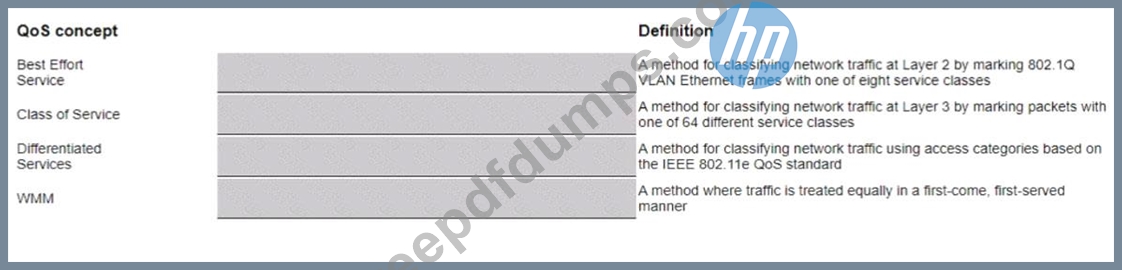
Match the appropriate QoS concept with its definition.
Correct Answer:
Explanation
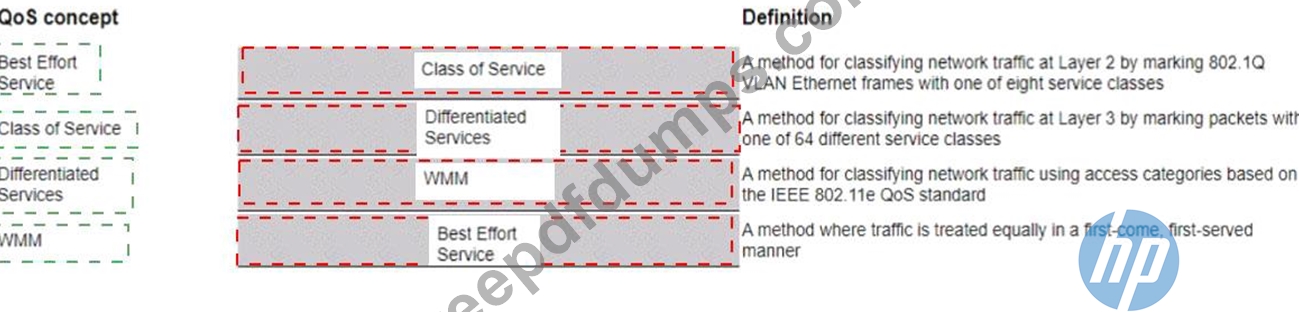
QoS Quality of Service (QoS) is a set of techniques that manage network resources and provide different levels of service to different types of traffic based on their requirements. QoS can improve network performance, reduce latency, increase throughput, and prevent congestion. concept and its definition. Here is my answer:
QoS Concept:
Best Effort Service
Class of Service
Differentiated Services
WMM ====================== Definition:
d) A method where traffic is treated equally in a first-come, first-served manner a) A method for classifying network traffic at Layer 2 by marking 802.1Q VLAN Ethernet frames with one of eight service classes b) A method for classifying network traffic at Layer 3 by marking packets with one of 64 different service classes c) A method for classifying network traffic using access categories based on the IEEE 802.11e QoS standard Short But Comprehensive Explanation of Correct Answer Only: The correct match between QoS concept and its definition is as follows:
Best Effort Service: This is a method where traffic is treated equally in a first-come, first-served manner without any prioritization or differentiation. This is the default service level for most networks and applications that do not have specific QoS requirements or guarantees. Best Effort Service does not provide any assurance of bandwidth, delay, jitter, or packet loss.
Class of Service: This is a method for classifying network traffic at Layer 2 by marking 802.1Q VLAN Ethernet frames with one of eight service classes (0 to 7). These service classes are also known as IEEE
802.1p priority values or PCP Priority Code Point (PCP) is a 3-bit field in the 802.1Q VLAN tag that indicates the priority level of an Ethernet frame . Class of Service allows network devices to identify and handle different types of traffic based on their priority levels. Class of Service is typically used in LAN Local Area Network (LAN) is a network that connects devices within a limited geographic area, such as a home, office, or building environments where Layer 2 switching is predominant.
Differentiated Services: This is a method for classifying network traffic at Layer 3 by marking packets with one of 64 different service classes (0 to 63). These service classes are also known as DiffServ Code Points (DSCP) DiffServ Code Point (DSCP) is a 6-bit field in the IP header that indicates the service class of a packet . Differentiated Services allows network devices to identify and handle different types of traffic based on their service classes. Differentiated Services is typically used in WAN Wide Area Network (WAN) is a network that connects devices across a large geographic area, such as a country or continent environments where Layer 3 routing is predominant.
WMM: This is a method for classifying network traffic using access categories based on the IEEE
802.11e QoS standard. WMM stands for Wi-Fi Multimedia and it is a certification program developed by the Wi-Fi Alliance to enhance QoS for wireless networks. WMM defines four access categories (AC): Voice, Video, Best Effort, and Background. These access categories correspond to different priority levels and contention parameters for wireless traffic. WMM allows wireless devices to identify and handle different types of traffic based on their access categories.
References: https://en.wikipedia.org/wiki/Quality_of_service
https://www.cisco.com/c/en/us/td/docs/ios-xml/ios/qos_dfsrv/configuration/xe-16/qos-dfsrv-xe-16-book/qos-dfsr
https://www.cisco.com/c/en/us/support/docs/wireless-mobility/wireless-lan-wlan/81831-qos-wlan.html
https://www.wi-fi.org/discover-wi-fi/wi-fi-certified-wmm
HPE6-A85 Exam Question 14
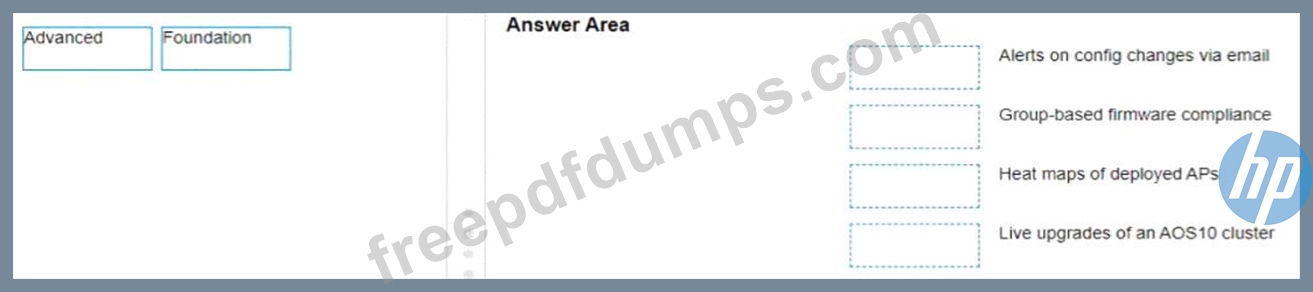
A network administrator with existing IAP-315 access points is interested in Aruba Central and needs to know which license is required for specific features Please match the required license per feature (Matches may be used more than once.)
Correct Answer:

Explanation
a) Alerts on config changes via email - Foundation b) Group-based firmware compliance - Foundation c) Heat maps of deployed APs - Advanced d) Live upgrades of an AOS10 cluster - Advanced According to the Aruba Central Licensing Guide1, the Foundation License provides basic device management features such as configuration, monitoring, alerts, reports, firmware management, etc. The Advanced License provides additional features such as AI insights, WLAN services, NetConductor Fabric, heat maps, live upgrades, etc.
https://www.arubanetworks.com/techdocs/central/2.5.3/content/pdfs/licensing-guide.pdf
HPE6-A85 Exam Question 15
When using Aruba Central what can identify recommended steps to resolve network health issues and allows you to share detailed information with support personnel?
Correct Answer: B
Explanation
OAlOps is a feature of Aruba Central that uses artificial intelligence and machine learning to identify recommended steps to resolve network health issues and allows you to share detailed information with support personnel. OAlOps provides insights into network performance, root cause analysis, anomaly detection, proactive alerts, and automated remediation actions.OAlOps also integrates with Aruba User Experience Insight (UXI) sensors to measure and improve user experience across wired and wireless networks.
References:https://www.arubanetworks.com/assets/ds/DS_ArubaCentral.pdf
OAlOps is a feature of Aruba Central that uses artificial intelligence and machine learning to identify recommended steps to resolve network health issues and allows you to share detailed information with support personnel. OAlOps provides insights into network performance, root cause analysis, anomaly detection, proactive alerts, and automated remediation actions.OAlOps also integrates with Aruba User Experience Insight (UXI) sensors to measure and improve user experience across wired and wireless networks.
References:https://www.arubanetworks.com/assets/ds/DS_ArubaCentral.pdf
- Other Version
- 659HP.HPE6-A85.v2026-09-23.q64
- 2115HP.HPE6-A85.v2025-10-09.q102
- 883HP.HPE6-A85.v2024-09-20.q46
- 1132HP.HPE6-A85.v2024-08-21.q58
- Latest Upload
- 138Fortinet.NSE6_FNC_AD-7.6.v2026-11-09.q39
- 133Salesforce.AP-222.v2026-11-09.q64
- 126VMware.3V0-12.26.v2026-11-09.q29
- 268Cisco.350-901.v2026-11-07.q332
- 246Cisco.200-201.v2026-11-07.q272
- 212Microsoft.AI-901.v2026-11-07.q56
- 234Microsoft.AZ-700.v2026-11-06.q141
- 187CWNP.CWNA-109.v2026-11-06.q84
- 155Databricks.Databricks-Generative-AI-Engineer-Associate.v2026-11-06.q42
- 205EC-COUNCIL.312-40.v2026-11-05.q82
[×]
Download PDF File
Enter your email address to download HP.HPE6-A85.v2023-07-31.q28 Practice Test