

CKS Exam Question 1
SIMULATION
Context
You must fully integrate a container image scanner into the kubeadm provisioned cluster.
Task
Given an incomplete configuration located at /etc/kubernetes/bouncer and a functional container image scanner with an HTTPS endpoint at https://smooth-yak.local/review, perform the following tasks to implement a validating admission controller.
First, re-configure the API server to enable all admission plugin(s) to support the provided AdmissionConfiguration.
Next, re-configure the ImagePolicyWebhook configuration to deny images on backend failure.
Next, complete the backend configuration to point to the container image scanner's endpoint at https://smooth-yak.local/review.
Finally, to test the configuration, deploy the test resource defined in /home/candidate/vulnerable.yaml which is using an image that should be denied.
You may delete and re-create the resource as often as needed.
The container image scanner's log file is located at /var/log/nginx/access_log.
Context
You must fully integrate a container image scanner into the kubeadm provisioned cluster.
Task
Given an incomplete configuration located at /etc/kubernetes/bouncer and a functional container image scanner with an HTTPS endpoint at https://smooth-yak.local/review, perform the following tasks to implement a validating admission controller.
First, re-configure the API server to enable all admission plugin(s) to support the provided AdmissionConfiguration.
Next, re-configure the ImagePolicyWebhook configuration to deny images on backend failure.
Next, complete the backend configuration to point to the container image scanner's endpoint at https://smooth-yak.local/review.
Finally, to test the configuration, deploy the test resource defined in /home/candidate/vulnerable.yaml which is using an image that should be denied.
You may delete and re-create the resource as often as needed.
The container image scanner's log file is located at /var/log/nginx/access_log.
CKS Exam Question 2
SIMULATION
Create a new ServiceAccount named backend-sa in the existing namespace default, which has the capability to list the pods inside the namespace default.
Create a new Pod named backend-pod in the namespace default, mount the newly created sa backend-sa to the pod, and Verify that the pod is able to list pods.
Ensure that the Pod is running.
Create a new ServiceAccount named backend-sa in the existing namespace default, which has the capability to list the pods inside the namespace default.
Create a new Pod named backend-pod in the namespace default, mount the newly created sa backend-sa to the pod, and Verify that the pod is able to list pods.
Ensure that the Pod is running.
CKS Exam Question 3
SIMULATION

Context
A container image scanner is set up on the cluster, but it's not yet fully integrated into the cluster s configuration. When complete, the container image scanner shall scan for and reject the use of vulnerable images.
Task

Given an incomplete configuration in directory /etc/kubernetes/epconfig and a functional container image scanner with HTTPS endpoint https://wakanda.local:8081 /image_policy :
1. Enable the necessary plugins to create an image policy
2. Validate the control configuration and change it to an implicit deny
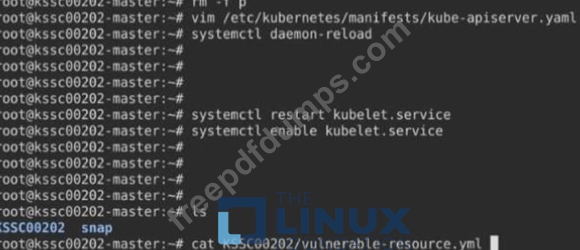
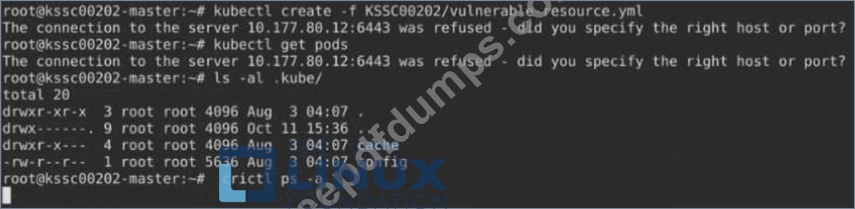
3. Edit the configuration to point to the provided HTTPS endpoint correctly Finally, test if the configuration is working by trying to deploy the vulnerable resource /root/KSSC00202/vulnerable-resource.yml.

Context
A container image scanner is set up on the cluster, but it's not yet fully integrated into the cluster s configuration. When complete, the container image scanner shall scan for and reject the use of vulnerable images.
Task
Given an incomplete configuration in directory /etc/kubernetes/epconfig and a functional container image scanner with HTTPS endpoint https://wakanda.local:8081 /image_policy :
1. Enable the necessary plugins to create an image policy
2. Validate the control configuration and change it to an implicit deny
3. Edit the configuration to point to the provided HTTPS endpoint correctly Finally, test if the configuration is working by trying to deploy the vulnerable resource /root/KSSC00202/vulnerable-resource.yml.







CKS Exam Question 4
SIMULATION
use the Trivy to scan the following images,
1. amazonlinux:1
2. k8s.gcr.io/kube-controller-manager:v1.18.6
Look for images with HIGH or CRITICAL severity vulnerabilities and store the output of the same in /opt/trivy-vulnerable.txt
use the Trivy to scan the following images,
1. amazonlinux:1
2. k8s.gcr.io/kube-controller-manager:v1.18.6
Look for images with HIGH or CRITICAL severity vulnerabilities and store the output of the same in /opt/trivy-vulnerable.txt
CKS Exam Question 5
SIMULATION
You can switch the cluster/configuration context using the following command:
[desk@cli] $ kubectl config use-context qa
Context:
A pod fails to run because of an incorrectly specified ServiceAccount
Task:
Create a new service account named backend-qa in an existing namespace qa, which must not have access to any secret.
Edit the frontend pod yaml to use backend-qa service account
Note: You can find the frontend pod yaml at /home/cert_masters/frontend-pod.yaml
You can switch the cluster/configuration context using the following command:
[desk@cli] $ kubectl config use-context qa
Context:
A pod fails to run because of an incorrectly specified ServiceAccount
Task:
Create a new service account named backend-qa in an existing namespace qa, which must not have access to any secret.
Edit the frontend pod yaml to use backend-qa service account
Note: You can find the frontend pod yaml at /home/cert_masters/frontend-pod.yaml