

CKS Exam Question 11
SIMULATION
Cluster: dev
Master node: master1
Worker node: worker1
You can switch the cluster/configuration context using the following command:
[desk@cli] $ kubectl config use-context dev
Task:
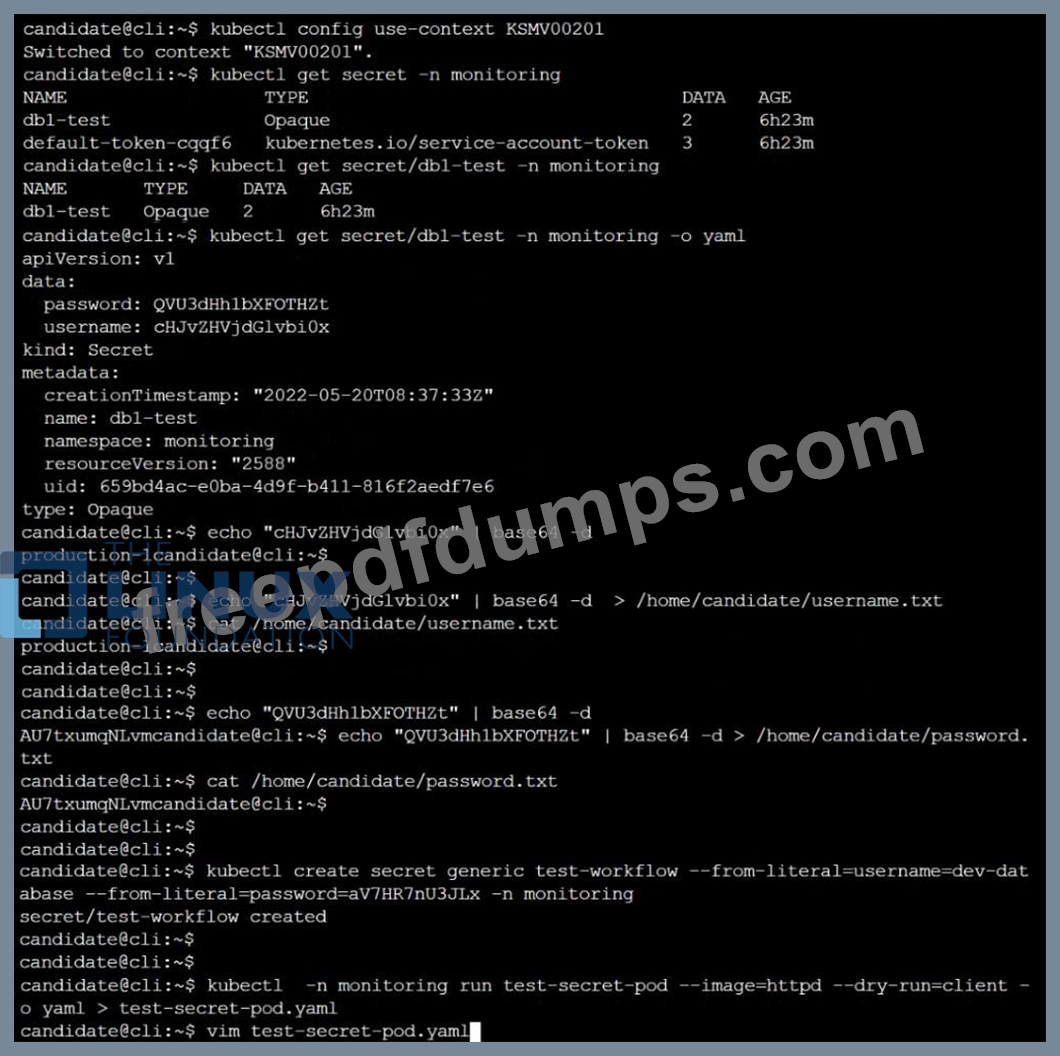
Retrieve the content of the existing secret named adam in the safe namespace.
Store the username field in a file names /home/cert-masters/username.txt, and the password field in a file named /home/cert-masters/password.txt.
1. You must create both files; they don't exist yet.
2. Do not use/modify the created files in the following steps, create new temporary files if needed.
Create a new secret names newsecret in the safe namespace, with the following content:
Username: dbadmin
Password: moresecurepas
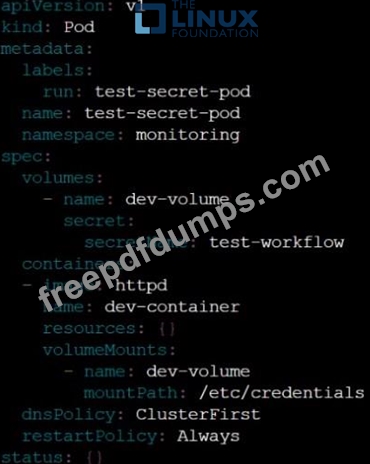
Finally, create a new Pod that has access to the secret newsecret via a volume:
Namespace: safe
Pod name: mysecret-pod
Container name: db-container
Image: redis
Volume name: secret-vol
Mount path: /etc/mysecret
Cluster: dev
Master node: master1
Worker node: worker1
You can switch the cluster/configuration context using the following command:
[desk@cli] $ kubectl config use-context dev
Task:
Retrieve the content of the existing secret named adam in the safe namespace.
Store the username field in a file names /home/cert-masters/username.txt, and the password field in a file named /home/cert-masters/password.txt.
1. You must create both files; they don't exist yet.
2. Do not use/modify the created files in the following steps, create new temporary files if needed.
Create a new secret names newsecret in the safe namespace, with the following content:
Username: dbadmin
Password: moresecurepas
Finally, create a new Pod that has access to the secret newsecret via a volume:
Namespace: safe
Pod name: mysecret-pod
Container name: db-container
Image: redis
Volume name: secret-vol
Mount path: /etc/mysecret


CKS Exam Question 12
SIMULATION


Two tools are pre-installed on the cluster's worker node:
Using the tool of your choice (including any non pre-installed tool), analyze the container's behavior for at least 30 seconds, using filters that detect newly spawning and executing processes.
Store an incident file at /opt/KSRS00101/alerts/details, containing the detected incidents, one per line, in the following format:

The following example shows a properly formatted incident file:


Two tools are pre-installed on the cluster's worker node:
Using the tool of your choice (including any non pre-installed tool), analyze the container's behavior for at least 30 seconds, using filters that detect newly spawning and executing processes.
Store an incident file at /opt/KSRS00101/alerts/details, containing the detected incidents, one per line, in the following format:
The following example shows a properly formatted incident file:


CKS Exam Question 13
SIMULATION
Documentation Ingress, Service, NGINX Ingress Controller
You must connect to the correct host . Failure to do so may result in a zero score.
[candidate@base] $ ssh cks000032
Context
You must expose a web application using HTTPS routes.
Task
Create an Ingress resource named web in the prod namespace and configure it as follows:
. Route traffic for host web.k8s.local and all paths to the existing Service web
. Enable TLS termination using the existing Secret web-cert.
. Redirect HTTP requests to HTTPS .
You can test your Ingress configuration with the following command:
[candidate@cks000032]$ curl -L http://web.k8s.local
Documentation Ingress, Service, NGINX Ingress Controller
You must connect to the correct host . Failure to do so may result in a zero score.
[candidate@base] $ ssh cks000032
Context
You must expose a web application using HTTPS routes.
Task
Create an Ingress resource named web in the prod namespace and configure it as follows:
. Route traffic for host web.k8s.local and all paths to the existing Service web
. Enable TLS termination using the existing Secret web-cert.
. Redirect HTTP requests to HTTPS .
You can test your Ingress configuration with the following command:
[candidate@cks000032]$ curl -L http://web.k8s.local
CKS Exam Question 14
SIMULATION

Context
AppArmor is enabled on the cluster's worker node. An AppArmor profile is prepared, but not enforced yet.

Task
On the cluster's worker node, enforce the prepared AppArmor profile located at /etc/apparmor.d/nginx_apparmor.
Edit the prepared manifest file located at /home/candidate/KSSH00401/nginx-pod.yaml to apply the AppArmor profile.
Finally, apply the manifest file and create the Pod specified in it.
Context
AppArmor is enabled on the cluster's worker node. An AppArmor profile is prepared, but not enforced yet.
Task
On the cluster's worker node, enforce the prepared AppArmor profile located at /etc/apparmor.d/nginx_apparmor.
Edit the prepared manifest file located at /home/candidate/KSSH00401/nginx-pod.yaml to apply the AppArmor profile.
Finally, apply the manifest file and create the Pod specified in it.


CKS Exam Question 15
SIMULATION

Task
Create a NetworkPolicy named pod-access to restrict access to Pod users-service running in namespace dev-team.
Only allow the following Pods to connect to Pod users-service:


Task
Create a NetworkPolicy named pod-access to restrict access to Pod users-service running in namespace dev-team.
Only allow the following Pods to connect to Pod users-service:


