

AZ-700 Exam Question 136
SIMULATION
Username and password
Use the following login credentials as needed:
- To enter your username, place your cursor in the Sign in box and click on the username below.
- To enter your password, place your cursor in the Enter password box and click on the password below.
- Azure Username: [email protected]
- Azure Password: xxxxxxxxxx
- If the Azure portal does not load successfully in the browser, press CTRL-K to reload the portal in a new browser tab.
The following information is for technical support purposes only:
- Lab Instance: 12345678
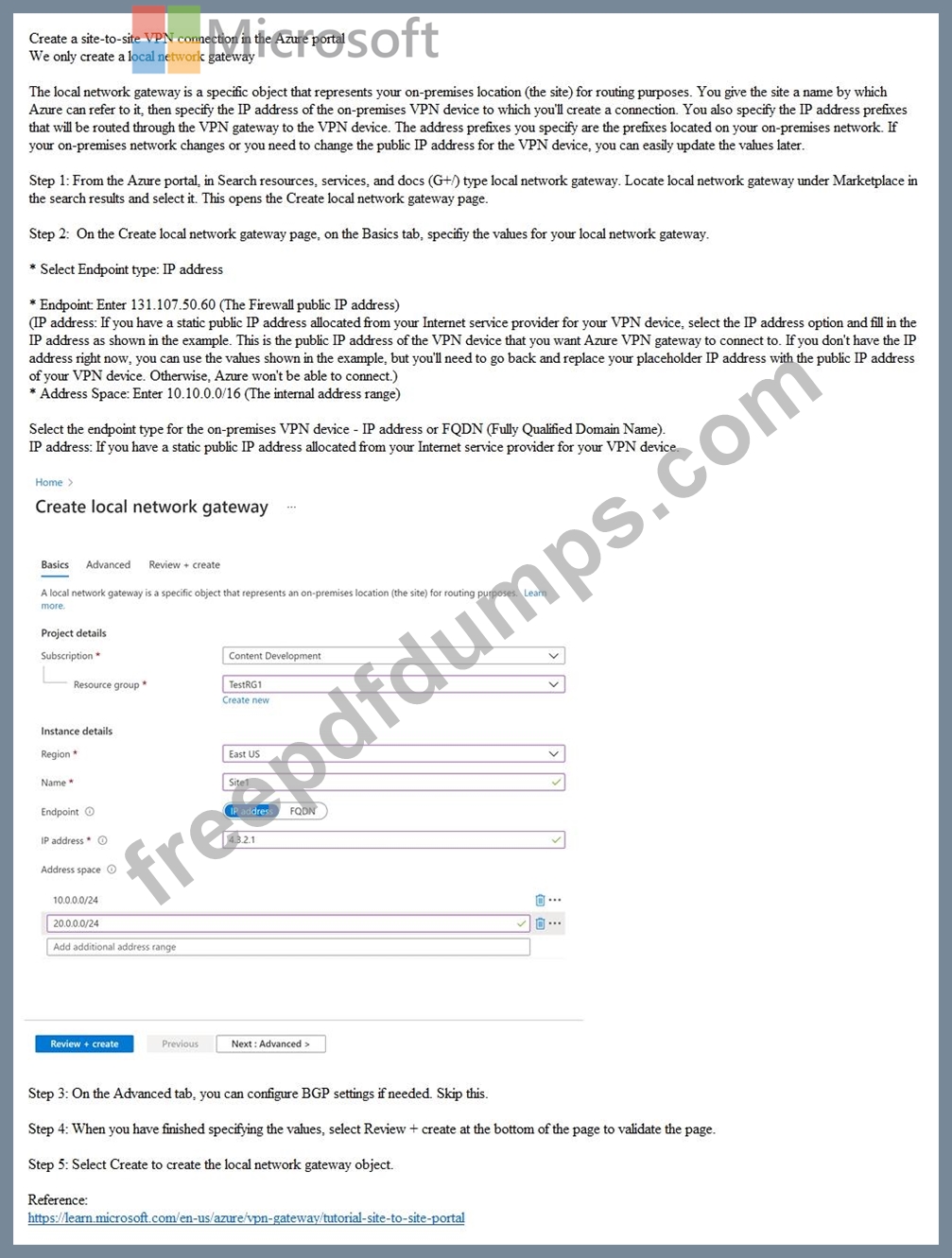
You are preparing to connect your on-premises network to VNET4 by using a Site-to-Site VPN.
The on-premises endpoint of the VPN will be created on a firewall named Firewall1.
The on-premises network has the following configuration:
- internal address range: 10.10.0.0/16
- Firewall1 internal IP address: 10.10.1.1
- Firewall public IP address: 131.107.50.60
BGP is NOT used.
You need to create the object that will provide the IP addressing configuration of the on-premises network to the Site-to-Site VPN. You do NOT need to create a virtual network gateway to complete this task.
To complete this task, sign in to the Azure portal.
Username and password
Use the following login credentials as needed:
- To enter your username, place your cursor in the Sign in box and click on the username below.
- To enter your password, place your cursor in the Enter password box and click on the password below.
- Azure Username: [email protected]
- Azure Password: xxxxxxxxxx
- If the Azure portal does not load successfully in the browser, press CTRL-K to reload the portal in a new browser tab.
The following information is for technical support purposes only:
- Lab Instance: 12345678
You are preparing to connect your on-premises network to VNET4 by using a Site-to-Site VPN.
The on-premises endpoint of the VPN will be created on a firewall named Firewall1.
The on-premises network has the following configuration:
- internal address range: 10.10.0.0/16
- Firewall1 internal IP address: 10.10.1.1
- Firewall public IP address: 131.107.50.60
BGP is NOT used.
You need to create the object that will provide the IP addressing configuration of the on-premises network to the Site-to-Site VPN. You do NOT need to create a virtual network gateway to complete this task.
To complete this task, sign in to the Azure portal.
AZ-700 Exam Question 137
Hotspot Question
You have an Azure subscription named Sub1 that is linked to a Microsoft Entra tenant named Tenant1. Sub1 contains an Azure VPN gateway named VNetGW1.
You manually register the Azure VPN Client in Tenant1.
You need to configure VNetGW1 to support the Microsoft Entra authentication of Point-to-Site (P2S) VPN connections. The solution must ensure that users can establish P2S VPN connections by using the Azure VPN Client.
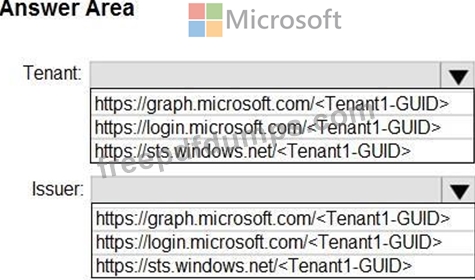
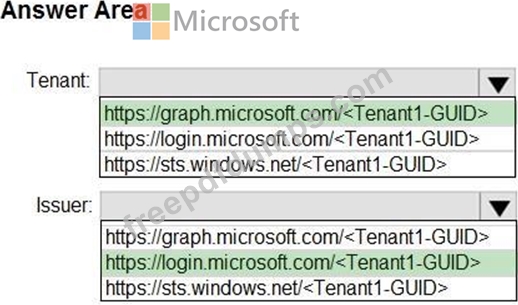
To what should you set Tenant and Issuer in the Point-to-site configuration settings of VNetGW1?
To answer, select the appropriate options in the answer area.
NOTE: Each correct selection is worth one point.
You have an Azure subscription named Sub1 that is linked to a Microsoft Entra tenant named Tenant1. Sub1 contains an Azure VPN gateway named VNetGW1.
You manually register the Azure VPN Client in Tenant1.
You need to configure VNetGW1 to support the Microsoft Entra authentication of Point-to-Site (P2S) VPN connections. The solution must ensure that users can establish P2S VPN connections by using the Azure VPN Client.
To what should you set Tenant and Issuer in the Point-to-site configuration settings of VNetGW1?
To answer, select the appropriate options in the answer area.
NOTE: Each correct selection is worth one point.
AZ-700 Exam Question 138
SIMULATION
Username and password
Use the following login credentials as needed:
- To enter your username, place your cursor in the Sign in box and click on the username below.
- To enter your password, place your cursor in the Enter password box and click on the password below.
- Azure Username: [email protected]
- Azure Password: xxxxxxxxxx
If the Azure portal does not load successfully in the browser, press CTRL-K to reload the portal in a new browser tab.
The following information is for technical support purposes only:
- Lab Instance: 12345678
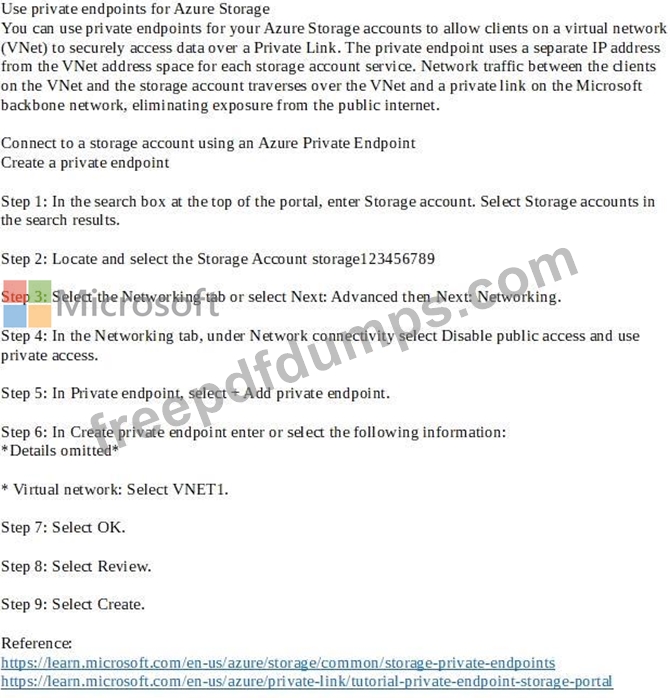
You need to ensure that only hosts on VNET1 can access the storage123456789 storage account. The solution must ensure that access occurs over the Azure backbone network.
To complete this task, sign in to the Azure portal.
Username and password
Use the following login credentials as needed:
- To enter your username, place your cursor in the Sign in box and click on the username below.
- To enter your password, place your cursor in the Enter password box and click on the password below.
- Azure Username: [email protected]
- Azure Password: xxxxxxxxxx
If the Azure portal does not load successfully in the browser, press CTRL-K to reload the portal in a new browser tab.
The following information is for technical support purposes only:
- Lab Instance: 12345678
You need to ensure that only hosts on VNET1 can access the storage123456789 storage account. The solution must ensure that access occurs over the Azure backbone network.
To complete this task, sign in to the Azure portal.
AZ-700 Exam Question 139
Hotspot Question
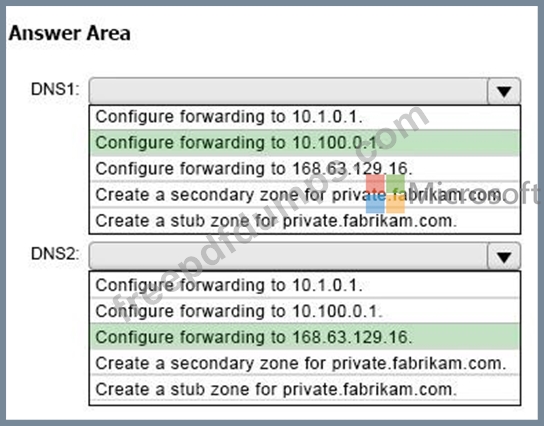
Your on-premises network contains a server named DNS1 that runs Windows Server 2022.
DNS1 has the DNS server role and an IP address of 10.1.0.1. The network contains computers that use DNS1 for name resolution.
You have an Azure subscription that contains the resources shown in the following table.
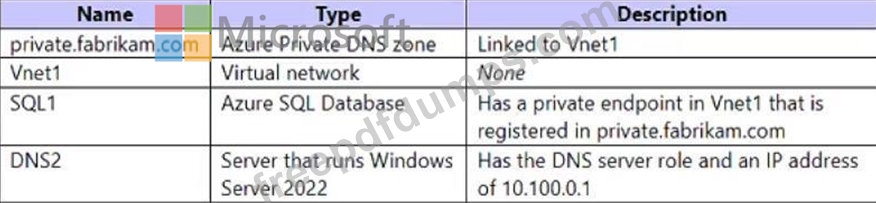
The on-premises network connects to Vnet1 by using a Site-to-Site VPN.
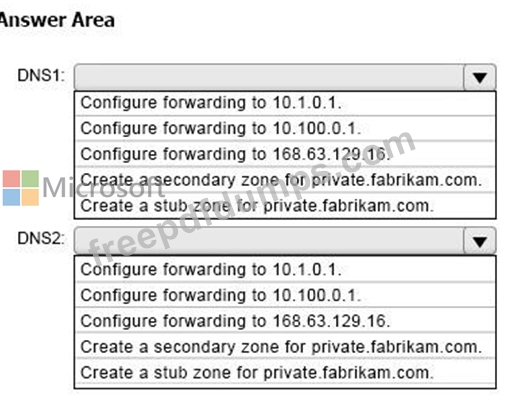
You need to ensure that the computers on the on-premises network can resolve the IP address for sql1.private.fabrikam.com.
What should you do on DNS1 and DNS2? To answer, drag the appropriate actions to the correct servers. Each action may be used once, more than once, or not at all. You may need to drag the split bar between panes or scroll to view content.
NOTE: Each correct selection is worth one point.
Your on-premises network contains a server named DNS1 that runs Windows Server 2022.
DNS1 has the DNS server role and an IP address of 10.1.0.1. The network contains computers that use DNS1 for name resolution.
You have an Azure subscription that contains the resources shown in the following table.
The on-premises network connects to Vnet1 by using a Site-to-Site VPN.
You need to ensure that the computers on the on-premises network can resolve the IP address for sql1.private.fabrikam.com.
What should you do on DNS1 and DNS2? To answer, drag the appropriate actions to the correct servers. Each action may be used once, more than once, or not at all. You may need to drag the split bar between panes or scroll to view content.
NOTE: Each correct selection is worth one point.
AZ-700 Exam Question 140
You have an Azure subscription that contains an Azure App Service web app named WebApp1 and an Azure Front Door profile named FDProfile1. FDProfile1 forwards requests addressed to
https://www.contoso.com to WebApp1.
You need to ensure that only requests addressed to https://www.contoso.com/users/* are forwarded to WebApp1.
What should you modify in FDProfile1?
https://www.contoso.com to WebApp1.
You need to ensure that only requests addressed to https://www.contoso.com/users/* are forwarded to WebApp1.
What should you modify in FDProfile1?