AZ-801 Exam Question 96
When you try to start a Windows Server VM, you get an error. You have no idea why this startup failed. What can you do first to determine the possible cause?
AZ-801 Exam Question 97
Drag and Drop Question
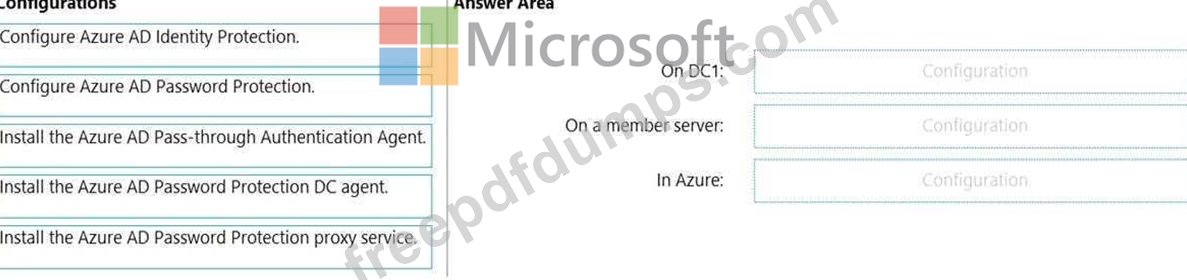
You have an on-premises Active Directory Domain Services (AD DS) domain that syncs with an Azure Active Directory (Azure AD) tenant.
The AD DS domain contains a domain controller named DC1. DC1 does NOT have internet access.
You need to configure password security for on-premises users. The solution must meet the following requirements:
- Prevent the users from using known weak passwords.
- Prevent the users from using the company name in passwords.
What should you do? To answer, drag the appropriate configurations to the correct targets. Each configuration may be used once, more than once, or not at all. You may need to drag the split bar between panes or scroll to view content.
NOTE: Each correct selection is worth one point.
You have an on-premises Active Directory Domain Services (AD DS) domain that syncs with an Azure Active Directory (Azure AD) tenant.
The AD DS domain contains a domain controller named DC1. DC1 does NOT have internet access.
You need to configure password security for on-premises users. The solution must meet the following requirements:
- Prevent the users from using known weak passwords.
- Prevent the users from using the company name in passwords.
What should you do? To answer, drag the appropriate configurations to the correct targets. Each configuration may be used once, more than once, or not at all. You may need to drag the split bar between panes or scroll to view content.
NOTE: Each correct selection is worth one point.

AZ-801 Exam Question 98
Case Study 2 - Contoso, Ltd
Overview
Contoso, Ltd. is a manufacturing company that has a main office in Seattle and branch offices in Los Angeles and Montreal.
Existing Environment
Active Directory Environment
Contoso has an on-premises Active Directory Domain Services (AD DS) domain named contoso.com that syncs with an Azure Active Directory (Azure AD) tenant. The AD DS domain contains the domain controllers shown in the following table.

Contoso recently purchased an Azure subscription.
The functional level of the forest is Windows Server 2012 R2. The functional level of the domain is Windows Server 2012. The forest has the Active Directory Recycle Bin enabled.
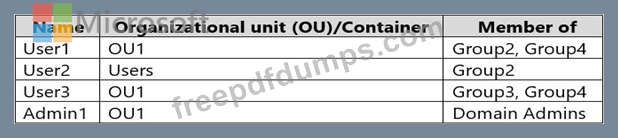
The contoso.com domain contains the users shown in the following table.
The contoso.com domain has the Group Policy Objects (GPOs) shown in the following table.

The contoso.com domain has the Password Settings Objects (PSOs) shown in the following table.

Server Infrastructure
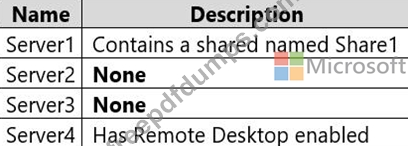
The contoso.com domain contains servers that run Windows Server 2022 as shown in the following table.
By using Windows Firewall with Advanced Security, the servers have isolation connection security rules configured as shown in the following table.
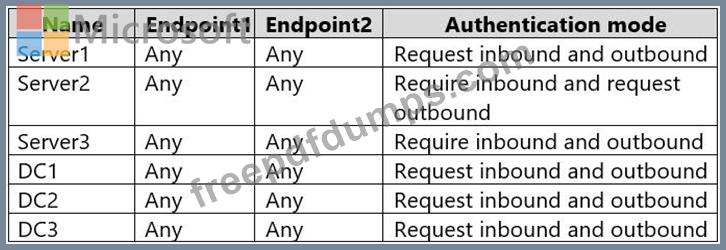
Server4 has no connection security rules.
Server4 Configurations
Server4 has the effective Group Policy settings for user rights as shown in the following table.

Server4 has the disk configurations shown in the following exhibit.
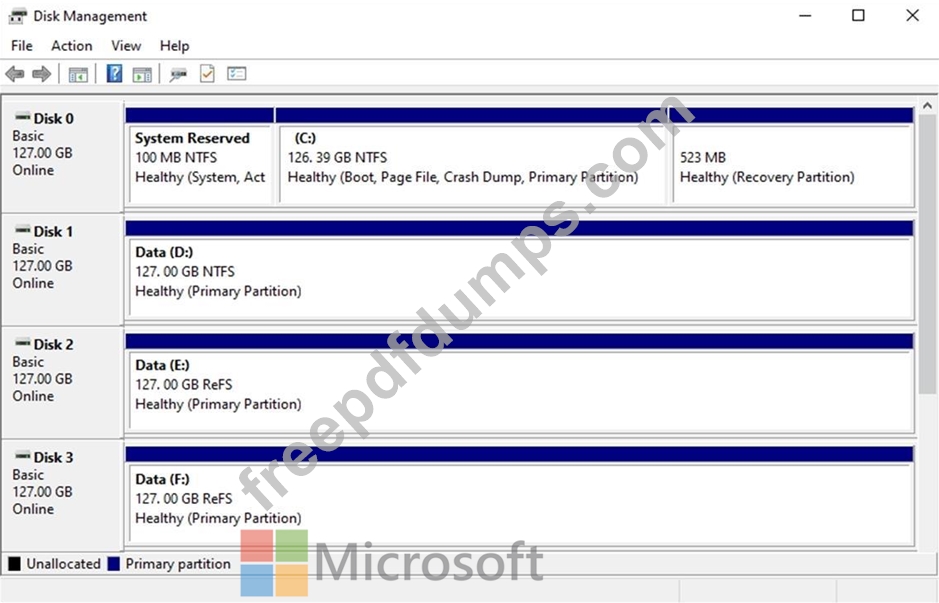
Virtualization Infrastructure
The contoso.com domain has the Hyper-V failover clusters shown in the following table.

Technical Requirements
Contoso identifies the following technical requirements:
* Promote a new server named DC4 that runs to Windows Server 2022 to a domain controller.
* Replicate the virtual machines from Cluster2 to an Azure Recovery Services vault.
* Centrally manage performance alerts in Azure for all the domain controllers.
* Ensure that User1 can recover objects from the Active Directory Recycle Bin.
* Migrate Share1 to Server2, including all the share and folder permissions.
* Back up Server4 and all data to an Azure Recovery Services vault.
* Use Hyper-V Replica to protect the virtual machines in Cluster3.
* Implement BitLocker Drive Encryption (BitLocker) on Server4.
* Whenever possible, use the principle of least privilege.
You need to back up Server 4 to meet the technical requirements.
What should you do first?
Overview
Contoso, Ltd. is a manufacturing company that has a main office in Seattle and branch offices in Los Angeles and Montreal.
Existing Environment
Active Directory Environment
Contoso has an on-premises Active Directory Domain Services (AD DS) domain named contoso.com that syncs with an Azure Active Directory (Azure AD) tenant. The AD DS domain contains the domain controllers shown in the following table.
Contoso recently purchased an Azure subscription.
The functional level of the forest is Windows Server 2012 R2. The functional level of the domain is Windows Server 2012. The forest has the Active Directory Recycle Bin enabled.
The contoso.com domain contains the users shown in the following table.
The contoso.com domain has the Group Policy Objects (GPOs) shown in the following table.
The contoso.com domain has the Password Settings Objects (PSOs) shown in the following table.
Server Infrastructure
The contoso.com domain contains servers that run Windows Server 2022 as shown in the following table.
By using Windows Firewall with Advanced Security, the servers have isolation connection security rules configured as shown in the following table.
Server4 has no connection security rules.
Server4 Configurations
Server4 has the effective Group Policy settings for user rights as shown in the following table.
Server4 has the disk configurations shown in the following exhibit.
Virtualization Infrastructure
The contoso.com domain has the Hyper-V failover clusters shown in the following table.
Technical Requirements
Contoso identifies the following technical requirements:
* Promote a new server named DC4 that runs to Windows Server 2022 to a domain controller.
* Replicate the virtual machines from Cluster2 to an Azure Recovery Services vault.
* Centrally manage performance alerts in Azure for all the domain controllers.
* Ensure that User1 can recover objects from the Active Directory Recycle Bin.
* Migrate Share1 to Server2, including all the share and folder permissions.
* Back up Server4 and all data to an Azure Recovery Services vault.
* Use Hyper-V Replica to protect the virtual machines in Cluster3.
* Implement BitLocker Drive Encryption (BitLocker) on Server4.
* Whenever possible, use the principle of least privilege.
You need to back up Server 4 to meet the technical requirements.
What should you do first?
AZ-801 Exam Question 99
You have two servers named Host1 and Host2 that run Windows Server and have the Hyper-V server role installed. Host2 is configured as a replica server.
Host1 contains a virtual machine named VM1.
You plan to use Hyper-V Replica to replicate VM1 to Host2.
You need to ensure that you can restore a replica of VM1 to a specific state from the past eight hours.
What should you do?
Host1 contains a virtual machine named VM1.
You plan to use Hyper-V Replica to replicate VM1 to Host2.
You need to ensure that you can restore a replica of VM1 to a specific state from the past eight hours.
What should you do?
AZ-801 Exam Question 100
Hotspot Question
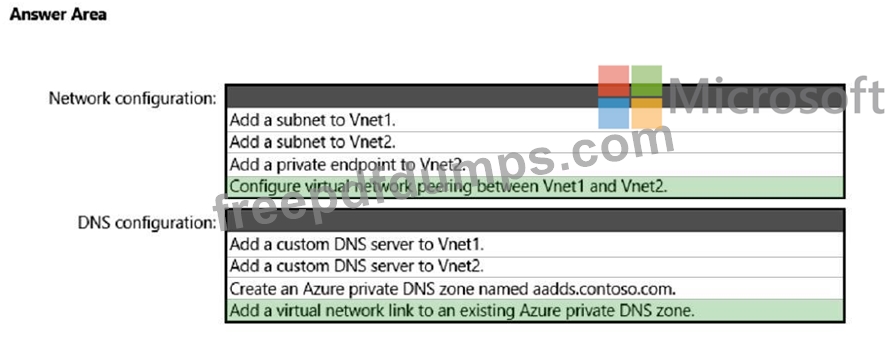
You have an Azure Active Directory Domain Services (Azure AD DS) domain named aadds.contoso.com.
You have an Azure virtual network named Vnet1. Vnet1 contains two virtual machines named VM1 and VM2 that run Windows Server. VM1 and VM2 are joined to aadds.contoso.com.
You create a new Azure virtual network named Vnet2. You add a new server named VM3 to Vnet2.
When you attempt to join VM3 to aadds.contoso.com, you get an error message that the domain cannot be found.
You need to ensure that you can join VM3 to aadds.contoso.com.
What should you do? To answer, select the appropriate options in the answer area.
NOTE: Each correct selection is worth one point.

You have an Azure Active Directory Domain Services (Azure AD DS) domain named aadds.contoso.com.
You have an Azure virtual network named Vnet1. Vnet1 contains two virtual machines named VM1 and VM2 that run Windows Server. VM1 and VM2 are joined to aadds.contoso.com.
You create a new Azure virtual network named Vnet2. You add a new server named VM3 to Vnet2.
When you attempt to join VM3 to aadds.contoso.com, you get an error message that the domain cannot be found.
You need to ensure that you can join VM3 to aadds.contoso.com.
What should you do? To answer, select the appropriate options in the answer area.
NOTE: Each correct selection is worth one point.