

MB-240 Exam Question 26
The company has hired a new manager to set up and configure Field Service to automatically schedule work orders to the most appropriate resource scheduling.
The manager is unable to optimize requirements and bookings related to work orders.
Which three settings are required? Each correct answer presents part of the solution.
The manager is unable to optimize requirements and bookings related to work orders.
Which three settings are required? Each correct answer presents part of the solution.
MB-240 Exam Question 27
Note: This question is part of a series of questions that present the same scenario. Each question in the series contains a unique solution that might meet stated goals. Some question sets might have more than one correct solution, while others might not have a correct solution.
After you answer a question in this section, you will NOT be able to return to it. As a result, these questions will not appear in the review screen.
You are a Dynamics 365 for Field Service system administrator.
You are configuring a new instance of Dynamics 365 for Field Service. The organization needs to automatically generate work orders based on agreements, and send invoices on a recurring basis by customer.
Solution: You implement the following configuration changes.
1) Create Agreement
2) Define Agreement Products
3) Set Booking Recurrence
4) Create Invoice Setup
5) Define Invoice Recurrence
Does this meet the goal?
After you answer a question in this section, you will NOT be able to return to it. As a result, these questions will not appear in the review screen.
You are a Dynamics 365 for Field Service system administrator.
You are configuring a new instance of Dynamics 365 for Field Service. The organization needs to automatically generate work orders based on agreements, and send invoices on a recurring basis by customer.
Solution: You implement the following configuration changes.
1) Create Agreement
2) Define Agreement Products
3) Set Booking Recurrence
4) Create Invoice Setup
5) Define Invoice Recurrence
Does this meet the goal?
MB-240 Exam Question 28
Case Study 1 - Litware, Inc
Overview. Company structure
Litware, Inc. is a multi-national home improvement retail company with stores around the world.
Litware, Inc. also offers various installation and repair services using a combination of employees and subcontractors.
Litware, Inc. has stores located throughout the United States and Canada. The company has three main types of stores:
1. DIY Stores are retail and contractor stores with supply items for DIY projects.
- Offer electrical, lightning and other home improvement items.
- Only offer delivery and installation services for major appliances.
2. Pro Stores offer design ideas for major home renovations.
- Staffed with design experts for every major category, expert installation services, service technicians, and site coordinators.
3. Home Improvement Stores offer the convenience of purchasing items available in the DIY stores, but also include the expert design, installation and repair services offered in the Pro Stores.
Overview. Staff
Each type of store has a different combination of designers, service technicians and installers.
DIY Stores
- Installers
- Work 8am-6pm Monday to Friday.
- Saturdays and Sundays are generally off days.
- Delivery
- Pick up at the local warehouse for each store.
- Delivery personnel have a rotating work schedule. Monday to Friday every other week.
Wednesday to Sunday every other week.
Pro Stores
- Designers
- Work various hours and days of the week.
- Assigned to a department based on skills and expertise.
- Installers
- Work 8am-6pm Monday to Friday.
- Assigned to a geographic region.
- Repair Technicians
- Normal work hours 8am-6pm Monday to Friday.
- Nights and weekends for emergencies only, based on availability.
- These are all subcontractors.
Home Improvement Stores
- Designers
- Assigned to a department based on skills and expertise.
- Delivery
- Pick up at the local warehouse for each store.
- Delivery personnel have a rotating work schedule. Monday to Friday every other week.
Wednesday to Sunday every other week.
- Installers
- Work 8am-6pm Monday to Friday.
- Assigned to multiple stores in a geographic region.
- Repair Technicians
- Normal work hours 8am-6pm Monday to Friday.
- Nights and weekends for emergencies only, based on availability.
- These are all subcontractors.
- Dispatchers
- Assigned to all territories in the region.
- Assign repair and installation work to technicians based on skill.
All internal delivery, repair and installation employees will utilize the Field Service mobile app.
Litware, Inc. employees will have full-service licenses, while subcontractors will not.
Overview. Regions
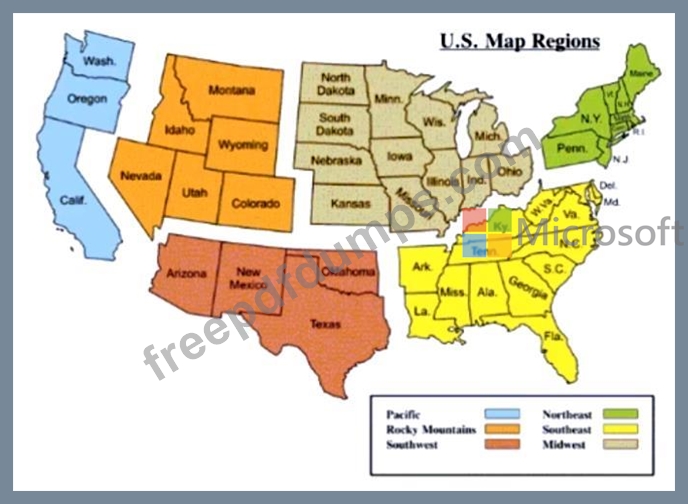
Dispatchers can see all work request data for their region, including resources.
The United States regions are:
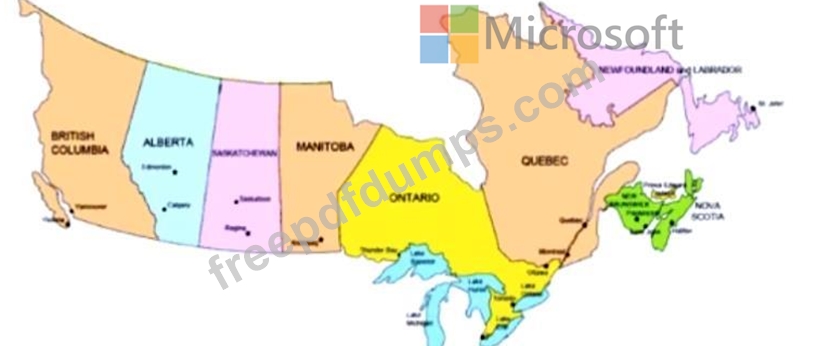
Canadian regions are broken down by province where Litware, Inc. either has stores or provides services:
Existing Environment. Data management structure
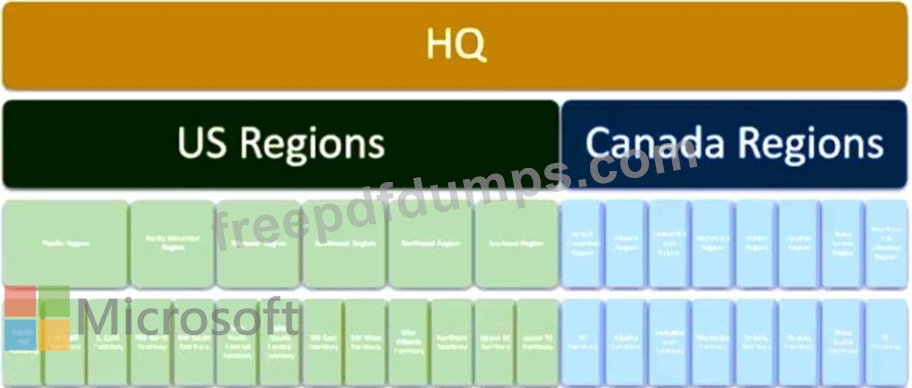
Litware, Inc, store employees can see data within their region. This is to provide better support of customers and stores within the regions.
The current data access structure appears as follows:
Existing Environment. Field Service difficulties
Typical job assignment is as follows:
- Appliance Delivery & Hookup: 2 resources - subcontracted out
- Landscaping: minimum 2 resources. 1 expert
- Carpeting: 2-3 resources
- Tile Flooring: 2 resources
- Kitchen Cabinets: 3 resources
- Hardwood Flooring: 2 resources
- Repairs: 1-2 resources
A spreadsheet tracks the skills and certifications earned by each internal employee. They are:

The Skill Proficiency Model used at Litware, Inc. is as follows:
1- Novice
2 - Inexperienced
3 - Moderate Experience
4 - Experienced
5 - Expert/Certified
For each type of job, there must be at least one certified or highly experienced resource on the job. Their current system does not have a way to share technical documents and instructions with the technicians and have them review it while onsite.
All work is printed out and the provided to the resources. Contractors are currently emailed the job details to which they need to confirm availability. Contractors sometimes decline work. In some of these cases, the Litware, Inc. dispatch team does not react quickly to this information and the customer's work or delivery is delayed.
Existing Environment. Customer base
Currently all customers and their data are held in Dynamics 365 Finance and Operations (D365 F&O).
- Most store employees do not have access to this data as it is currently being implemented for backend features, such as inventory and invoicing.
- Designers and those scheduling can pull up a customer and their pending orders and installations, but they cannot see the payment details and terms.
85% of Litware's customers are households.
15% are construction-based companies that either purchase or hire Litware, Inc. for specific jobs.
- Most of these companies receive a 5-10% discount on supplies and 10% discount on labor.
- Some are Non-Profit Organizations (NPOs) and they receive a flat 15% discount.
Requirements. Planned changes
Litware, Inc. plans to implement Dynamics 365 Field Service. The requirements gathered during analysis are:
Work Orders and Scheduling
- Scheduling based on resource skill, and number of required resources based on job type and duration.
- Preventative Maintenance emergency calls take priority over other types of jobs.
- Schedule resources based on location, maximizing total work hours and then minimizing drive time.
- All HVAC down jobs require a resource to be onsite at the customer location within 2 hours, per contract terms.
- Some high-end HVAC systems can tell the company when the system is experiencing issues.
Alert dispatchers when this occurs if this feature is enabled and purchased.
- Set contractually obligated times for HVAC down jobs.
- Set reminders or see critical details to act on for a job.
- Ability to quickly book a job.
- Easily see when a resource is on Paid Time Off on the schedule board.
Service Contracts
- Set up and create a Preventative Maintenance (PM) type of contracts.
- PM contracts are only for HVAC systems. Semi-annual maintenance jobs should be created 30- days before they are to be scheduled.
- Preventative Maintenance
- Semi-annual inspections
- Discount on any required parts and additional labor.
- Include 24-hour emergency service calls at no-charge.
Extended Warranties
- Ability to setup and create an Extended Warranty type of contracts.
- Start when Manufacturer warranty ends.
- Can be purchased for 1, 2 or 3 years and include all parts and labor.
Products and Services
- Integration between D365 F&O and D365 Field Service.
- Implement a parts return process for any unused or defective part during an installation job.
- Multiple price lists will be used, based on region and customer type (retail, NPO, construction).
Resources
- Implement company holidays for US and Canada.
- Implement various pay types based on OT, Weekends/Holidays, Travel and Regular Time.
- Implement Paid Time Off.
Optimize resource schedules
- Access to jobs assigned for the day.
- Specialty equipment scheduled on work orders as needed.
System
- Geocoding will be activated throughout the system.
- Territories will be used for Accounts, Resources and Work Orders.
- Enable SharePoint integration.
Requirements. Technical requirements
Invoicing
- Send Work Order details to D365 F&O when a job is completed, and after internal reviews are performed.
- The system must track the price of resources based on holidays and after-hours scenarios at a rate of one and a half times the normal billing rate.
- Travel time is non-billable. Travel time should be captured as normal billing rate.
- A Delivery Fee of $75 is charged for each order.
- Subcontractor travel time is non-billable but is paid to the subcontractor company by Litware, Inc.
Resources
- Contractor technicians require access to work order and customer details once assigned to a booking. They do not have a license.
- Dispatchers need a schedule board for their region(s).
- Resources have access to view their skills, skill level and certification data.
- Certifications set to expire over the next 120 days should show highlighted in Yellow.
- Certifications already expired will show in Red.
- Resources will be notified when they enter or leave a job, or are assigned a job for the day.
- Resource booking automatically updated when they enter job site.
- High priority jobs will send an alert to the resources' phone and send them a text message.
- Resources assigned to a job where their skill level = 1 will be assigned to an experienced resource for 3 months.
- Resources on the job can use their smartphone to call and obtain assistance.
- Resources can access documents either online or offline.
Products and Services
- All parts removed from a customer's equipment must be returned to the Main warehouse.
- All parts not used or deemed defective during an installation must be returned to the originating warehouse.
- All appliances and parts will become part of the customer record.
- All products are received into the Main warehouse and then distributed to van stock for delivery or installation.
- All assets that have an expired manufacturer warranty should show a notification.
Work Orders
- The ability to have templates for work orders. Templates will provide guidance for technicians, and recommend products and default services.
- Work Orders created from a PM contract need to have a status = Service Contract.
- Work Orders created from an Extended Warranty contract need to have a status = Extended Warranty
- All HVAC down work orders must be set to high priority.
- All emergency, and contractual Work Orders must be created, reviewed and dispatched within 1 hour. A technician must be onsite within 2 hours.
- All Work Orders created from a PM are non-billable.
- All Extended Warranty jobs must include a flat service fee of $75.
Scheduling
- High Priority work orders for HVAC down cannot be moved once scheduled.
- Work Orders scheduled to technician(s) who do not have the desired skill set and level should show a warning.
- If scheduled, it will send an approval record to the manager to approve the assignment.
Approved are booked. Rejected are canceled and the dispatcher notified.
- Dispatchers will assign multi-day work orders, such as kitchen cabinets, bathrooms, landscaping, to the same group of resources for the duration of the work.
- All work orders for an existing asset, where the asset does not have an active manufacturer's warranty, or a valid extended warranty should show an alert upon scheduling.
- Resources should be optimized for high priority items, maximize their work hours and then minimize travel time.
Security and access
- Safeguards must be in place for the data on the Field Service Mobile app if a technician loses his mobile device.
- Technicians in the field should only see work orders scheduled for today.
- Field Service administrators need the ability to update the defaults for the schedule assistant.
Accounts
- NPO customers should be assigned the NPO pricing.
- NPO customers are tax exempt. They are the only customers that do not get charged tax on products or services.
- Construction-Based customers should be assigned the Construction-based pricing.
All delivery charges must be automatically added to any Delivery work order, and the price must be set and locked. The delivery charge must be set up in a way so that it is invoiced upon delivery completion.
Which three steps should you take to set up the invoice? Each correct answer presents part of the solution.
NOTE: Each correct selection is worth one point.
Overview. Company structure
Litware, Inc. is a multi-national home improvement retail company with stores around the world.
Litware, Inc. also offers various installation and repair services using a combination of employees and subcontractors.
Litware, Inc. has stores located throughout the United States and Canada. The company has three main types of stores:
1. DIY Stores are retail and contractor stores with supply items for DIY projects.
- Offer electrical, lightning and other home improvement items.
- Only offer delivery and installation services for major appliances.
2. Pro Stores offer design ideas for major home renovations.
- Staffed with design experts for every major category, expert installation services, service technicians, and site coordinators.
3. Home Improvement Stores offer the convenience of purchasing items available in the DIY stores, but also include the expert design, installation and repair services offered in the Pro Stores.
Overview. Staff
Each type of store has a different combination of designers, service technicians and installers.
DIY Stores
- Installers
- Work 8am-6pm Monday to Friday.
- Saturdays and Sundays are generally off days.
- Delivery
- Pick up at the local warehouse for each store.
- Delivery personnel have a rotating work schedule. Monday to Friday every other week.
Wednesday to Sunday every other week.
Pro Stores
- Designers
- Work various hours and days of the week.
- Assigned to a department based on skills and expertise.
- Installers
- Work 8am-6pm Monday to Friday.
- Assigned to a geographic region.
- Repair Technicians
- Normal work hours 8am-6pm Monday to Friday.
- Nights and weekends for emergencies only, based on availability.
- These are all subcontractors.
Home Improvement Stores
- Designers
- Assigned to a department based on skills and expertise.
- Delivery
- Pick up at the local warehouse for each store.
- Delivery personnel have a rotating work schedule. Monday to Friday every other week.
Wednesday to Sunday every other week.
- Installers
- Work 8am-6pm Monday to Friday.
- Assigned to multiple stores in a geographic region.
- Repair Technicians
- Normal work hours 8am-6pm Monday to Friday.
- Nights and weekends for emergencies only, based on availability.
- These are all subcontractors.
- Dispatchers
- Assigned to all territories in the region.
- Assign repair and installation work to technicians based on skill.
All internal delivery, repair and installation employees will utilize the Field Service mobile app.
Litware, Inc. employees will have full-service licenses, while subcontractors will not.
Overview. Regions
Dispatchers can see all work request data for their region, including resources.
The United States regions are:
Canadian regions are broken down by province where Litware, Inc. either has stores or provides services:
Existing Environment. Data management structure
Litware, Inc, store employees can see data within their region. This is to provide better support of customers and stores within the regions.
The current data access structure appears as follows:
Existing Environment. Field Service difficulties
Typical job assignment is as follows:
- Appliance Delivery & Hookup: 2 resources - subcontracted out
- Landscaping: minimum 2 resources. 1 expert
- Carpeting: 2-3 resources
- Tile Flooring: 2 resources
- Kitchen Cabinets: 3 resources
- Hardwood Flooring: 2 resources
- Repairs: 1-2 resources
A spreadsheet tracks the skills and certifications earned by each internal employee. They are:
The Skill Proficiency Model used at Litware, Inc. is as follows:
1- Novice
2 - Inexperienced
3 - Moderate Experience
4 - Experienced
5 - Expert/Certified
For each type of job, there must be at least one certified or highly experienced resource on the job. Their current system does not have a way to share technical documents and instructions with the technicians and have them review it while onsite.
All work is printed out and the provided to the resources. Contractors are currently emailed the job details to which they need to confirm availability. Contractors sometimes decline work. In some of these cases, the Litware, Inc. dispatch team does not react quickly to this information and the customer's work or delivery is delayed.
Existing Environment. Customer base
Currently all customers and their data are held in Dynamics 365 Finance and Operations (D365 F&O).
- Most store employees do not have access to this data as it is currently being implemented for backend features, such as inventory and invoicing.
- Designers and those scheduling can pull up a customer and their pending orders and installations, but they cannot see the payment details and terms.
85% of Litware's customers are households.
15% are construction-based companies that either purchase or hire Litware, Inc. for specific jobs.
- Most of these companies receive a 5-10% discount on supplies and 10% discount on labor.
- Some are Non-Profit Organizations (NPOs) and they receive a flat 15% discount.
Requirements. Planned changes
Litware, Inc. plans to implement Dynamics 365 Field Service. The requirements gathered during analysis are:
Work Orders and Scheduling
- Scheduling based on resource skill, and number of required resources based on job type and duration.
- Preventative Maintenance emergency calls take priority over other types of jobs.
- Schedule resources based on location, maximizing total work hours and then minimizing drive time.
- All HVAC down jobs require a resource to be onsite at the customer location within 2 hours, per contract terms.
- Some high-end HVAC systems can tell the company when the system is experiencing issues.
Alert dispatchers when this occurs if this feature is enabled and purchased.
- Set contractually obligated times for HVAC down jobs.
- Set reminders or see critical details to act on for a job.
- Ability to quickly book a job.
- Easily see when a resource is on Paid Time Off on the schedule board.
Service Contracts
- Set up and create a Preventative Maintenance (PM) type of contracts.
- PM contracts are only for HVAC systems. Semi-annual maintenance jobs should be created 30- days before they are to be scheduled.
- Preventative Maintenance
- Semi-annual inspections
- Discount on any required parts and additional labor.
- Include 24-hour emergency service calls at no-charge.
Extended Warranties
- Ability to setup and create an Extended Warranty type of contracts.
- Start when Manufacturer warranty ends.
- Can be purchased for 1, 2 or 3 years and include all parts and labor.
Products and Services
- Integration between D365 F&O and D365 Field Service.
- Implement a parts return process for any unused or defective part during an installation job.
- Multiple price lists will be used, based on region and customer type (retail, NPO, construction).
Resources
- Implement company holidays for US and Canada.
- Implement various pay types based on OT, Weekends/Holidays, Travel and Regular Time.
- Implement Paid Time Off.
Optimize resource schedules
- Access to jobs assigned for the day.
- Specialty equipment scheduled on work orders as needed.
System
- Geocoding will be activated throughout the system.
- Territories will be used for Accounts, Resources and Work Orders.
- Enable SharePoint integration.
Requirements. Technical requirements
Invoicing
- Send Work Order details to D365 F&O when a job is completed, and after internal reviews are performed.
- The system must track the price of resources based on holidays and after-hours scenarios at a rate of one and a half times the normal billing rate.
- Travel time is non-billable. Travel time should be captured as normal billing rate.
- A Delivery Fee of $75 is charged for each order.
- Subcontractor travel time is non-billable but is paid to the subcontractor company by Litware, Inc.
Resources
- Contractor technicians require access to work order and customer details once assigned to a booking. They do not have a license.
- Dispatchers need a schedule board for their region(s).
- Resources have access to view their skills, skill level and certification data.
- Certifications set to expire over the next 120 days should show highlighted in Yellow.
- Certifications already expired will show in Red.
- Resources will be notified when they enter or leave a job, or are assigned a job for the day.
- Resource booking automatically updated when they enter job site.
- High priority jobs will send an alert to the resources' phone and send them a text message.
- Resources assigned to a job where their skill level = 1 will be assigned to an experienced resource for 3 months.
- Resources on the job can use their smartphone to call and obtain assistance.
- Resources can access documents either online or offline.
Products and Services
- All parts removed from a customer's equipment must be returned to the Main warehouse.
- All parts not used or deemed defective during an installation must be returned to the originating warehouse.
- All appliances and parts will become part of the customer record.
- All products are received into the Main warehouse and then distributed to van stock for delivery or installation.
- All assets that have an expired manufacturer warranty should show a notification.
Work Orders
- The ability to have templates for work orders. Templates will provide guidance for technicians, and recommend products and default services.
- Work Orders created from a PM contract need to have a status = Service Contract.
- Work Orders created from an Extended Warranty contract need to have a status = Extended Warranty
- All HVAC down work orders must be set to high priority.
- All emergency, and contractual Work Orders must be created, reviewed and dispatched within 1 hour. A technician must be onsite within 2 hours.
- All Work Orders created from a PM are non-billable.
- All Extended Warranty jobs must include a flat service fee of $75.
Scheduling
- High Priority work orders for HVAC down cannot be moved once scheduled.
- Work Orders scheduled to technician(s) who do not have the desired skill set and level should show a warning.
- If scheduled, it will send an approval record to the manager to approve the assignment.
Approved are booked. Rejected are canceled and the dispatcher notified.
- Dispatchers will assign multi-day work orders, such as kitchen cabinets, bathrooms, landscaping, to the same group of resources for the duration of the work.
- All work orders for an existing asset, where the asset does not have an active manufacturer's warranty, or a valid extended warranty should show an alert upon scheduling.
- Resources should be optimized for high priority items, maximize their work hours and then minimize travel time.
Security and access
- Safeguards must be in place for the data on the Field Service Mobile app if a technician loses his mobile device.
- Technicians in the field should only see work orders scheduled for today.
- Field Service administrators need the ability to update the defaults for the schedule assistant.
Accounts
- NPO customers should be assigned the NPO pricing.
- NPO customers are tax exempt. They are the only customers that do not get charged tax on products or services.
- Construction-Based customers should be assigned the Construction-based pricing.
All delivery charges must be automatically added to any Delivery work order, and the price must be set and locked. The delivery charge must be set up in a way so that it is invoiced upon delivery completion.
Which three steps should you take to set up the invoice? Each correct answer presents part of the solution.
NOTE: Each correct selection is worth one point.
MB-240 Exam Question 29
Case Study 4 - Contoso Ltd
Company background. General overview
Contoso Ltd. is a leading provider of technology services, with clients all around the world.
Contoso Ltd. has over 1,000 offices globally and over 10,000 employees servicing those buildings, from janitorial service people, repair technicians and new project (office setup, painting, furniture) setup resources. Each day, they dispatch these resources to work on and/or repair items in the cluster of buildings within their geographical area.
The major offices are located in North America, Asia Pacific, Europe, and Latin America.

Company background. Concerns
Contoso Ltd. has several key challenges and issues in managing their day-to-day operations and facilities.
Many of their facilities have issues spanning five-to-ten days, before the proper personnel begins to work on the request. In some cases, issues within their facilities cause significant issues for the employees in the building or cause disruptions to customers. For example: An air conditioning issue causes servers to reach a critical temperature. It forces servers to shut down, and Contoso Ltd. must employ their emergency disruption plans.
Additional concerns:
1. Many different and siloed systems to manage requests, and track history and progress.
2. No concise and definitive processes to log, manage and complete requests throughout the organization.
3. No tools and technology to make technicians more effective.
4. Lack of ease for internal customers to log a request for work, provide updates and track progress.
5. The inability to monitor equipment performance and check for anomalies, and then interpret and act upon the data.
6. Lack of insight of historical details for the technicians and building management.
7. Field technicians experience issues trying to work in areas that do not have internet connectivity. Most of the requests are details within an email. As a result, they always carry paper copies of all the requests.
8. The current system lacks the ability to capture real-time data for system critical components, such as air conditioning and heating units, and energy consumption details.
9. Technicians in the field do not have standard devices. Some have iPhones and Android devices, while some use Windows-based laptops, such as the Surface Pro 7.
Field Service background and pain points
Field Service background and pain points. Scheduling and work orders challenges During several discovery sessions, key users (subject matter experts) mentioned the following areas of operation pain points.
Scheduling and work orders
- Outlook and Excel is used to schedule technicians.
- Technicians receive email appointments with the applicable details, and self-schedule work based on their availability.
- Technicians and contractors work primarily in email, and print out the work order details from the email. This has turned into a large amount of paper work orders with cryptic email notes.
- There is zero reporting or insight, and in-house technicians cannot monitor critical equipment to ensure it is working as expected.
- Since the equipment is not monitored, often the breakdown of equipment is what leads to recognition of a potential issue and the scheduling of a work request.
The implementation team recognized, during the initial implementation, that technicians need access to several custom entities. Without that visibility, the technicians will not be able to complete their work.
Field Service background and pain points. Visibility challenges
Technicians and dispatchers have either limited or zero visibility to:
- Install-base history.
- Real-time readings of equipment.
- Customer Information including detailed request information.
- Customer updates.
- Correct equipment they should be working on. Cannot search or see serial number or barcode of equipment.
There is also no ability to work offline with the data.
Field Service background and pain points. Challenges associated with the team IT staff:
- Are inexperienced when it comes to implementing and managing software implementations, and the ongoing maintenance. They quickly find themselves experiencing issues implementing changes required by the users.
- Struggle with the concept of connected field service. They do not understand the different options, benefits, or the security model.
- Need a solution that can store device data for longer time periods to perform data analysis to better predict device failures.
Technicians:
- Have issues gaining access to the mobile app and receive error messages when trying to connect.
- Cannot access the data offline.
Managers:
- Need mobile access.
- Need access to historical data.
- Need access to a broader and larger amount of data than the technicians.
Field Service background and pain points. Asset management data challenges As a large global company, Contoso Ltd.'s lack of consolidated systems, and systems that track and maintain asset history, has become a significant issue for technicians.
In addition, technicians are constantly being forced to leave in-progress low priority jobs to handle emergency issues. If Contoso Ltd. had the ability to determine when a system would experience a failure, and alert them ahead of time, many of the emergency issues could have been avoided.
This capability needs to be in the new system.
Desired solution and requirements
Desired solution and requirements. Overall Field Service requirements
During requirement gathering workshops, the following high-level Field Service requirements were captured:
- Standardize systems onto a single platform.
- Provide an effective tool for employees and third-party contractors to digitally manage work.
- Streamline the service request process; automating processes where possible.
- Implement Dynamics 365 Field Service Mobile app, along with Connected Field Service capabilities.
* Connected Field Service solution needs to allow for development capabilities, such as sending remote commands.
- Implement scheduling to ensure successful adoption.
- Provide insight and analytics to key personnel.
- Receive automated prescriptive guidance.
Further, there is a need to secure data and access for technicians and management to see only the data they need to see.

Desired solution and requirements. Install-base requirements
1. Access to all service history and historical readings.
2. Access to warranty and service contract details.
3. Proactive monitoring of the install base health, including alerts to the internal call center team.
4. Details of the customer asset, including BOM (bill of material) and various key properties that are maintained over time.
Desired solution and requirements. Connected Field Service requirements
1. Configure and setup Connected Field Service.
2. Implement a solution that will capture large amounts of data to accurately predict failures.
3. The solution should allow for additional developer capabilities.
4. Allow Field Administrators and administrators access to Connected Field Service data.
5. Anomaly detection and auto work order creation.
During User Acceptance Testing, technicians receive the message "Contact your administrator for access to your organization's mobile apps." As the functional consultant, what should you do to correct the error?
Company background. General overview
Contoso Ltd. is a leading provider of technology services, with clients all around the world.
Contoso Ltd. has over 1,000 offices globally and over 10,000 employees servicing those buildings, from janitorial service people, repair technicians and new project (office setup, painting, furniture) setup resources. Each day, they dispatch these resources to work on and/or repair items in the cluster of buildings within their geographical area.
The major offices are located in North America, Asia Pacific, Europe, and Latin America.
Company background. Concerns
Contoso Ltd. has several key challenges and issues in managing their day-to-day operations and facilities.
Many of their facilities have issues spanning five-to-ten days, before the proper personnel begins to work on the request. In some cases, issues within their facilities cause significant issues for the employees in the building or cause disruptions to customers. For example: An air conditioning issue causes servers to reach a critical temperature. It forces servers to shut down, and Contoso Ltd. must employ their emergency disruption plans.
Additional concerns:
1. Many different and siloed systems to manage requests, and track history and progress.
2. No concise and definitive processes to log, manage and complete requests throughout the organization.
3. No tools and technology to make technicians more effective.
4. Lack of ease for internal customers to log a request for work, provide updates and track progress.
5. The inability to monitor equipment performance and check for anomalies, and then interpret and act upon the data.
6. Lack of insight of historical details for the technicians and building management.
7. Field technicians experience issues trying to work in areas that do not have internet connectivity. Most of the requests are details within an email. As a result, they always carry paper copies of all the requests.
8. The current system lacks the ability to capture real-time data for system critical components, such as air conditioning and heating units, and energy consumption details.
9. Technicians in the field do not have standard devices. Some have iPhones and Android devices, while some use Windows-based laptops, such as the Surface Pro 7.
Field Service background and pain points
Field Service background and pain points. Scheduling and work orders challenges During several discovery sessions, key users (subject matter experts) mentioned the following areas of operation pain points.
Scheduling and work orders
- Outlook and Excel is used to schedule technicians.
- Technicians receive email appointments with the applicable details, and self-schedule work based on their availability.
- Technicians and contractors work primarily in email, and print out the work order details from the email. This has turned into a large amount of paper work orders with cryptic email notes.
- There is zero reporting or insight, and in-house technicians cannot monitor critical equipment to ensure it is working as expected.
- Since the equipment is not monitored, often the breakdown of equipment is what leads to recognition of a potential issue and the scheduling of a work request.
The implementation team recognized, during the initial implementation, that technicians need access to several custom entities. Without that visibility, the technicians will not be able to complete their work.
Field Service background and pain points. Visibility challenges
Technicians and dispatchers have either limited or zero visibility to:
- Install-base history.
- Real-time readings of equipment.
- Customer Information including detailed request information.
- Customer updates.
- Correct equipment they should be working on. Cannot search or see serial number or barcode of equipment.
There is also no ability to work offline with the data.
Field Service background and pain points. Challenges associated with the team IT staff:
- Are inexperienced when it comes to implementing and managing software implementations, and the ongoing maintenance. They quickly find themselves experiencing issues implementing changes required by the users.
- Struggle with the concept of connected field service. They do not understand the different options, benefits, or the security model.
- Need a solution that can store device data for longer time periods to perform data analysis to better predict device failures.
Technicians:
- Have issues gaining access to the mobile app and receive error messages when trying to connect.
- Cannot access the data offline.
Managers:
- Need mobile access.
- Need access to historical data.
- Need access to a broader and larger amount of data than the technicians.
Field Service background and pain points. Asset management data challenges As a large global company, Contoso Ltd.'s lack of consolidated systems, and systems that track and maintain asset history, has become a significant issue for technicians.
In addition, technicians are constantly being forced to leave in-progress low priority jobs to handle emergency issues. If Contoso Ltd. had the ability to determine when a system would experience a failure, and alert them ahead of time, many of the emergency issues could have been avoided.
This capability needs to be in the new system.
Desired solution and requirements
Desired solution and requirements. Overall Field Service requirements
During requirement gathering workshops, the following high-level Field Service requirements were captured:
- Standardize systems onto a single platform.
- Provide an effective tool for employees and third-party contractors to digitally manage work.
- Streamline the service request process; automating processes where possible.
- Implement Dynamics 365 Field Service Mobile app, along with Connected Field Service capabilities.
* Connected Field Service solution needs to allow for development capabilities, such as sending remote commands.
- Implement scheduling to ensure successful adoption.
- Provide insight and analytics to key personnel.
- Receive automated prescriptive guidance.
Further, there is a need to secure data and access for technicians and management to see only the data they need to see.
Desired solution and requirements. Install-base requirements
1. Access to all service history and historical readings.
2. Access to warranty and service contract details.
3. Proactive monitoring of the install base health, including alerts to the internal call center team.
4. Details of the customer asset, including BOM (bill of material) and various key properties that are maintained over time.
Desired solution and requirements. Connected Field Service requirements
1. Configure and setup Connected Field Service.
2. Implement a solution that will capture large amounts of data to accurately predict failures.
3. The solution should allow for additional developer capabilities.
4. Allow Field Administrators and administrators access to Connected Field Service data.
5. Anomaly detection and auto work order creation.
During User Acceptance Testing, technicians receive the message "Contact your administrator for access to your organization's mobile apps." As the functional consultant, what should you do to correct the error?
MB-240 Exam Question 30
You are a Dynamics 365 for Field Service Administrator and work for a manufacturing firm. You are receiving support requests that field engineers are unable to see a custom area entitled
"Parts Requests" within the Dynamics 365 Field Service Mobile App.
You need to troubleshoot the Dynamics 365 for Field Service mobile app to ensure that the field engineers are able to view the customizations created.
What are the three steps you can take to troubleshoot the issue reported? Each correct answer presents a complete solution.
"Parts Requests" within the Dynamics 365 Field Service Mobile App.
You need to troubleshoot the Dynamics 365 for Field Service mobile app to ensure that the field engineers are able to view the customizations created.
What are the three steps you can take to troubleshoot the issue reported? Each correct answer presents a complete solution.