

MB-280 Exam Question 36
Case Study 2 - Terra Flora
Background information
Terra Flora, Incorporated is a boutique pet hotel that has been in business for six (6) months. The hotel guests include both dogs and cats.
The founder created the Dynamics 365 Sales Professional environment to grow their network and pipeline. They started out using out-of-the-box capabilities only and using the Sales Professional app only. Only one environment (production) is in use.
The pet hotel is gaining in popularity and the number of bookings is growing. The founder has shifted their focus to customizing their environment to record the information they need to delight their customers by tailoring the experience to their unique pets.
Terra Flora has recently hired a part-time carer for the resident pets. The carer has been granted the Salesperson security role to allow them to record new leads and update customer information.
You are a Dynamics 365 Customer Experience consultant who has been hired to assist Terra Flora with their customizations, resolve issues, and advise on best designs to meet their requirements.
Configurations
Overall configurations
To better understand their four-legged customers, Terra Flora has created a custom Pet table, which is user-owned and related 1-n with the Contact table, which represents the pets' primary owner.
The Pet table has been added to the Sales Professional app sitemap. The table has the following columns, each created WITHOUT making any changes to the advanced options.

A pet sub-grid has been added to the Contact main form, using the Active Pets view.
Additionally, Read, Write, and Update, Append, Append To, and Assign access to the Pet table has been added to the Salesperson security role.
"Onboard new pet" business process flow
The founder is creating a business process flow named Onboard new pet to ensure that appropriate information is recorded for all new pets, starting with ensuring the correct litter choices are selected for cats who will be staying at Terra Flora.
When the Onboard new pet business process flow is done, the founder wants to have access to a view that will display all active pets including the and Type columns, as well as the current stage on the Onboard new pet business process flow.
Name
Pet table icon
A custom image .svg file has been created for the Pet table.
Terra Flora wants to ensure this image is displayed alongside the pet page within the app.
Related Pet table activities
Terra Flora wants carers to be able to see their pets' activity history, as well as add new activities related to their pets. They want the following information to appear on their pets' timeline:
- Tasks carers completed or should do.
- E-mails exchanged with pet's owner (customer).
- A record of phone calls.
Other types of activities should NOT appear to users on the Pets forms.
The founder edited the Pet table advanced setting to enable associating Pet records with activities. The founder also added Pet table to the app sitemap that is being used.
Attachments are enabled for the Pet table, including notes and files. But users should NOT see posts in the pet's activity timeline.
Post configuration is NOT enabled for the Pet table.
Logs
Auditing, log access, and read logs have been enabled in the production environment.
Auditing has started on the Terra Flora environment and has been enabled for common entities.
Marketing
Breed galas
To celebrate their upcoming first year in operation, the founder is planning a series of breed galas. The series begins with a Corgi dog breed meet-up gala.
The breed of an owner's pet may be mentioned in many places within the system, including:
1. Emails (subject or body).
2. Notes (including Word documents exports of PDFs uploaded as attachments).
3. Single or multiple lines of text columns on any standard table (including lead, contact and opportunity at minimum).
4. On the Pet table in either the Description or in the Breed columns.
Additionally, the breed may be referenced in several ways including singular, multiple, shorthand (for example: corgi, corgis, or corgs), and may have been misspelled.
Corgi meet-up gala
The carer needs to be assigned ownership of several Contact records (representing customers that own Corgis) that live nearby so that event flyers can be delivered personally. When the carer is delivering flyers, they need to quickly check the owner and related pet information on their phone.
When the Contact records are assigned to carer, any pets that are related to these contacts via the primary owner relationship should also be assigned to the carer.
The founder has created a business process flow on the Pet table named Corgi meet-up to allow Corgis to be registered as attending the gala. This business process flow is second in the default order on the Pet table. If the carer has a conversation with the owners, the carer is required to add notes to the timeline and complete the first stage of the business process flow.
Issues
Duplicate records
Before the creation of the Pet table, information regarding pets was either added to the owner's Contact record in the form of notes or created as records themselves.
Contact
These Contact records used the name of the pet in the Last Name column and the owner's address in the first set of Address columns.
When these pet Contact records are identified, they are deactivated.
No duplicate detection rules have been published and duplicate pet records are currently present across both the Contact and Pet tables.
Auditing
When a pet's dietary requirements or a Contact's email address is updated, Terra Flora requires the following information to be logged:
1. The user who made the change.
2. The current and previous values of the columns.
3. The time and date of the changes.
Terra Flora also needs to track any exports of records to Microsoft Excel within the compliance center.
Relationship behavior
Recently, a pet owner informed Terra Flora that their pet cat has been rehomed.
After receiving this information, the carer deleted the owner's Contact record from the system, which in turn deleted the Pet record.
Shortly after, the new pet owner contacted Terra Flora to book their cat for a stay and was frustrated that Terra Flora had NOT retained a record of their cat's dietary requirements or any of the previous carer notes about the cat.
In such situations, Terra Flora now requires that the owner's Contact record should NOT be allowed to be deleted if any Pet records are related to it via the primary owner look-up column.
Users should be required to update the look-up column to new owner's Contact record or remove the current value first before they can delete the Pet record. If the new owner's Contact record is selected on a pet, any active bookings against the pet should also be updated to the new owner, but previous inactive bookings should NOT be updated.
Business process flows and the Corgi meet-up gala
The founder has recently made an update to the Onboard new pet business flow but now CANNOT activate it.
For the Corgi gala, the founder has asked the carer for help in:
1. completing the registrations that the founder started, and
2. registering more Corgis for the upcoming gala.
When the carer creates new pet records, the carer is UNABLE to see the Corgi meet-up business process flow.
Currently, when the carer checks the owner's record on their phone, the related pet information is difficult to view as they must scroll down to review the information.
You need to configure search to ensure the administrators can find all records which reference Corgis.
Which action must you perform?
Background information
Terra Flora, Incorporated is a boutique pet hotel that has been in business for six (6) months. The hotel guests include both dogs and cats.
The founder created the Dynamics 365 Sales Professional environment to grow their network and pipeline. They started out using out-of-the-box capabilities only and using the Sales Professional app only. Only one environment (production) is in use.
The pet hotel is gaining in popularity and the number of bookings is growing. The founder has shifted their focus to customizing their environment to record the information they need to delight their customers by tailoring the experience to their unique pets.
Terra Flora has recently hired a part-time carer for the resident pets. The carer has been granted the Salesperson security role to allow them to record new leads and update customer information.
You are a Dynamics 365 Customer Experience consultant who has been hired to assist Terra Flora with their customizations, resolve issues, and advise on best designs to meet their requirements.
Configurations
Overall configurations
To better understand their four-legged customers, Terra Flora has created a custom Pet table, which is user-owned and related 1-n with the Contact table, which represents the pets' primary owner.
The Pet table has been added to the Sales Professional app sitemap. The table has the following columns, each created WITHOUT making any changes to the advanced options.
A pet sub-grid has been added to the Contact main form, using the Active Pets view.
Additionally, Read, Write, and Update, Append, Append To, and Assign access to the Pet table has been added to the Salesperson security role.
"Onboard new pet" business process flow
The founder is creating a business process flow named Onboard new pet to ensure that appropriate information is recorded for all new pets, starting with ensuring the correct litter choices are selected for cats who will be staying at Terra Flora.
When the Onboard new pet business process flow is done, the founder wants to have access to a view that will display all active pets including the and Type columns, as well as the current stage on the Onboard new pet business process flow.
Name
Pet table icon
A custom image .svg file has been created for the Pet table.
Terra Flora wants to ensure this image is displayed alongside the pet page within the app.
Related Pet table activities
Terra Flora wants carers to be able to see their pets' activity history, as well as add new activities related to their pets. They want the following information to appear on their pets' timeline:
- Tasks carers completed or should do.
- E-mails exchanged with pet's owner (customer).
- A record of phone calls.
Other types of activities should NOT appear to users on the Pets forms.
The founder edited the Pet table advanced setting to enable associating Pet records with activities. The founder also added Pet table to the app sitemap that is being used.
Attachments are enabled for the Pet table, including notes and files. But users should NOT see posts in the pet's activity timeline.
Post configuration is NOT enabled for the Pet table.
Logs
Auditing, log access, and read logs have been enabled in the production environment.
Auditing has started on the Terra Flora environment and has been enabled for common entities.
Marketing
Breed galas
To celebrate their upcoming first year in operation, the founder is planning a series of breed galas. The series begins with a Corgi dog breed meet-up gala.
The breed of an owner's pet may be mentioned in many places within the system, including:
1. Emails (subject or body).
2. Notes (including Word documents exports of PDFs uploaded as attachments).
3. Single or multiple lines of text columns on any standard table (including lead, contact and opportunity at minimum).
4. On the Pet table in either the Description or in the Breed columns.
Additionally, the breed may be referenced in several ways including singular, multiple, shorthand (for example: corgi, corgis, or corgs), and may have been misspelled.
Corgi meet-up gala
The carer needs to be assigned ownership of several Contact records (representing customers that own Corgis) that live nearby so that event flyers can be delivered personally. When the carer is delivering flyers, they need to quickly check the owner and related pet information on their phone.
When the Contact records are assigned to carer, any pets that are related to these contacts via the primary owner relationship should also be assigned to the carer.
The founder has created a business process flow on the Pet table named Corgi meet-up to allow Corgis to be registered as attending the gala. This business process flow is second in the default order on the Pet table. If the carer has a conversation with the owners, the carer is required to add notes to the timeline and complete the first stage of the business process flow.
Issues
Duplicate records
Before the creation of the Pet table, information regarding pets was either added to the owner's Contact record in the form of notes or created as records themselves.
Contact
These Contact records used the name of the pet in the Last Name column and the owner's address in the first set of Address columns.
When these pet Contact records are identified, they are deactivated.
No duplicate detection rules have been published and duplicate pet records are currently present across both the Contact and Pet tables.
Auditing
When a pet's dietary requirements or a Contact's email address is updated, Terra Flora requires the following information to be logged:
1. The user who made the change.
2. The current and previous values of the columns.
3. The time and date of the changes.
Terra Flora also needs to track any exports of records to Microsoft Excel within the compliance center.
Relationship behavior
Recently, a pet owner informed Terra Flora that their pet cat has been rehomed.
After receiving this information, the carer deleted the owner's Contact record from the system, which in turn deleted the Pet record.
Shortly after, the new pet owner contacted Terra Flora to book their cat for a stay and was frustrated that Terra Flora had NOT retained a record of their cat's dietary requirements or any of the previous carer notes about the cat.
In such situations, Terra Flora now requires that the owner's Contact record should NOT be allowed to be deleted if any Pet records are related to it via the primary owner look-up column.
Users should be required to update the look-up column to new owner's Contact record or remove the current value first before they can delete the Pet record. If the new owner's Contact record is selected on a pet, any active bookings against the pet should also be updated to the new owner, but previous inactive bookings should NOT be updated.
Business process flows and the Corgi meet-up gala
The founder has recently made an update to the Onboard new pet business flow but now CANNOT activate it.
For the Corgi gala, the founder has asked the carer for help in:
1. completing the registrations that the founder started, and
2. registering more Corgis for the upcoming gala.
When the carer creates new pet records, the carer is UNABLE to see the Corgi meet-up business process flow.
Currently, when the carer checks the owner's record on their phone, the related pet information is difficult to view as they must scroll down to review the information.
You need to configure search to ensure the administrators can find all records which reference Corgis.
Which action must you perform?
MB-280 Exam Question 37
You are implementing Dynamics 365 Sales for a company.
Sellers regularly must compare data stored in Sales with an authoritative data source and contact individuals directly from the Sales app.
You need to recommend a solution for the sellers.
Which feature should you recommend?
Sellers regularly must compare data stored in Sales with an authoritative data source and contact individuals directly from the Sales app.
You need to recommend a solution for the sellers.
Which feature should you recommend?
MB-280 Exam Question 38
Drag and Drop Question
The sales team wants to see a timeline of related activities and notes on a custom Dynamics 365 Sales form.
You need to add a timeline control to the form,
Which five actions should you perform in sequence? To answer, move the five appropriate actions from the list of actions to the answer area. Arrange the five actions in the correct order.

The sales team wants to see a timeline of related activities and notes on a custom Dynamics 365 Sales form.
You need to add a timeline control to the form,
Which five actions should you perform in sequence? To answer, move the five appropriate actions from the list of actions to the answer area. Arrange the five actions in the correct order.

MB-280 Exam Question 39
Which features are enabled by Microsoft 365 Copilot for Sales to enhance sales productivity?
(Select TWO)
(Select TWO)
MB-280 Exam Question 40
Hotspot Question
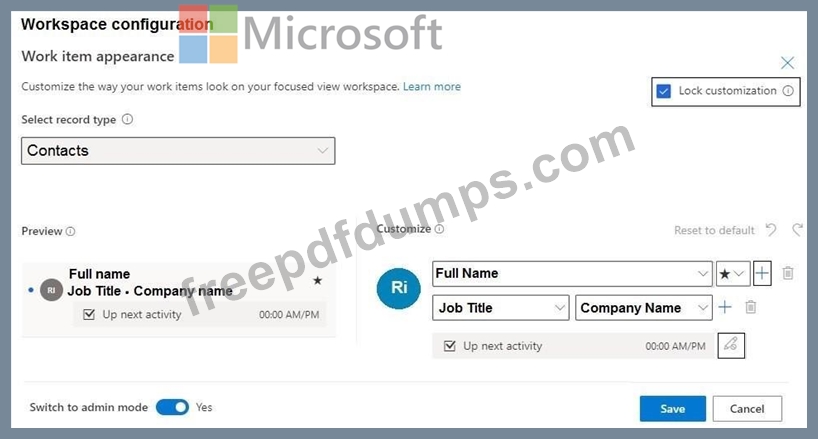
You are customizing a workspace in the sales accelerator.
The workspace must display the industry of a company.
You need to configure the work item appearance for a company.
Which two settings should you modify? To answer, select the appropriate UI element in the answer area.
NOTE: Each correct selection is worth one point.
You are customizing a workspace in the sales accelerator.
The workspace must display the industry of a company.
You need to configure the work item appearance for a company.
Which two settings should you modify? To answer, select the appropriate UI element in the answer area.
NOTE: Each correct selection is worth one point.
