MD-100 Exam Question 91
You have a Microsoft Azure Active Directory (Azure AD) tenant.
Some users signs in to that computer by using Windows hello for Business.
A user User1 purchases a new computer and joins the computer to Azure AD.
User1 attempts to configure the sign-in options and receives the error message shown in the exhibit. (Click the Exhibit tab.)

You open device Manager and confirmed that all the hardware works correctly.
You need to ensure that user1 can use Windows Hello for Business facial recognition to sign in to the computer.
What should you do first.
Some users signs in to that computer by using Windows hello for Business.
A user User1 purchases a new computer and joins the computer to Azure AD.
User1 attempts to configure the sign-in options and receives the error message shown in the exhibit. (Click the Exhibit tab.)
You open device Manager and confirmed that all the hardware works correctly.
You need to ensure that user1 can use Windows Hello for Business facial recognition to sign in to the computer.
What should you do first.
MD-100 Exam Question 92
Your network contains an Active Directory domain. The domain contains a group named Group1.
All the computers in the domain run Windows 10. Each computer contains a folder named C:\Documents that has the default NTFS permissions set.
You add a folder named C:\Documents\Templates to each computer.
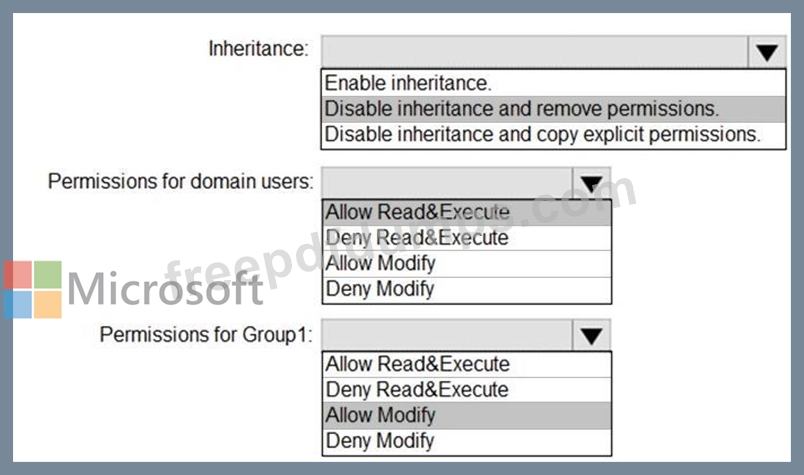
You need to configure the NTFS permissions to meet the following requirements:
All domain users must be able to open the files in the Templates folder.
Only the members of Group1 must be allowed to edit the files in the Templates folder.

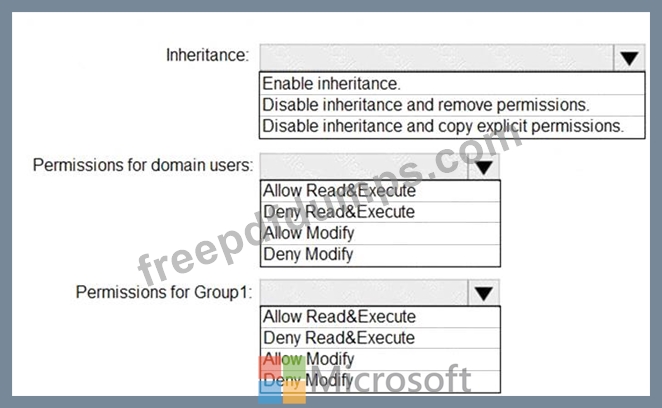
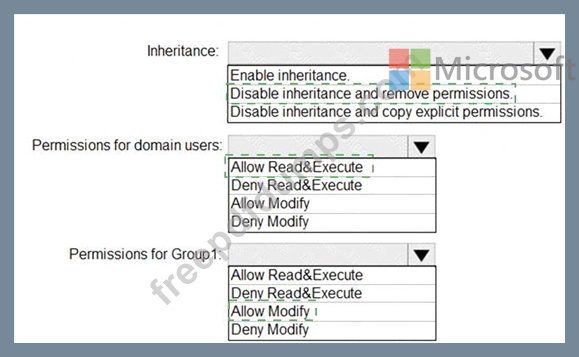
How should you configure the NTFS settings on the Templates folder? To answer, select the appropriate options in the answer area.
NOTE: Each correct selection is worth one point.
All the computers in the domain run Windows 10. Each computer contains a folder named C:\Documents that has the default NTFS permissions set.
You add a folder named C:\Documents\Templates to each computer.
You need to configure the NTFS permissions to meet the following requirements:
All domain users must be able to open the files in the Templates folder.
Only the members of Group1 must be allowed to edit the files in the Templates folder.
How should you configure the NTFS settings on the Templates folder? To answer, select the appropriate options in the answer area.
NOTE: Each correct selection is worth one point.
MD-100 Exam Question 93
You have a computer that runs Windows 10.
From the Settings app, you view the connection properties shown in the following exhibit.
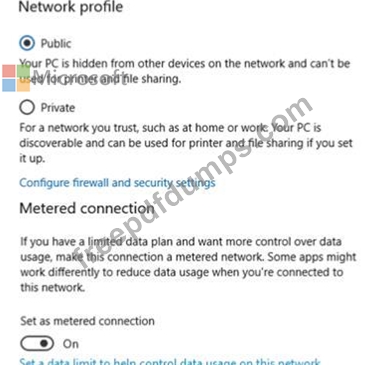
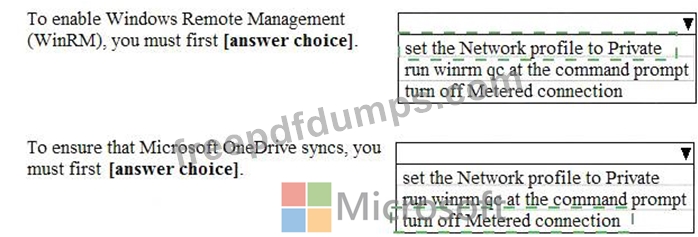
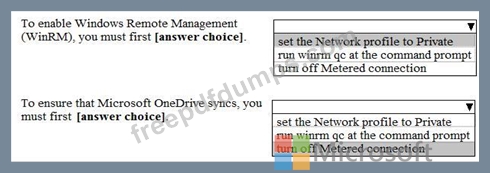
Use the drop-down menus to select the answer choice that completes each statement based on the information presented in the graphic.
NOTE: Each correct selection is worth one point.
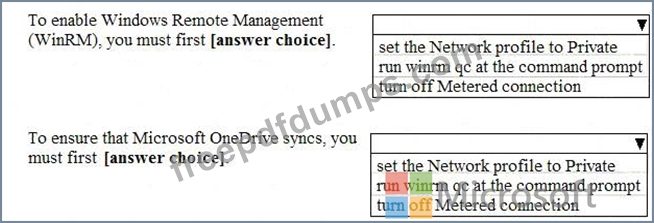
From the Settings app, you view the connection properties shown in the following exhibit.
Use the drop-down menus to select the answer choice that completes each statement based on the information presented in the graphic.
NOTE: Each correct selection is worth one point.
MD-100 Exam Question 94
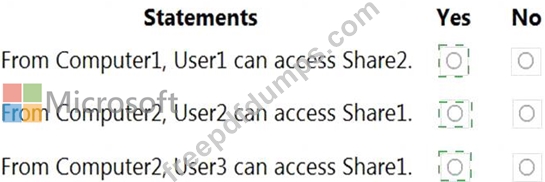
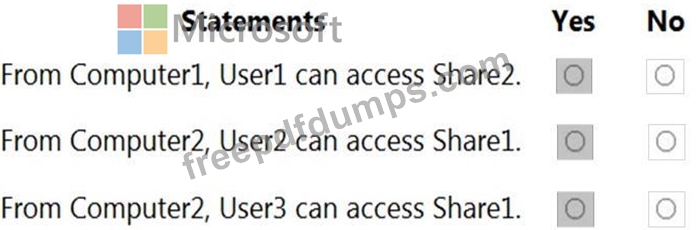
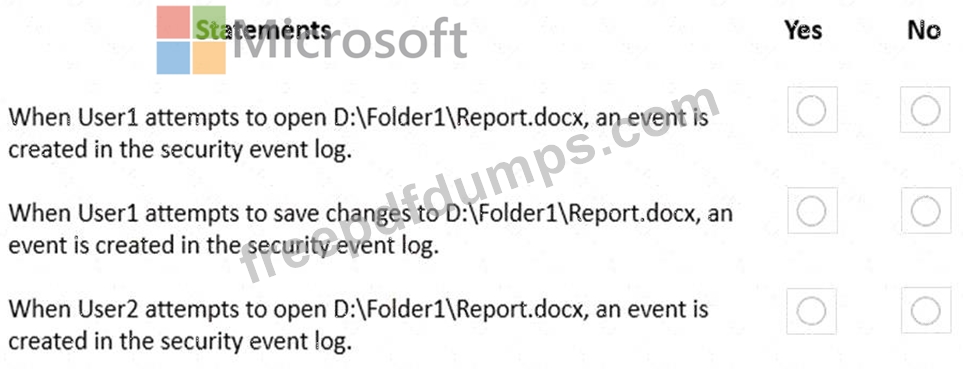
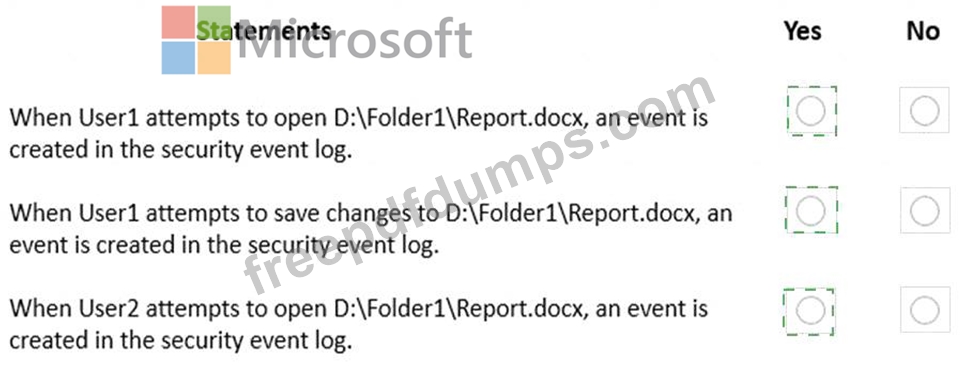
For each of the following statements, select Yes if the statement is true. Otherwise, select No.
NOTE: Each correct selection is worth one point.
NOTE: Each correct selection is worth one point.

MD-100 Exam Question 95
You have two workgroup computers named Computer1 and Computer2 that run Windows 10. The Guest account is enabled on both computers.
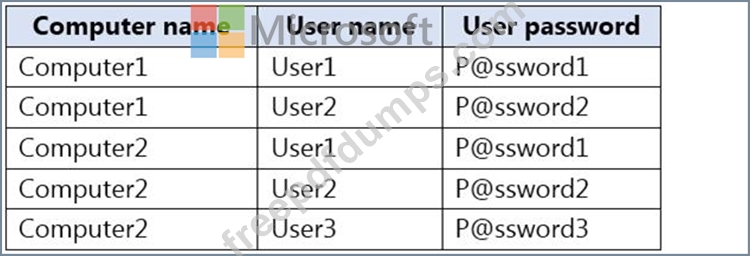
The computers contain the users shown in the following table.
The computers contain the shared folders shown in the following table.

Computer1 has password-protected sharing turned on. Computer2 has password-protected sharing turned off.
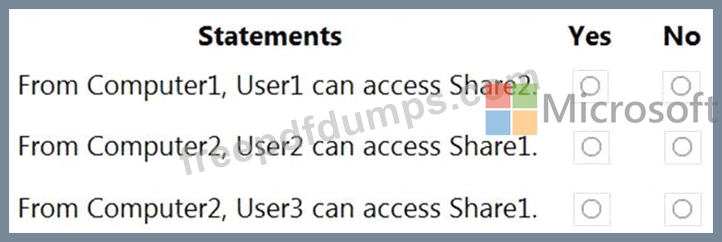
For each of the following statements, select Yes if the statement is true. Otherwise, select No.
NOTE: Each correct selection is worth one point.
The computers contain the users shown in the following table.
The computers contain the shared folders shown in the following table.
Computer1 has password-protected sharing turned on. Computer2 has password-protected sharing turned off.
For each of the following statements, select Yes if the statement is true. Otherwise, select No.
NOTE: Each correct selection is worth one point.