

MS-100 Exam Question 76
You have a Microsoft 365 subscription that uses an Azure Directory (Azure AD) tenant named Contoso.com.
The tenant contains the users shown in the following table.

You add another user named user5 to the User administrator role.
You need to identify which management tasks User5 can perform.
Which two tasks should you identify? Each correct answer presents a complete solution.
The tenant contains the users shown in the following table.
You add another user named user5 to the User administrator role.
You need to identify which management tasks User5 can perform.
Which two tasks should you identify? Each correct answer presents a complete solution.
MS-100 Exam Question 77
Your company has an on premises Microsoft Exchange Server 2016 organization and a Microsoft 365 Enterprise subscription. You plan to migrate mailboxes and groups to Exchange Online.
You start a new migration batch.
Users report *low performance when they use the on premises Exchange Server organization.
You discover that the migration is causing the slow performance.
You need to reduce the impact of the mailbox migration on the end-users.
What should you do?
You start a new migration batch.
Users report *low performance when they use the on premises Exchange Server organization.
You discover that the migration is causing the slow performance.
You need to reduce the impact of the mailbox migration on the end-users.
What should you do?
MS-100 Exam Question 78
You have a Microsoft 365 subscription.
You use the Microsoft Office Deployment tool to install Office 365 ProPlus.
You create a configuration file that contains the following settings.

Use the drop-down menus to select the answer choice that completes each statement based on the information presented in the graphic.
NOTE: Each correct selection is worth one point.

You use the Microsoft Office Deployment tool to install Office 365 ProPlus.
You create a configuration file that contains the following settings.
Use the drop-down menus to select the answer choice that completes each statement based on the information presented in the graphic.
NOTE: Each correct selection is worth one point.


MS-100 Exam Question 79
You have a Microsoft 365 subscription that contains a guest user named User1. User1 is assigned the User administrator role.
You have a Microsoft Azure Active Directory (Azure AD) tenant named contoso.com. Contoso.com is configured as shown in the following exhibit.

Use the drop-down menus to select the answer choice that completes each statement based on the information presented in the graphic.
NOTE: Each correct selection is worth one point.

You have a Microsoft Azure Active Directory (Azure AD) tenant named contoso.com. Contoso.com is configured as shown in the following exhibit.
Use the drop-down menus to select the answer choice that completes each statement based on the information presented in the graphic.
NOTE: Each correct selection is worth one point.


MS-100 Exam Question 80
You have a Microsoft 365 subscription that uses an Azure Active Directory (Azure AD) tenant named contoso.com. The tenant contains the Windows 10 devices shown in the following table.

All the devices are managed by using Microsoft Endpoint Manager and are members of a group named Group1.
From the Microsoft Endpoint Manager admin center, you create an app suite named App1 for Microsoft Office
365 apps.
You configure the App1 settings as shown in the exhibit. (Click the
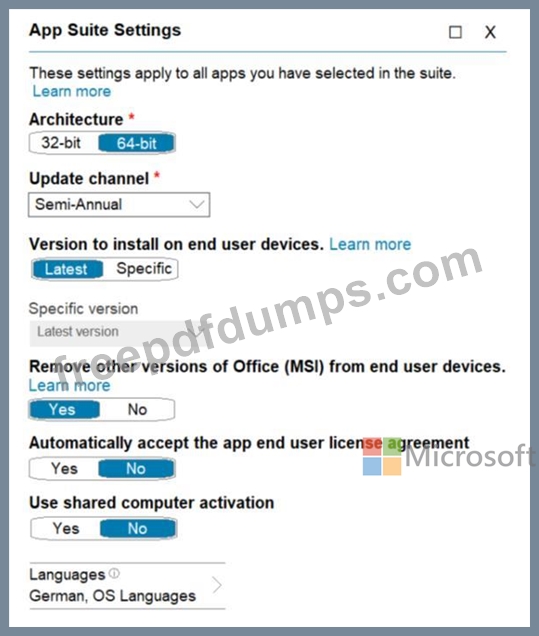
You assign App1 to Group1.
For each of the following statements, select Yes if the statement is true. Otherwise, select No.
Note: Each correct selection is worth one point.

All the devices are managed by using Microsoft Endpoint Manager and are members of a group named Group1.
From the Microsoft Endpoint Manager admin center, you create an app suite named App1 for Microsoft Office
365 apps.
You configure the App1 settings as shown in the exhibit. (Click the
You assign App1 to Group1.
For each of the following statements, select Yes if the statement is true. Otherwise, select No.
Note: Each correct selection is worth one point.

