

MS-100 Exam Question 66
Please wait while the virtual machine loads. Once loaded, you may proceed to the lab section. This may take a few minutes, and the wait time will not be deducted from your overall test time.
When the Next button is available, click it to access the lab section. In this section, you will perform a set of tasks in a live environment. While most functionality will be available to you as it would be in a live environment, some functionality (e.g., copy and paste, ability to navigate to external websites) will not be possible by design.
Scoring is based on the outcome of performing the tasks stated in the lab. In other words, it doesn't matter how you accomplish the task, if you successfully perform it, you will earn credit for that task.
Labs are not timed separately, and this exam may have more than one lab that you must complete. You can use as much time as you would like to complete each lab. But, you should manage your time appropriately to ensure that you are able to complete the lab(s) and all other sections of the exam in the time provided.
Please note that once you submit your work by clicking the Next button within a lab, you will NOT be able to return to the lab.
You may now click next to proceed to the lab.
Lab information
Use the following login credentials as needed:
To enter your username, place your cursor in the Sign in box and click on the username below.
To enter your password, place your cursor in the Enter password box and click on the password below.
Microsoft 365 Username:
[email protected]
Microsoft 365 Password:*yfLo7Ir2&y-
If the Microsoft 365 portal does not load successfully in the browser, press CTRL-K to reload the portal in a new browser tab.
The following information is for technical support purposes only:
Lab Instance:10811525
Your organization plans to open an office in New York, and then to add 100 users to the office.
Thecityattribute for all new users will be New York.
You need to ensure that all the new users in the New York office are licensed for Microsoft Office 365 automatically.
When the Next button is available, click it to access the lab section. In this section, you will perform a set of tasks in a live environment. While most functionality will be available to you as it would be in a live environment, some functionality (e.g., copy and paste, ability to navigate to external websites) will not be possible by design.
Scoring is based on the outcome of performing the tasks stated in the lab. In other words, it doesn't matter how you accomplish the task, if you successfully perform it, you will earn credit for that task.
Labs are not timed separately, and this exam may have more than one lab that you must complete. You can use as much time as you would like to complete each lab. But, you should manage your time appropriately to ensure that you are able to complete the lab(s) and all other sections of the exam in the time provided.
Please note that once you submit your work by clicking the Next button within a lab, you will NOT be able to return to the lab.
You may now click next to proceed to the lab.
Lab information
Use the following login credentials as needed:
To enter your username, place your cursor in the Sign in box and click on the username below.
To enter your password, place your cursor in the Enter password box and click on the password below.
Microsoft 365 Username:
[email protected]
Microsoft 365 Password:*yfLo7Ir2&y-
If the Microsoft 365 portal does not load successfully in the browser, press CTRL-K to reload the portal in a new browser tab.
The following information is for technical support purposes only:
Lab Instance:10811525
Your organization plans to open an office in New York, and then to add 100 users to the office.
Thecityattribute for all new users will be New York.
You need to ensure that all the new users in the New York office are licensed for Microsoft Office 365 automatically.
MS-100 Exam Question 67
Your company has a Microsoft 365 subscription that has multi-factor authentication configured for all users.
Users on the network report that they are prompted for multi-factor authentication multiple times a day.
You need to reduce the number of times the users are prompted for multi-factor authentication on their company-owned devices.
What should you do?
Users on the network report that they are prompted for multi-factor authentication multiple times a day.
You need to reduce the number of times the users are prompted for multi-factor authentication on their company-owned devices.
What should you do?
MS-100 Exam Question 68
You have a Microsoft 365 E5 subscription that contains an Azure Active Directory (Azure AD) tenant named contoso.com. The tenant contains a Microsoft SharePoint Online site named Site1 and the accounts shown in the following table.

You have an on-premises server named Server1 that contains a folder named Folder1. Folder1 contains the files shown in the following table.

The User1, User2, and Group1 accounts have the security identifiers (SIDs) shown in the following table.

You use the SharePoint Migration Tool to migrate Folder1 to Site1. You preserve the file share permissions and use the following user mapping file.
S-1-5-21-4534338-1127018997-2609994386-1304, [email protected], FALSE
S-1-5-21-4534338-1127018997-2609994386-1228, [email protected], FALSE
S-1-5-21-4534338-1127018997-2609994386-1106, GroupA, TRUE
For each of the following statements, select Yes if the statement is true. Otherwise, select No.
NOTE: Each correct selection is worth one point

You have an on-premises server named Server1 that contains a folder named Folder1. Folder1 contains the files shown in the following table.
The User1, User2, and Group1 accounts have the security identifiers (SIDs) shown in the following table.
You use the SharePoint Migration Tool to migrate Folder1 to Site1. You preserve the file share permissions and use the following user mapping file.
S-1-5-21-4534338-1127018997-2609994386-1304, [email protected], FALSE
S-1-5-21-4534338-1127018997-2609994386-1228, [email protected], FALSE
S-1-5-21-4534338-1127018997-2609994386-1106, GroupA, TRUE
For each of the following statements, select Yes if the statement is true. Otherwise, select No.
NOTE: Each correct selection is worth one point

MS-100 Exam Question 69
You have a Microsoft 365 subscription.
All users have their email stored in Microsoft Exchange Online
In the mailbox of a user named User, you need to preserve a copy of all the email messages that contain the word ProjectX.
What should you do first?
All users have their email stored in Microsoft Exchange Online
In the mailbox of a user named User, you need to preserve a copy of all the email messages that contain the word ProjectX.
What should you do first?
MS-100 Exam Question 70
Note: This question is part of a series of questions that present the same scenario. Each question in the series contains a unique solution that might meet the stated goals. Some question sets might have more than one correct solution, while others might not have a correct solution.
After you answer a question in this section, you will NOT be able to return to it. As a result, these questions will not appear in the review screen.
You have a hybrid deployment of Microsoft 365 that contains the objects shown in the following table.
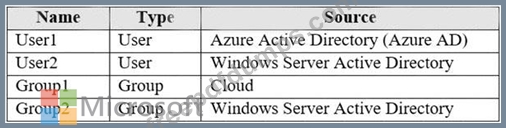
Azure AD Connect has the following settings:
* Password Hash Sync: Enabled
* Password writeback: Enabled
* Group writeback: Enabled
You need to add User2 to Group 2.
Solution: You use the Azure Active Directory admin center.
Does this meet the goal?
After you answer a question in this section, you will NOT be able to return to it. As a result, these questions will not appear in the review screen.
You have a hybrid deployment of Microsoft 365 that contains the objects shown in the following table.
Azure AD Connect has the following settings:
* Password Hash Sync: Enabled
* Password writeback: Enabled
* Group writeback: Enabled
You need to add User2 to Group 2.
Solution: You use the Azure Active Directory admin center.
Does this meet the goal?