

MS-100 Exam Question 61
You have a Microsoft 365 subscription.
You view the service advisories shown in the following exhibit.
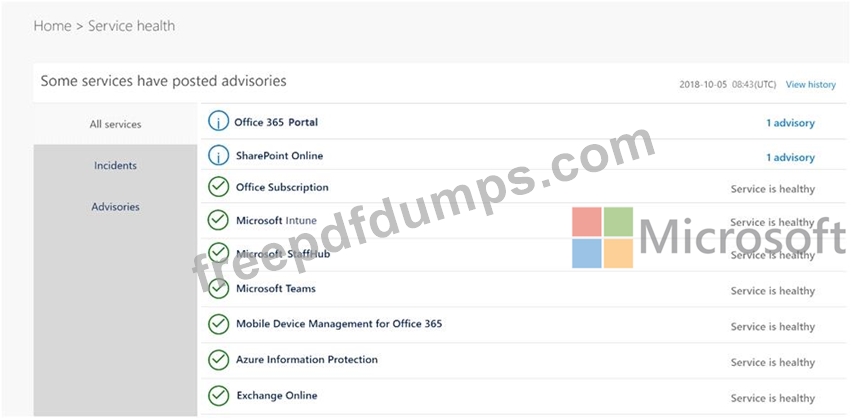
You need to ensure that users who administer Microsoft SharePoint Online can view the advisories to investigate health issues.
Which role should you assign to the users?
You view the service advisories shown in the following exhibit.
You need to ensure that users who administer Microsoft SharePoint Online can view the advisories to investigate health issues.
Which role should you assign to the users?
MS-100 Exam Question 62
You need to Add the custom domain name* to Office 36S K> support the planned changes as quickly as possible.
What should you create to verify the domain names successfully?
What should you create to verify the domain names successfully?
MS-100 Exam Question 63
You have a Microsoft 365 Enterprise subscription.
You have a conditional access policy to force multi factor .mthentication when accessing Microsoft SharePoint from a mobile device You need to view which users authenticated by using multi factor authentication.
What should you do?
You have a conditional access policy to force multi factor .mthentication when accessing Microsoft SharePoint from a mobile device You need to view which users authenticated by using multi factor authentication.
What should you do?
MS-100 Exam Question 64
Your company has a Microsoft 365 subscription. All identities are managed in the cloud.
The company purchases a new domain name.
You need to ensure that all new mailboxes use the new domain as their primary email address.
What are two possible ways to achieve the goal? Each correct answer presents a complete solution.
NOTE: Each correct selection is worth one point.
The company purchases a new domain name.
You need to ensure that all new mailboxes use the new domain as their primary email address.
What are two possible ways to achieve the goal? Each correct answer presents a complete solution.
NOTE: Each correct selection is worth one point.
MS-100 Exam Question 65
Please wait while the virtual machine loads. Once loaded, you may proceed to the lab section. This may take a few minutes, and the wait time will not be deducted from your overall test time.
When the Next button is available, click it to access the lab section. In this section, you will perform a set of tasks in a live environment. While most functionality will be available to you as it would be in a live environment, some functionality (e.g., copy and paste, ability to navigate to external websites) will not be possible by design.
Scoring is based on the outcome of performing the tasks stated in the lab. In other words, it doesn't matter how you accomplish the task, if you successfully perform it, you will earn credit for that task.
Labs are not timed separately, and this exam may have more than one lab that you must complete. You can use as much time as you would like to complete each lab. But, you should manage your time appropriately to ensure that you are able to complete the lab(s) and all other sections of the exam in the time provided.
Please note that once you submit your work by clicking the Next button within a lab, you will NOT be able to return to the lab.
You may now click next to proceed to the lab.
Lab information
Use the following login credentials as needed:
To enter your username, place your cursor in the Sign in box and click on the username below.
To enter your password, place your cursor in the Enter password box and click on the password below.
Microsoft 365 Username: [email protected]
Microsoft 365 Password: m3t^We$Z7&xy
If the Microsoft 365 portal does not load successfully in the browser, press CTRL-K to reload the portal in a new browser tab.
The following information is for technical support purposes only:
Lab Instance: 11440873

You need to create a policy that allows a user named Lee Gu to use Outlook Web App to review 50 percent of the outbound email messages sent by a user named Joni Sherman.
To answer, sign in to the Microsoft 365 portal.
When the Next button is available, click it to access the lab section. In this section, you will perform a set of tasks in a live environment. While most functionality will be available to you as it would be in a live environment, some functionality (e.g., copy and paste, ability to navigate to external websites) will not be possible by design.
Scoring is based on the outcome of performing the tasks stated in the lab. In other words, it doesn't matter how you accomplish the task, if you successfully perform it, you will earn credit for that task.
Labs are not timed separately, and this exam may have more than one lab that you must complete. You can use as much time as you would like to complete each lab. But, you should manage your time appropriately to ensure that you are able to complete the lab(s) and all other sections of the exam in the time provided.
Please note that once you submit your work by clicking the Next button within a lab, you will NOT be able to return to the lab.
You may now click next to proceed to the lab.
Lab information
Use the following login credentials as needed:
To enter your username, place your cursor in the Sign in box and click on the username below.
To enter your password, place your cursor in the Enter password box and click on the password below.
Microsoft 365 Username: [email protected]
Microsoft 365 Password: m3t^We$Z7&xy
If the Microsoft 365 portal does not load successfully in the browser, press CTRL-K to reload the portal in a new browser tab.
The following information is for technical support purposes only:
Lab Instance: 11440873
You need to create a policy that allows a user named Lee Gu to use Outlook Web App to review 50 percent of the outbound email messages sent by a user named Joni Sherman.
To answer, sign in to the Microsoft 365 portal.