

MS-100 Exam Question 16
Note: This question is part of a series of questions that present the same scenario. Each question in the series contains a unique solution that might meet the stated goals. Some question sets might have more than one correct solution, while others might not have a correct solution.
After you answer a question in this section, you will NOT be able to return to it. As a result, these questions will not appear in the review screen.
You need to assign User2 the required roles to meet the security requirements.
Solution: From the Office 365 admin center, you assign User2 the Security Reader role.
From the Exchange admin center, you assign User2 the Help Desk role.
Does this meet the goal?
After you answer a question in this section, you will NOT be able to return to it. As a result, these questions will not appear in the review screen.
You need to assign User2 the required roles to meet the security requirements.
Solution: From the Office 365 admin center, you assign User2 the Security Reader role.
From the Exchange admin center, you assign User2 the Help Desk role.
Does this meet the goal?
MS-100 Exam Question 17
You have an Azure Active Directory (Azure AD) tenant named contoso.com that contains the users shown in the following table.
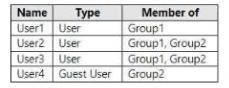
User1 is the owner of Group1, User2 is the owner of Group2.
You create an access review that contains the following configurations:
* Users to review, Member of a group
* Scope Everyone
* Group: Group1 and Group2
* Review Group owners
For each of the following statements, select Yes if the statement is true. Otherwise select No.
NOTE: Each correct selection is worth one point.

User1 is the owner of Group1, User2 is the owner of Group2.
You create an access review that contains the following configurations:
* Users to review, Member of a group
* Scope Everyone
* Group: Group1 and Group2
* Review Group owners
For each of the following statements, select Yes if the statement is true. Otherwise select No.
NOTE: Each correct selection is worth one point.


MS-100 Exam Question 18
You have a Microsoft 365 subscription that uses an Azure Active Directory (Azure AD) tenant named contoso.com. The tenant contains the users shown in the following table.
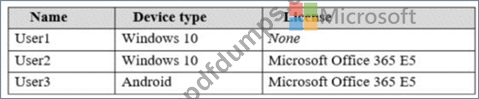
You configure the Office software download settings as shown in the exhibit. (Click the Exhibit tab.)
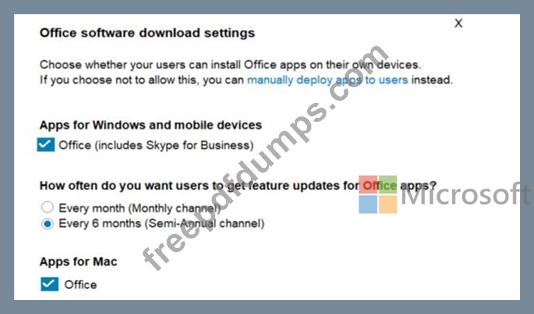
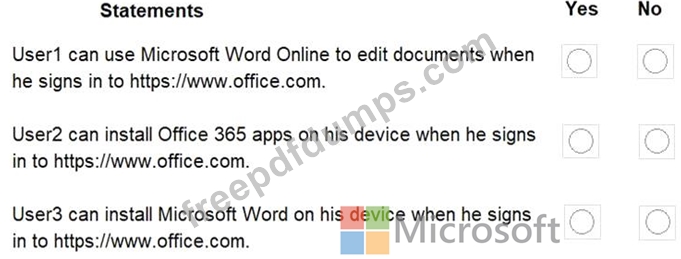
For each of the following statements, select Yes if the statement is true. Otherwise, select No.
NOTE: Each correct selection is worth one point.
You configure the Office software download settings as shown in the exhibit. (Click the Exhibit tab.)
For each of the following statements, select Yes if the statement is true. Otherwise, select No.
NOTE: Each correct selection is worth one point.


MS-100 Exam Question 19
Your on-premises network contains an Active Directory domain that syncs with an Azure Active Directory (Azure AD) tenant named contoso.com by using Azure AD Connect. Your company purchases another company that has an on-premises Active Directory domain named lrtwareinc.com. You need to sync litwarein.com with contoso.com. What should you install in the litwarein.com domain?
MS-100 Exam Question 20
You have a Microsoft 365 subscription that uses a default named contoso.com.
Three files were created on February 1, 2019, as shown in the following table.

On March 1, 2019, you create two retention labels named Label1 and label2.
The settings for Label1 are configured as shown in the Label1 exhibit. (Click the Label1 tab.) Label 1

The settings for Label2 are configured as shown in the Label1 exhibit. (Click the Label2 tab.) Label 2

You apply the retention labels to Exchange email, SharePoint sites, and OneDrive accounts.
For each of the following statements, select Yes if the statement is true. Otherwise, select No.
NOTE: Each correct selection is worth one point.

Three files were created on February 1, 2019, as shown in the following table.
On March 1, 2019, you create two retention labels named Label1 and label2.
The settings for Label1 are configured as shown in the Label1 exhibit. (Click the Label1 tab.) Label 1
The settings for Label2 are configured as shown in the Label1 exhibit. (Click the Label2 tab.) Label 2
You apply the retention labels to Exchange email, SharePoint sites, and OneDrive accounts.
For each of the following statements, select Yes if the statement is true. Otherwise, select No.
NOTE: Each correct selection is worth one point.

