

MS-100 Exam Question 36
Please wait while the virtual machine loads. Once loaded, you may proceed to the lab section. This may take a few minutes, and the wait time will not be deducted from your overall test time.
When the Next button is available, click it to access the lab section. In this section, you will perform a set of tasks in a live environment. While most functionality will be available to you as it would be in a live environment, some functionality (e.g., copy and paste, ability to navigate to external websites) will not be possible by design.
Scoring is based on the outcome of performing the tasks stated in the lab. In other words, it doesn't matter how you accomplish the task, if you successfully perform it, you will earn credit for that task.
Labs are not timed separately, and this exam may have more than one lab that you must complete. You can use as much time as you would like to complete each lab. But, you should manage your time appropriately to ensure that you are able to complete the lab(s) and all other sections of the exam in the time provided.
Please note that once you submit your work by clicking the Next button within a lab, you will NOT be able to return to the lab.
You may now click next to proceed to the lab.
Lab information
Use the following login credentials as needed:
To enter your username, place your cursor in the Sign in box and click on the username below.
To enter your password, place your cursor in the Enter password box and click on the password below.
Microsoft 365 Username:
[email protected]
Microsoft 365 Password: 3&YWyjse-6-d
If the Microsoft 365 portal does not load successfully in the browser, press CTRL-K to reload the portal in a new browser tab.
The following information is for technical support purposes only:
Lab Instance: 10887751
Your organization has an office in Seattle.
You plan to create 100 users who will work in the Seattle office. The city attribute for all the users will be Seattle.
You need to create a group named Group1 that will automatically contain all the Seattle office users.
When the Next button is available, click it to access the lab section. In this section, you will perform a set of tasks in a live environment. While most functionality will be available to you as it would be in a live environment, some functionality (e.g., copy and paste, ability to navigate to external websites) will not be possible by design.
Scoring is based on the outcome of performing the tasks stated in the lab. In other words, it doesn't matter how you accomplish the task, if you successfully perform it, you will earn credit for that task.
Labs are not timed separately, and this exam may have more than one lab that you must complete. You can use as much time as you would like to complete each lab. But, you should manage your time appropriately to ensure that you are able to complete the lab(s) and all other sections of the exam in the time provided.
Please note that once you submit your work by clicking the Next button within a lab, you will NOT be able to return to the lab.
You may now click next to proceed to the lab.
Lab information
Use the following login credentials as needed:
To enter your username, place your cursor in the Sign in box and click on the username below.
To enter your password, place your cursor in the Enter password box and click on the password below.
Microsoft 365 Username:
[email protected]
Microsoft 365 Password: 3&YWyjse-6-d
If the Microsoft 365 portal does not load successfully in the browser, press CTRL-K to reload the portal in a new browser tab.
The following information is for technical support purposes only:
Lab Instance: 10887751
Your organization has an office in Seattle.
You plan to create 100 users who will work in the Seattle office. The city attribute for all the users will be Seattle.
You need to create a group named Group1 that will automatically contain all the Seattle office users.
MS-100 Exam Question 37
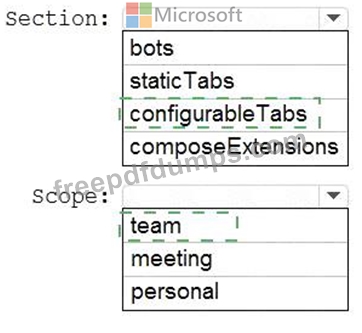
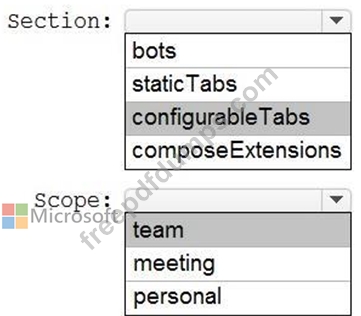
You need to modify the HRApp manifest to provide a tab that supports querying the third-party HR system.
Which section of the manifest should you modify, and which value should you set as the scope? To answer, select the appropriate options in the answer area.
NOTE: Each correct selection is worth one point.

Which section of the manifest should you modify, and which value should you set as the scope? To answer, select the appropriate options in the answer area.
NOTE: Each correct selection is worth one point.
MS-100 Exam Question 38
Your company has a Microsoft Azure Active Directory (Azure AD) tenant named contoso.onmicrosoft.com that contains the users shown in the following table.

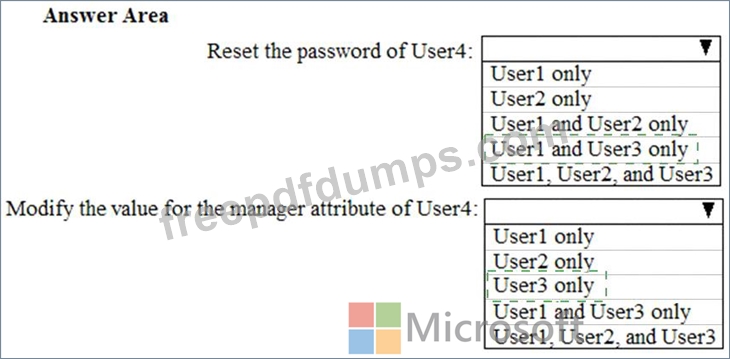
You need to identify which users can perform the following administrative tasks:
* Reset the password of User4.
* Modify the value for the manager attribute of User4.
Which users should you identify for each task? To answer, select the appropriate options in the answer area.
NOTE: Each correct selection is worth one point.

You need to identify which users can perform the following administrative tasks:
* Reset the password of User4.
* Modify the value for the manager attribute of User4.
Which users should you identify for each task? To answer, select the appropriate options in the answer area.
NOTE: Each correct selection is worth one point.

MS-100 Exam Question 39
Please wait while the virtual machine loads. Once loaded, you may proceed to the lab section. This may take a few minutes, and the wait time will not be deducted from your overall test time.
When the Next button is available, click it to access the lab section. In this section, you will perform a set of tasks in a live environment. While most functionality will be available to you as it would be in a live environment, some functionality (e.g., copy and paste, ability to navigate to external websites) will not be possible by design.
Scoring is based on the outcome of performing the tasks stated in the lab. In other words, it doesn't matter how you accomplish the task, if you successfully perform it, you will earn credit for that task.
Labs are not timed separately, and this exam may have more than one lab that you must complete. You can use as much time as you would like to complete each lab. But, you should manage your time appropriately to ensure that you are able to complete the lab(s) and all other sections of the exam in the time provided.
Please note that once you submit your work by clicking the Next button within a lab, you will NOT be able to return to the lab.
You may now click next to proceed to the lab.
Lab information
Use the following login credentials as needed:
To enter your username, place your cursor in the Sign in box and click on the username below.
To enter your password, place your cursor in the Enter password box and click on the password below.
Microsoft 365 Username: [email protected]
Microsoft 365 Password: m3t^We$Z7&xy
If the Microsoft 365 portal does not load successfully in the browser, press CTRL-K to reload the portal in a new browser tab.
The following information is for technical support purposes only:
Lab Instance: 11440873
You need to add Adele Vance to a group named Managers. The solution must ensure that you can grant permissions to Managers.
To answer, sign in to the Microsoft 365 portal.
When the Next button is available, click it to access the lab section. In this section, you will perform a set of tasks in a live environment. While most functionality will be available to you as it would be in a live environment, some functionality (e.g., copy and paste, ability to navigate to external websites) will not be possible by design.
Scoring is based on the outcome of performing the tasks stated in the lab. In other words, it doesn't matter how you accomplish the task, if you successfully perform it, you will earn credit for that task.
Labs are not timed separately, and this exam may have more than one lab that you must complete. You can use as much time as you would like to complete each lab. But, you should manage your time appropriately to ensure that you are able to complete the lab(s) and all other sections of the exam in the time provided.
Please note that once you submit your work by clicking the Next button within a lab, you will NOT be able to return to the lab.
You may now click next to proceed to the lab.
Lab information
Use the following login credentials as needed:
To enter your username, place your cursor in the Sign in box and click on the username below.
To enter your password, place your cursor in the Enter password box and click on the password below.
Microsoft 365 Username: [email protected]
Microsoft 365 Password: m3t^We$Z7&xy
If the Microsoft 365 portal does not load successfully in the browser, press CTRL-K to reload the portal in a new browser tab.
The following information is for technical support purposes only:
Lab Instance: 11440873
You need to add Adele Vance to a group named Managers. The solution must ensure that you can grant permissions to Managers.
To answer, sign in to the Microsoft 365 portal.
MS-100 Exam Question 40
Your network contains a single Active Directory domain and two Microsoft Azure Active Directory (Azure AD) tenants.
You plan to implement directory synchronization for both Azure AD tenants. Each tenant will contain some of the Active Directory users.
You need to recommend a solution for the planned directory synchronization.
What should you include in the recommendation?
You plan to implement directory synchronization for both Azure AD tenants. Each tenant will contain some of the Active Directory users.
You need to recommend a solution for the planned directory synchronization.
What should you include in the recommendation?
Premium Bundle
Newest MS-100 Exam PDF Dumps shared by Actual4test.com for Helping Passing MS-100 Exam! Actual4test.com now offer the updated MS-100 exam dumps, the Actual4test.com MS-100 exam questions have been updated and answers have been corrected get the latest Actual4test.com MS-100 pdf dumps with Exam Engine here:
(431 Q&As Dumps, 30%OFF Special Discount: Freepdfdumps)