

MS-101 Exam Question 11
Your company has a Microsoft 365 E5 subscription.
Users in the research department work with sensitive data.
You need to prevent the research department users from accessing potentially unsafe websites by using hyperlinks embedded in email messages and documents. Users in other departments must not be restricted.
What should you do from the Security & Compliance admin center?
Users in the research department work with sensitive data.
You need to prevent the research department users from accessing potentially unsafe websites by using hyperlinks embedded in email messages and documents. Users in other departments must not be restricted.
What should you do from the Security & Compliance admin center?
MS-101 Exam Question 12
You have a Microsoft 365 subscription that contains the users in the following table.

In Microsoft Endpoint Manager, you create two device type restrictions that have the settings shown in the following table.

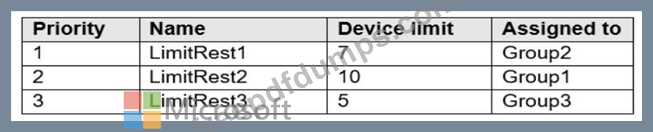
In Microsoft Endpoint Manager, you create three device limit restrictions that have the settings shown in the following table.
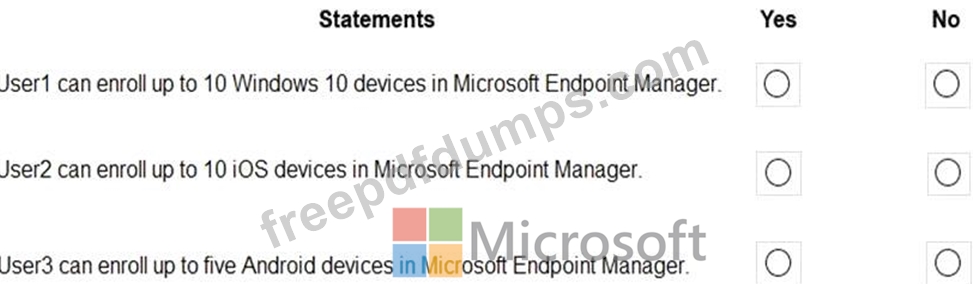
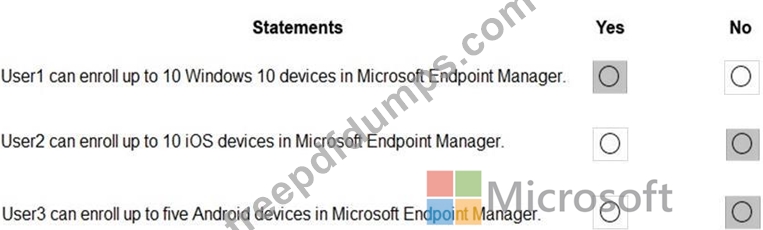
For each of the following statements, select Yes if the statement is true. Otherwise, select No.
NOTE: Each correct selection is worth one point.
In Microsoft Endpoint Manager, you create two device type restrictions that have the settings shown in the following table.
In Microsoft Endpoint Manager, you create three device limit restrictions that have the settings shown in the following table.
For each of the following statements, select Yes if the statement is true. Otherwise, select No.
NOTE: Each correct selection is worth one point.

MS-101 Exam Question 13
Your company purchases a cloud app named App1.
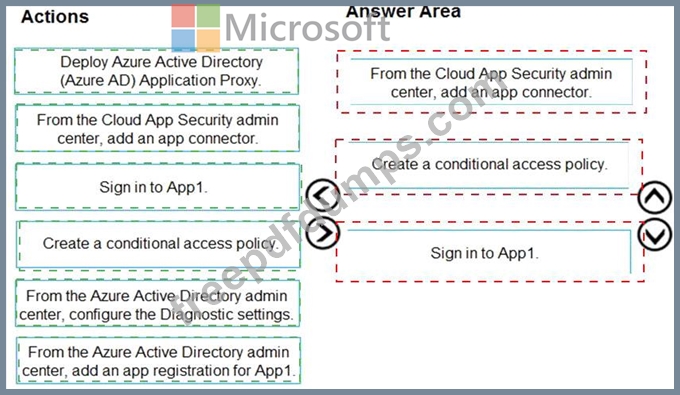
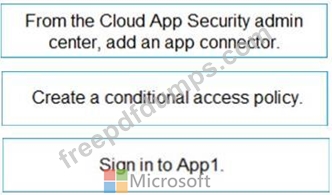
You need to ensure that you can use Microsoft Cloud App Security to block downloads in App1. App1 supports session controls.
Which three actions should you perform in sequence? To answer, move the appropriate actions from the list of actions to the answer area and arrange them in the correct order.
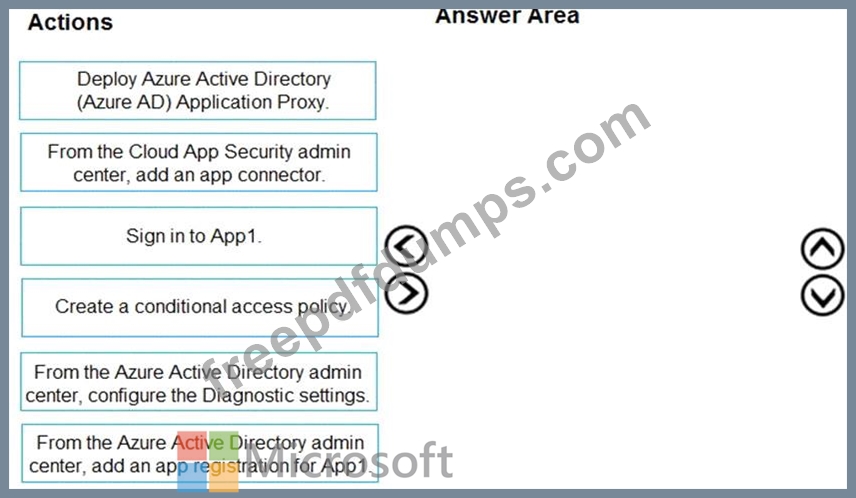
You need to ensure that you can use Microsoft Cloud App Security to block downloads in App1. App1 supports session controls.
Which three actions should you perform in sequence? To answer, move the appropriate actions from the list of actions to the answer area and arrange them in the correct order.
MS-101 Exam Question 14
You have a Microsoft 365 subscription.
You plan to enable Microsoft Azure Information Protection.
You need to ensure that only the members of a group named PilotUsers can protect content.
What should you do?
You plan to enable Microsoft Azure Information Protection.
You need to ensure that only the members of a group named PilotUsers can protect content.
What should you do?
MS-101 Exam Question 15
Note: This question is part of a series of questions that present the same scenario. Each question in the series contains a unique solution that might meet the stated goals. Some question sets might have more than one correct solution, while others might not have a correct solution.
After you answer a question in this section, you will NOT be able to return to it. As a result, these questions will not appear in the review screen.
You are deploying Microsoft Intune.
You successfully enroll Windows 10 devices in Intune.
When you try to enroll an iOS device in Intune, you get an error.
You need to ensure that you can enroll the iOS device in Intune.
Solution: You create an Apple Configurator enrollment profile.
Does this meet the goal?
After you answer a question in this section, you will NOT be able to return to it. As a result, these questions will not appear in the review screen.
You are deploying Microsoft Intune.
You successfully enroll Windows 10 devices in Intune.
When you try to enroll an iOS device in Intune, you get an error.
You need to ensure that you can enroll the iOS device in Intune.
Solution: You create an Apple Configurator enrollment profile.
Does this meet the goal?