

MS-101 Exam Question 36
You have a Microsoft 365 E5 subscription that uses an Azure Active Directory (Azure AD) tenant named contoso.com.
You need to ensure that users can enroll devices in Microsoft Endpoint Manager without manually entering the address of Microsoft Endpoint Manager.
Which two DNS records should you create? Each correct answer presents part of the solution.
NOTE: Each correct selection is worth one point.
You need to ensure that users can enroll devices in Microsoft Endpoint Manager without manually entering the address of Microsoft Endpoint Manager.
Which two DNS records should you create? Each correct answer presents part of the solution.
NOTE: Each correct selection is worth one point.
MS-101 Exam Question 37
You need to notify the manager of the human resources department when a user in the department shares a file or folder from the department's Microsoft SharePoint site.
What should you do?
What should you do?
MS-101 Exam Question 38
You have a Microsoft 365 subscription that contains a Microsoft SharePoint Online site named Site1. Site1 has he files in the following table.

The Site1 users are assigned the roles shown in the following table.

You create a data less prevention (DLP) policy names Policy1 as shown in the following exhibit.

How many files will be visible to user1 and User2 after Policy' is applied to answer, selected select the appropriate options in the answer area.
NOTE: Each correct selection is worth one point.

The Site1 users are assigned the roles shown in the following table.
You create a data less prevention (DLP) policy names Policy1 as shown in the following exhibit.
How many files will be visible to user1 and User2 after Policy' is applied to answer, selected select the appropriate options in the answer area.
NOTE: Each correct selection is worth one point.


MS-101 Exam Question 39
You have a Microsoft 365 E5 subscription that contains two users named Admin1 and Admin2.
All users are assigned a Microsoft 365 Enterprise E5 license and auditing is turned on.
You create the audit retention policy shown in the exhibit. (Click the tab.)

After Policy1 is created, the following actions are performed:
Admin1 creates a user named User1.
Admin2 creates a user named User2.
How long will the audit events for the creation of User1 and User2 be retained? To answer, select the appropriate options in the answer area.
NOTE: Each correct selection is worth one point.

All users are assigned a Microsoft 365 Enterprise E5 license and auditing is turned on.
You create the audit retention policy shown in the exhibit. (Click the tab.)
After Policy1 is created, the following actions are performed:
Admin1 creates a user named User1.
Admin2 creates a user named User2.
How long will the audit events for the creation of User1 and User2 be retained? To answer, select the appropriate options in the answer area.
NOTE: Each correct selection is worth one point.


MS-101 Exam Question 40
You have a Microsoft Azure Active Directory (Azure AD) tenant named sk180818.onmicrosoft.com. The tenant contains the users shown in the following table.
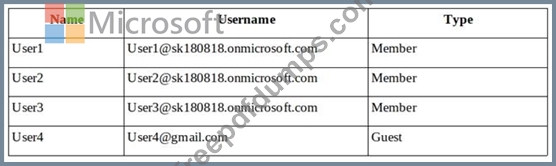
In Azure Information Protection, you create a label named Label1 as shown in the following exhibit.

Label1 is applied to a file named File1.
You send File1 as an email attachment to User1, User2, User3, and User4.
For each of the following statements, select Yes if the statement is true. Otherwise, select No.
NOTE: Each correct selection is worth one point.

In Azure Information Protection, you create a label named Label1 as shown in the following exhibit.
Label1 is applied to a file named File1.
You send File1 as an email attachment to User1, User2, User3, and User4.
For each of the following statements, select Yes if the statement is true. Otherwise, select No.
NOTE: Each correct selection is worth one point.

