

MS-102 Exam Question 81
You have a Microsoft 365 subscription that uses Microsoft Defender for Office 365.
A Built-in protection preset security policy is applied to the subscription.
Which two policy types will be applied by the Built-in protection policy? Each correct answer presents a complete solution.
NOTE: Each correct selection is worth one point.
A Built-in protection preset security policy is applied to the subscription.
Which two policy types will be applied by the Built-in protection policy? Each correct answer presents a complete solution.
NOTE: Each correct selection is worth one point.
MS-102 Exam Question 82
You have Microsoft 365 subscription.
You create an alert policy as shown in the following exhibit.

Use the drop-down menus to select the answer choice that completes each statement based on the information presented in the graphic NOTE: Each correct selection is worth one point.
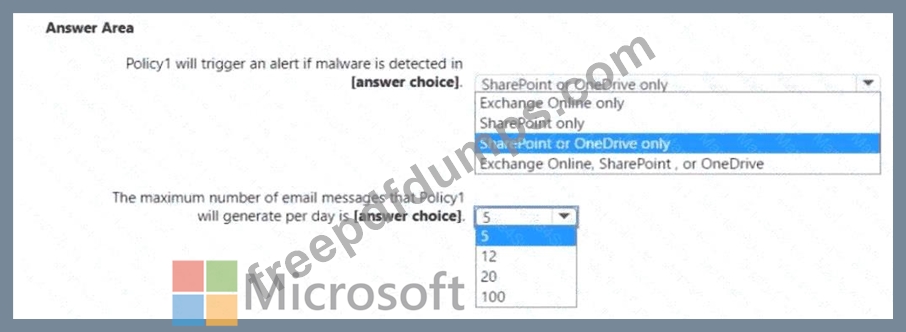
You create an alert policy as shown in the following exhibit.
Use the drop-down menus to select the answer choice that completes each statement based on the information presented in the graphic NOTE: Each correct selection is worth one point.


MS-102 Exam Question 83
Note: This question is part of a series of questions that present the same scenario. Each question in the series contains a unique solution that might meet the stated goals. Some question sets might have more than one correct solution, while others might not have a correct solution.
After you answer a question in this section, you will NOT be able to return to it. As a result, these questions will not appear in the review screen.
You have a Microsoft 365 E5 subscription.
You create an account for a new security administrator named SecAdmin1.
You need to ensure that SecAdmin1 can manage Office 365 Advanced Threat Protection (ATP) settings and policies for Microsoft Teams, SharePoint, and OneDrive.
Solution: From the Azure Active Directory admin center, you assign SecAdmin1 the Security administrator role.
Does this meet the goal?
After you answer a question in this section, you will NOT be able to return to it. As a result, these questions will not appear in the review screen.
You have a Microsoft 365 E5 subscription.
You create an account for a new security administrator named SecAdmin1.
You need to ensure that SecAdmin1 can manage Office 365 Advanced Threat Protection (ATP) settings and policies for Microsoft Teams, SharePoint, and OneDrive.
Solution: From the Azure Active Directory admin center, you assign SecAdmin1 the Security administrator role.
Does this meet the goal?
MS-102 Exam Question 84
You have a Microsoft 365 E5 subscription that contains the users shown in the following table.
Each user has an Android device with the Microsoft Authenticator app installed and has set up phone sign-in.
The subscription has the following Conditional Access policy:
* Name: Policy1
* Assignments
o Users and groups: Group1, Group2
o Cloud apps or actions: All cloud apps
* Access controls
o Grant Require multi-factor authentication
* Enable policy: On
From Microsoft Authenticator settings for the subscription, the Enable and Target settings are configured as shown in the exhibit. (Click the Exhibit tab.)
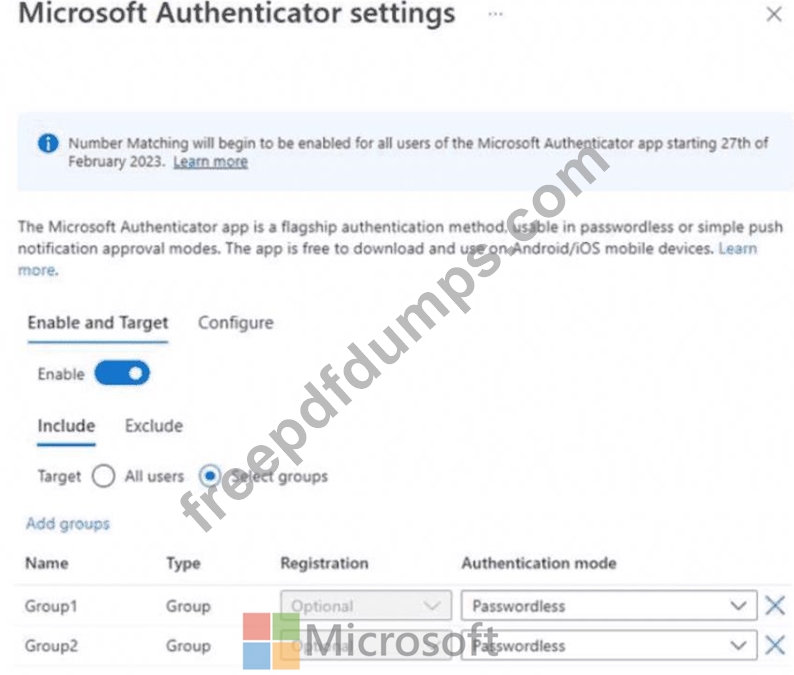
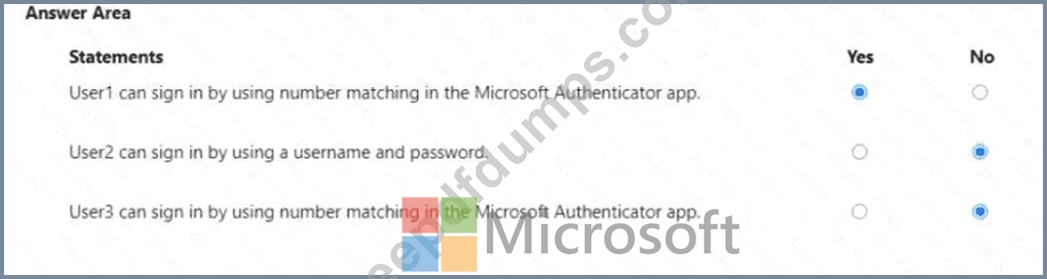
For each of the following statements, select Yes if the statement is true. Otherwise, select No.
NOTE: Each correct selection is worth one point.

Each user has an Android device with the Microsoft Authenticator app installed and has set up phone sign-in.
The subscription has the following Conditional Access policy:
* Name: Policy1
* Assignments
o Users and groups: Group1, Group2
o Cloud apps or actions: All cloud apps
* Access controls
o Grant Require multi-factor authentication
* Enable policy: On
From Microsoft Authenticator settings for the subscription, the Enable and Target settings are configured as shown in the exhibit. (Click the Exhibit tab.)
For each of the following statements, select Yes if the statement is true. Otherwise, select No.
NOTE: Each correct selection is worth one point.

MS-102 Exam Question 85
You have a Microsoft 365 subscription. You have a user named User1.
You need to ensure that Used can place a hold on all mailbox content.
What permission should you assign to User1?
You need to ensure that Used can place a hold on all mailbox content.
What permission should you assign to User1?